Article
Quantitative trading system development record (5): Python performance tuning practice
Transform performance optimization from empirical guesswork into a verifiable investigation process: start from the 3-second chart delay, locate the real bottleneck, compare optimization solutions, and establish benchmarks and rollback strategies.
Readers can regard this article as a review of performance optimization: first use delay budget and bottleneck location path to find the real problem, and then compare profiler, benchmark, algorithm complexity, database query, chart virtualization, multi-process, shared memory and vectorization solutions.
Series reading order
Part1 -> Part2 -> Part3 -> Part4 -> Part5 -> Part6 -> Part7. Performance optimization is placed behind the test line of defense because optimization without proof of correctness will only produce erroneous results faster.
Read the main thread: Performance optimization is not a checklist of acceleration tips
Performance optimization must start with measurable symptoms. When readers see “3 seconds chart delay”, they should not immediately jump to cache, Numba, multi-process or shared memory, but should first separate out the latency budget: how much time it takes to query the database, how much time it takes to convert data, how much time it takes to calculate indicators, and how much time it takes to create and draw chart objects. Only when time-consuming is broken down into verifiable stages will optimization not turn into empirical guesswork.
Performance issues in trading systems have an additional constraint: speed cannot trump correctness. Charts load faster, but the K-line attributes are wrong; indicators are calculated faster, but backtest and real-time results are inconsistent; multiple processes fill up the CPU, but the shared memory life cycle is uncontrollable. These are not effective optimizations. A performance solution that can enter the real-distribution link must answer at least five questions at the same time: does the bottleneck really exist, where does the revenue come from, how to prove the correctness, how to roll back in case of failure, and who will manage the residual costs.
Each case in the following article is developed according to “symptoms, measurement, bottlenecks, plans, costs, and verification”. Readers can use this sequence as their own performance troubleshooting template instead of directly copying a caching or concurrency solution. Without the optimization of rollback strategy and correctness assertion, it is not suitable for entering the real link.
Introduction: Latency optimization from 3 seconds to 30 milliseconds
A typical quantitative terminal problem is: loading 10,000 candlesticks takes 3 seconds. This delay may be just waiting time in offline backtesting, but it will become a risk perceived by users in real-time monitoring: the market has changed, the chart is still in the last round of loading state, and strategy verification and manual judgment will be slowed down.
The first step is not to change the code, but to split 3 seconds into a latency budget. Only by knowing how much query, conversion, indicator, object creation and drawing consume respectively can we judge whether the next step should be to optimize SQL, reduce data conversion, change the indicator algorithm, or split the chart rendering boundary.
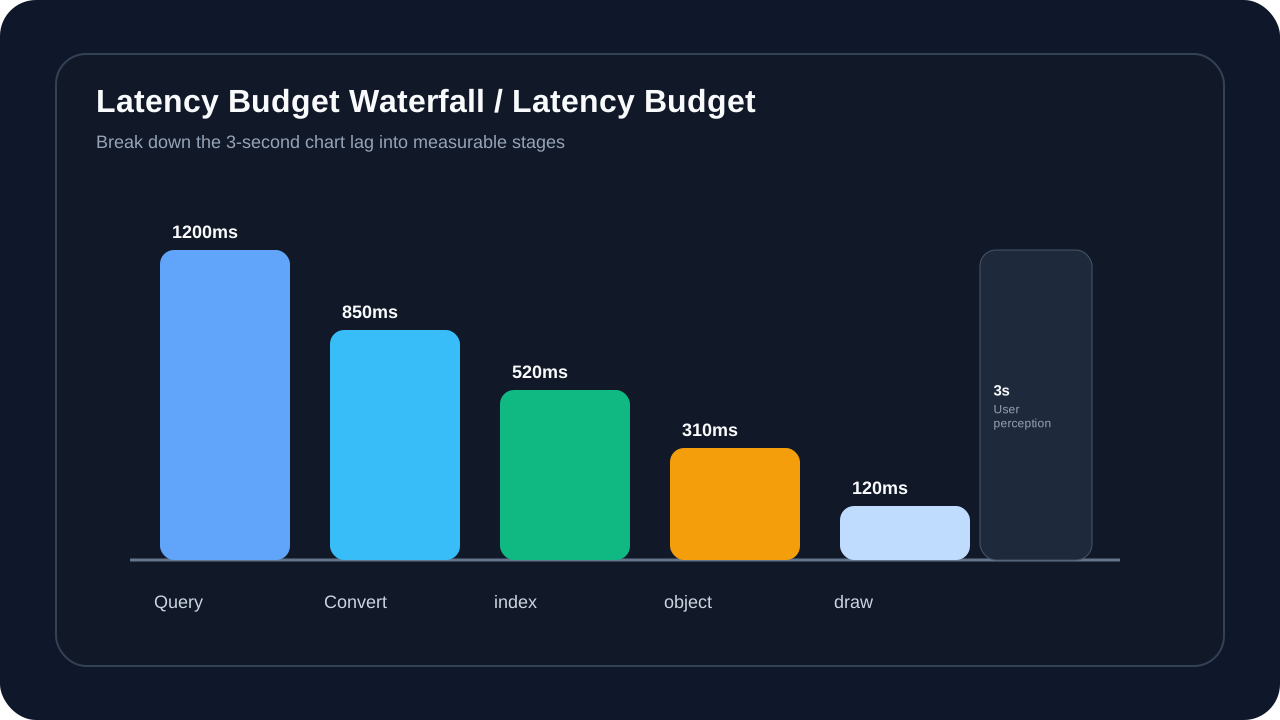
After three rounds of optimization:
- First round: algorithm optimization, reduced to 800 milliseconds
- Round 2: Data structure optimization, down to 100 milliseconds
- Round 3: Caching + precomputation, down to 30 milliseconds
The real value of this set of numbers is not “from 3 seconds to 30 milliseconds” itself, but that each round of optimization can explain the source of revenue: the first round reduces repeated calculations, the second round makes the data structure closer to the access pattern, and the third round moves reusable results forward to the cache and precomputation layer. Each round must also retain a fallback path, because the real-time trading system cannot sacrifice the correctness in extreme scenarios in order to pursue average time consumption.
Part One: Performance Analysis - Finding the Real Bottleneck
Don’t use guessing, use profiler
The most common misunderstanding in performance optimization is to directly translate user symptoms into code actions: if the chart is slow, change the rendering first; if the calculation is slow, use Numba first; if the loading is slow, add caching first. Trading systems cannot do this, since behind the same “stutter” can be database query, object allocation, indicator recalculation, plot item creation, GC or event loop blocking.
The key to the following diagnostic path is to first converge the symptoms into measurable stages, and then map the stage data to action plans. This can avoid “optimizing the most obvious code without encountering the real bottleneck”.
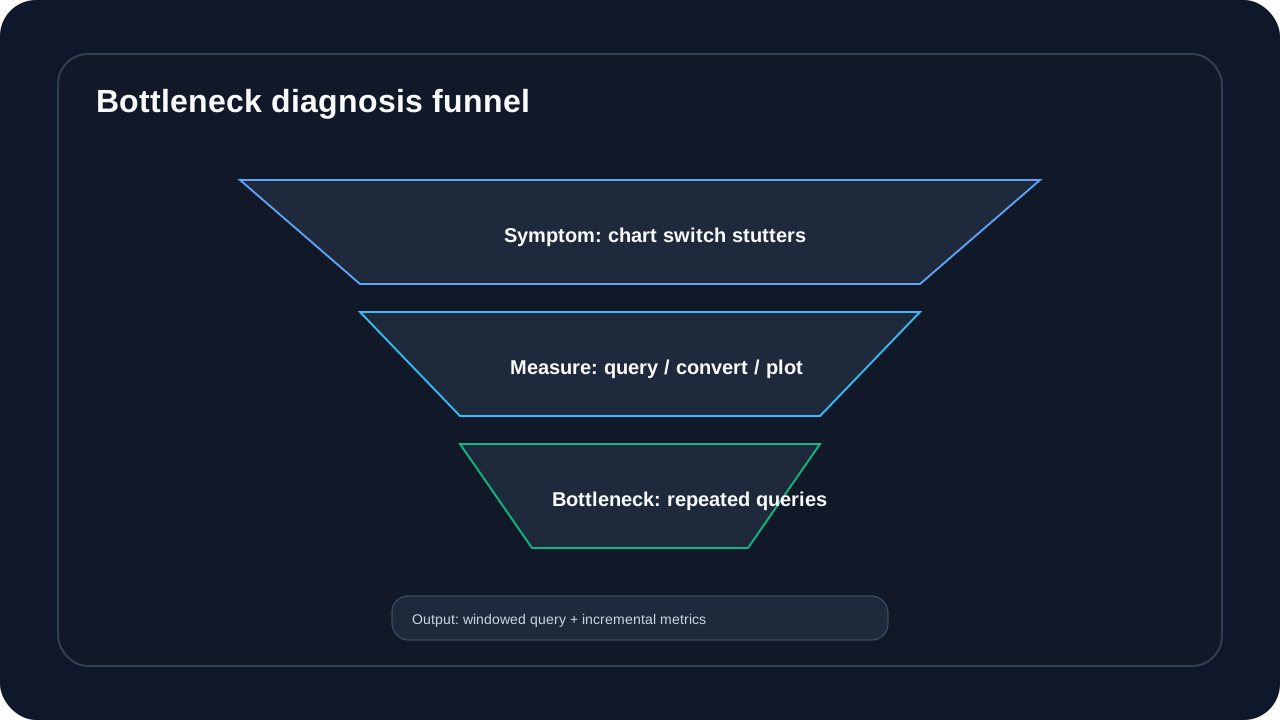
A typical case is: On the surface, the chart rendering is slow; but the actual profiler result shows:
- Data query: 60%
- Data conversion: 30%
- Chart rendering: 10%
The real problem is data querying, not rendering.
The performance analysis phase also records P50, P95 and maximum values simultaneously. P50 indicates whether most operations are fast enough, P95 indicates whether it is still stable under high load or complex data, and the maximum value exposes occasional lags. Just looking at the average will cover up the most dangerous experience problem of the trading terminal: it is usually very fast, but suddenly gets stuck when switching contracts, loading across cycles, or when real market prices are intensively entered.
Python performance analysis tool chain
1. cProfile - basic essentials
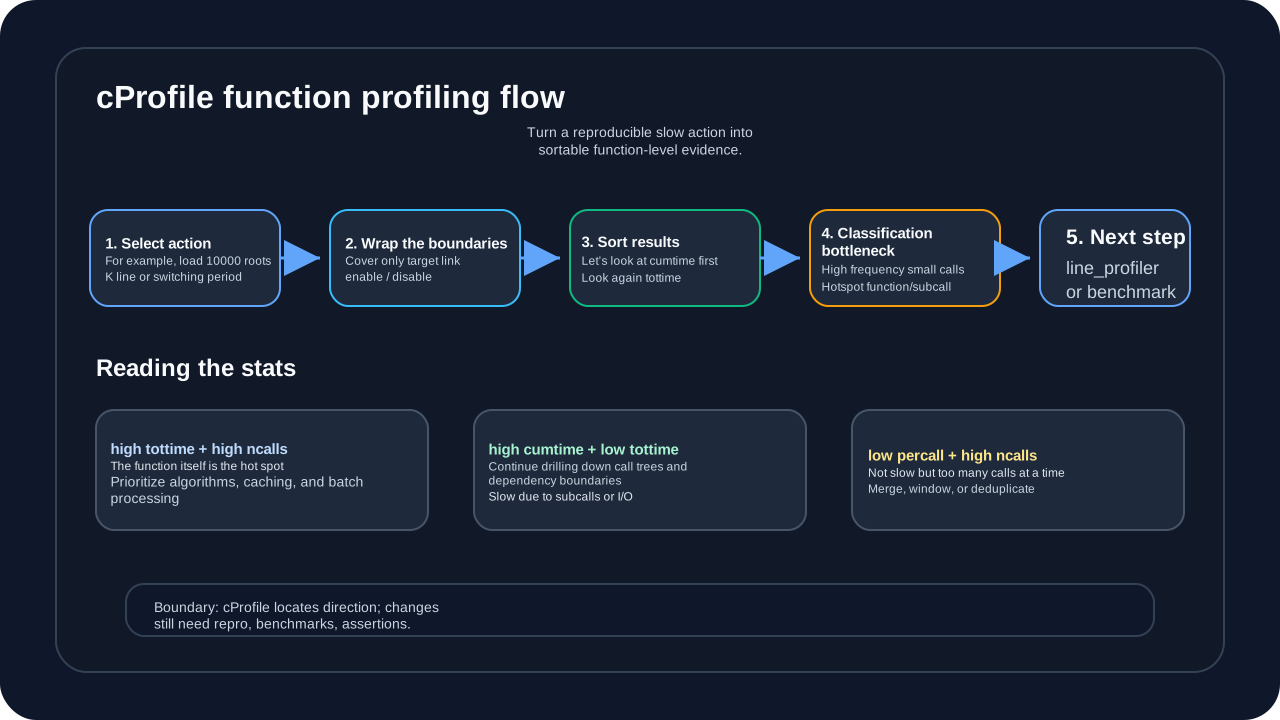
cProfile is suitable for answering the first question: In a complete user action, time is mainly spent on which functions and call chains. It is not suitable for directly making final performance conclusions, because function-level statistics cannot explain the details of each line of code, nor can it replace the benchmark before and after optimization. A more reliable method is to first select a reproducible action, such as loading 10,000 K-lines, switching trading periods, or refreshing candlestick charts, and then only wrap this action into the profiler boundary to avoid mixing startup, log, initialization, and irrelevant UI events into the results.
import cProfile  # illustrative code, not production code
import pstats

profiler = cProfile.Profile()
profiler.enable()

# code
load_chart_data(symbol, timeframe, count=10000)

profiler.disable()
stats = pstats.Stats(profiler)
stats.sort_stats('cumtime')
stats.print_stats(20)  # 20
Output Interpretation:
   ncalls  tottime  percall  cumtime  filename:lineno(function)
     1000    2.456    0.002    5.234  data.py:45(fetch_bars)
    50000    1.234    0.000    1.234  indicator.py:23(calculate_ma)
5000 0.890 0.000 3.456 database.py:120(query)- ncalls: Number of calls
- tottime: Execution time of the function itself (excluding sub-functions)
- cumtime: total function time (including sub-functions)
- percall: average call time
Key Indicators:
- High tottime + high ncalls = hot function, consider caching or algorithm optimization
- High cumtime + low tottime = sub-function is slow and needs in-depth analysis
- Low percall + high ncalls = frequent calls, consider batch processing
Therefore, the output of cProfile should be read as “next step to investigate” rather than “which function to modify immediately”. If the cumtime of fetch_bars is very high but the tottime is not high, it means that the slowdown may be hidden in database query, serialization or network I/O; if the tottime and ncalls of calculate_ma are both very high, it is more like an algorithm or repeated calculation problem; if the percall of a small function is very low but the ncalls is extremely high, give priority to checking whether batch processing, windowing queries or reducing event storms can be done. After the direction is clear, use line_profiler, directional benchmark and correctness assertion to verify the specific changes.
2. line_profiler——line-level analysis
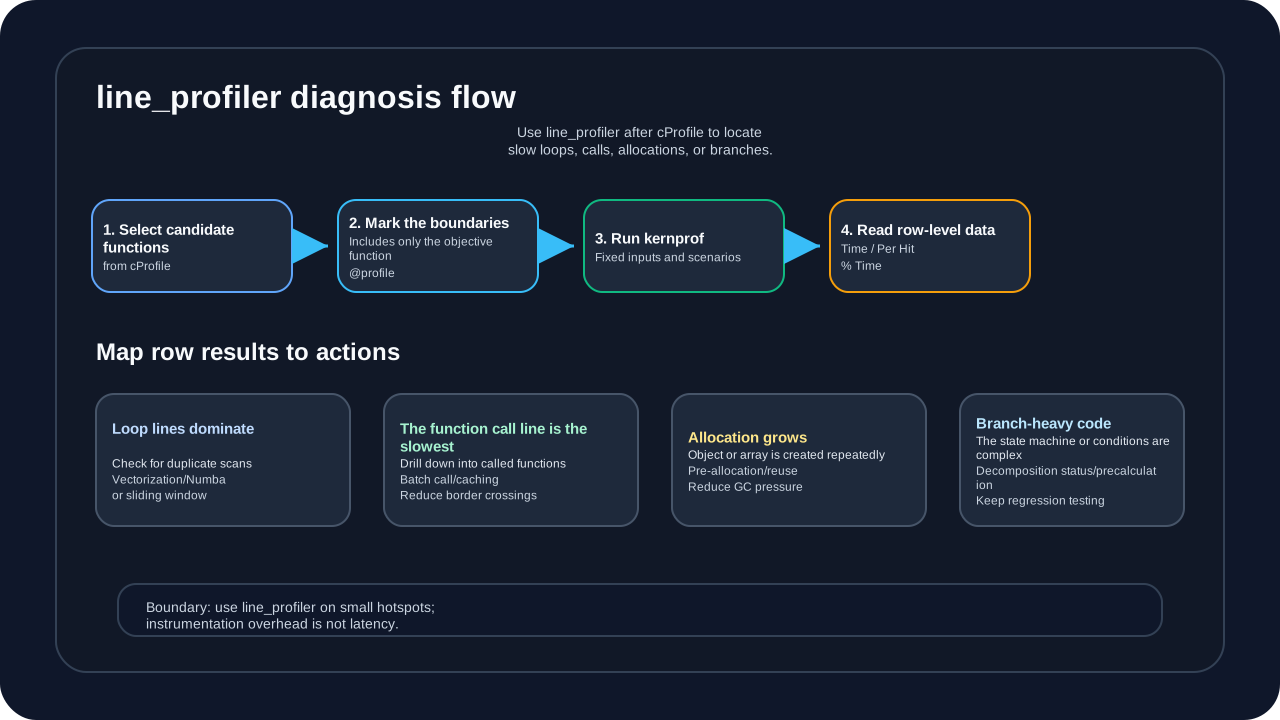
line_profiler is suitable for use after cProfile. cProfile tells the reader “Which function or call chain is questionable”, and line_profiler answers “Which line inside this function is consuming time”. Therefore, it should not cover the entire program right away, nor is it suitable for online delay proof. A safer approach is to only annotate one or a few candidate functions, reproduce the experiment with fixed inputs, and then interpret Time, Per Hit and % Time as specific optimization actions.
# : pip install line_profiler  # illustrative code, not production code
# function

@profile
def calculate_indicator(bars):
    result = []
    for bar in bars:
        # this may be slow
        value = complex_calculation(bar)
        result.append(value)
    return result

# : kernprof -l -v script.py
Example output:
Line #      Time  Per Hit   % Time  Line Contents
================================================
     1                             @profile
     2                             def calculate_indicator(bars):
     3         2.0      2.0      0.0      result = []
     4   5000000.0      5.0     95.0      for bar in bars:
     5    250000.0      0.5      5.0          value = complex_calculation(bar)
     6         1.0      1.0      0.0          result.append(value)
     7         1.0      1.0      0.0      return result
Finding: The loop itself takes 95% of the time, factoring in vectorization or Numba speedup.
The judgment here cannot only look at % Time. If the % Time of a certain line is high, but the Hits is low, it may be an external call or I/O blocking; if the Hits is high but the Per Hit is low, the problem is more likely that the call granularity is too fragmented; if the loop line takes up the main time, vectorization, sliding window or Numba evaluation is entered. In other words, the value of line_profiler is not to prove that “a certain line of code is bad”, but to help readers converge the optimization actions from general “acceleration” to verifiable engineering choices.
3. memory_profiler——memory analysis
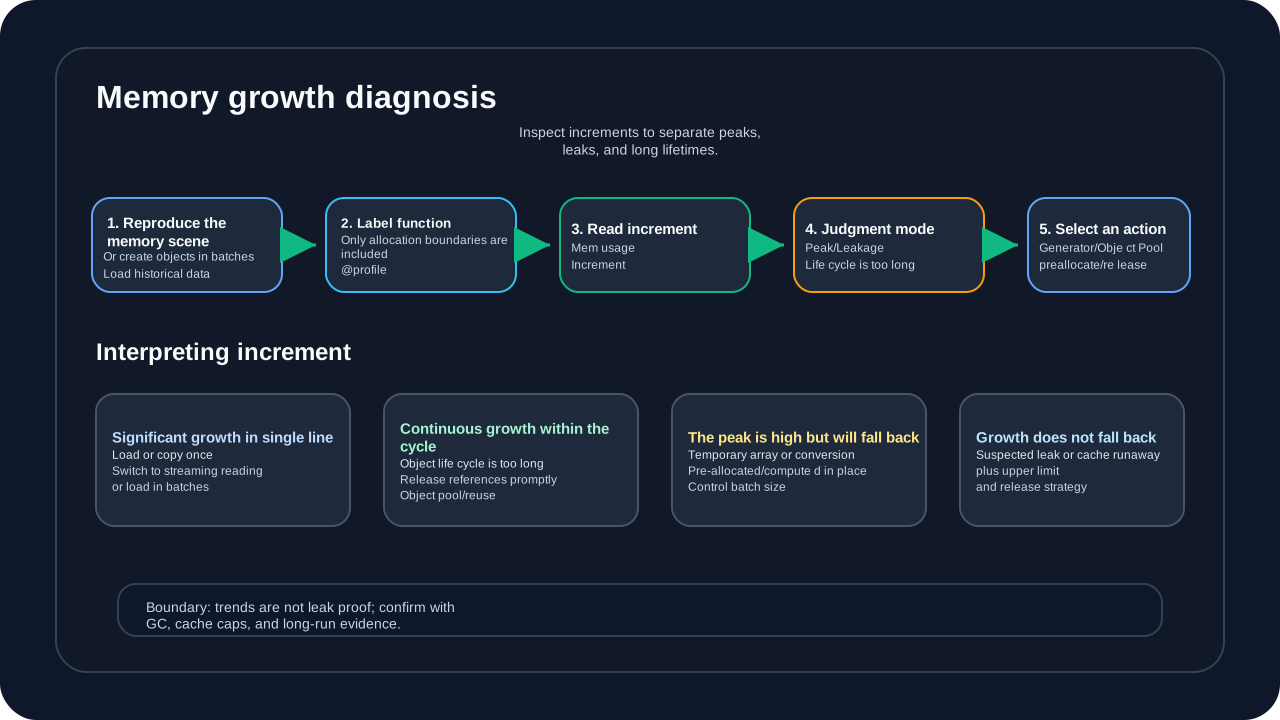
memory_profiler is suitable for answering another type of question: whether the performance degradation is due to memory spikes, object accumulation, cache runaway, or GC pressure. What it focuses on is not the time consumption of the function, but the changes in process memory before and after each line is executed. Readers must first fix the input scale when using it, such as loading 6-month K-lines, constructing drawing objects in batches, or generating indicator arrays at once; otherwise, memory curves under different data scales cannot be compared.
from memory_profiler import profile  # illustrative code, not production code

@profile
def load_data():
    data = []
    for i in range(100000):
        data.append(create_large_object())
    return data
Output:
Line #    Mem usage    Increment   Line Contents
================================================
     1     35.2 MiB     35.2 MiB   @profile
     2                             def load_data():
     3     35.2 MiB      0.0 MiB       data = []
     4    435.2 MiB      0.4 MiB       for i in range(100000):
     5    435.2 MiB      4.0 MiB           data.append(create_large_object())
     6    435.2 MiB      0.0 MiB       return data
Found: Memory growth of 400MB, consider using generators or object pools.
This type of output should focus on Increment, rather than just the final Mem usage. If a row grows very large at a time, it usually means that a large object is loaded, copied, or constructed at once; if there is a small increase every time inside the loop, the problem may be that the object life cycle is too long, the list continues to be appended, or the cache has no upper limit; if the peak value is high but then falls back, the focus should be on batch size, temporary arrays, and in-place calculations; if the growth does not fall back for a long time, it is necessary to continue to combine GC, cache strategies, and long-term running observations to determine whether there is a leak. memory_profiler is suitable as a positioning tool and cannot alone replace final memory peaks, release behavior and long-term stability verification.
4. py-spy——sampling analysis (production environment friendly)
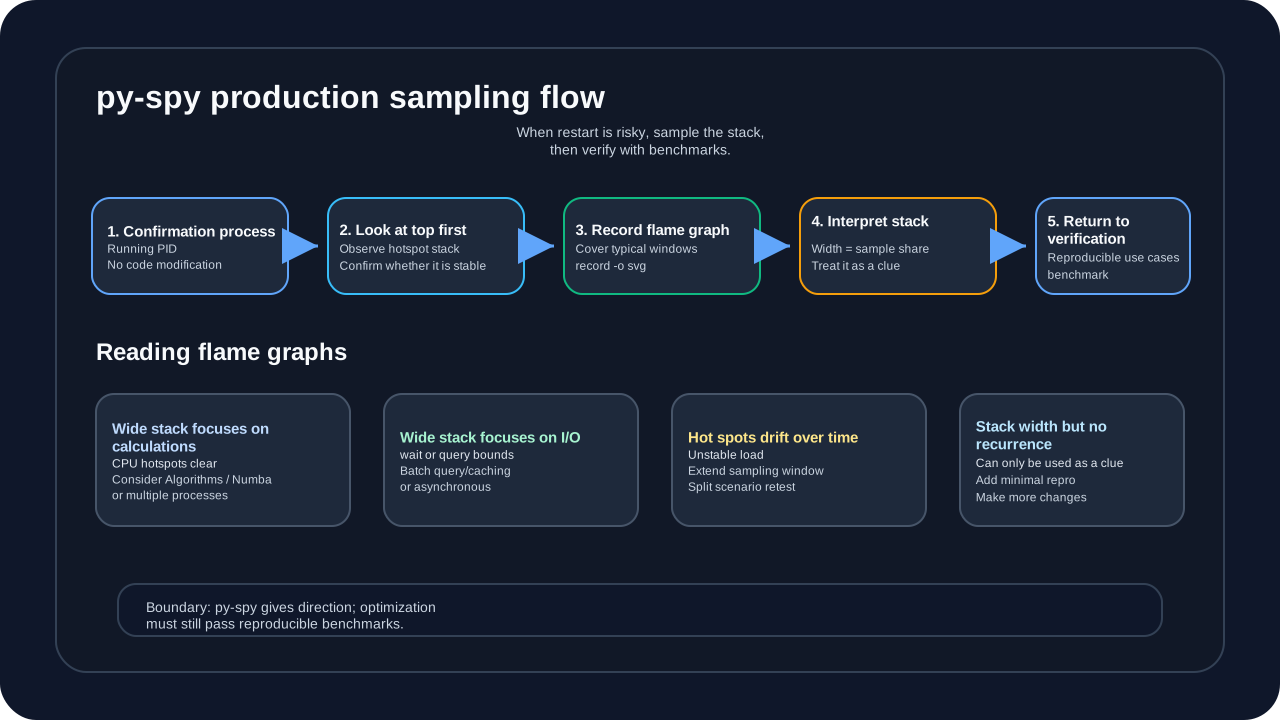
The value of py-spy lies in low-invasive sampling: when the process is already running, the problem only occurs after specific interactions or long running times, or it is inconvenient to add decorators to the code, it can be directly attached to the target process and observe the current call stack distribution. Readers should note that what py-spy sees is “which stacks frequently appear” within the sampling window, not the precise time consumption of a certain line of code; it is suitable for judging the direction, but not suitable for final optimization acceptance alone.
# Nomodifycode, direct attach process
py-spy top --pid 12345
py-spy record -o profile.svg --pid 12345
Advantages:
- No need to modify code
- Low overhead (<1% CPU)
- Can generate flame graph (flame graph)
The focus of reading flame graphs is “width”, not height. The wider a function stack is, the more frequently it appears in the sampling window; if the wide stack is focused on indicator calculations, the next step can be to return to the algorithm, Numba, or multi-process direction; if the wide stack is focused on databases, files, or network calls, check batch queries, caches, and I/O boundaries first; if hot spots drift over time, it means that the sampling window or scene definition is not yet stable, and the sampling needs to be extended or the replication scene needs to be split. Final changes still need to be verified against directional benchmarks, P95/P99 and correctness assertions.
5. Performance benchmark test——timeit
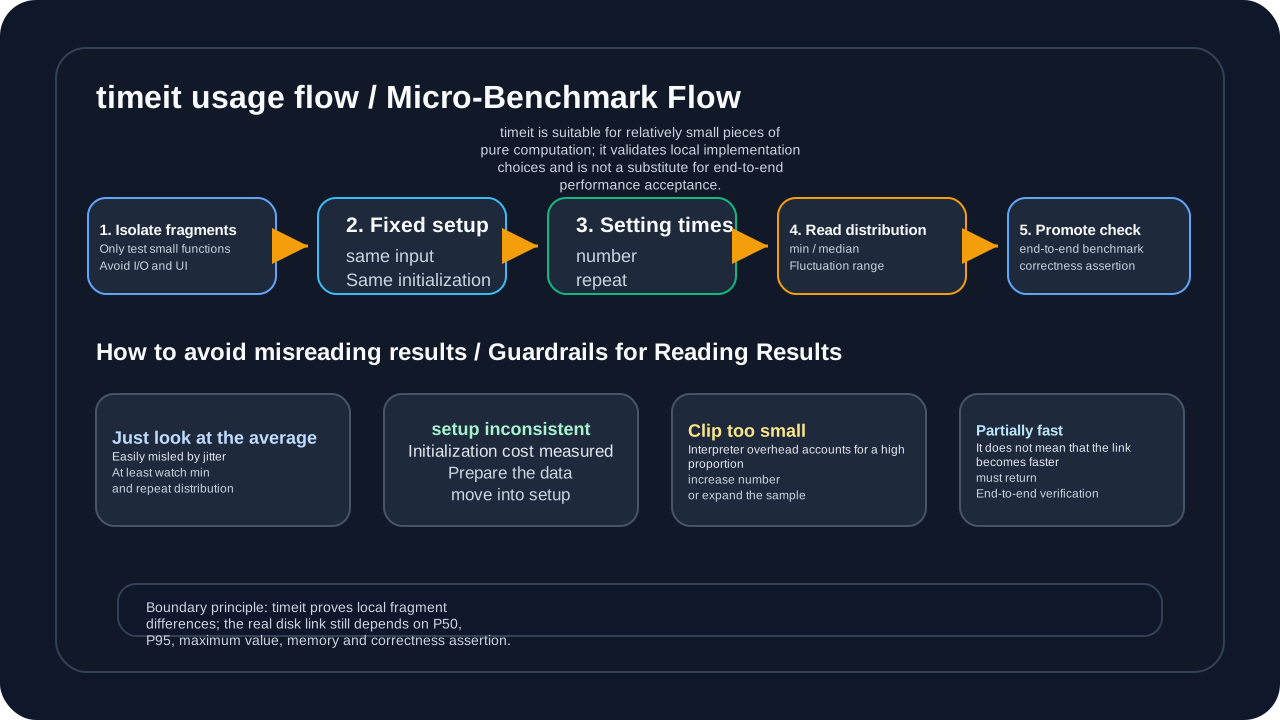
timeit is suitable for micro-benchmarking, which is comparing two small pieces of pure calculation, such as list comprehensions and generator expressions, bisect and searchsorted, small function calls and inline logic. Its advantage is that it can reduce occasional jitter with large number of repeated executions, but its boundaries are also clear: do not use it to directly measure database, UI, network, file I/O or complete transaction links. The fact that a local fragment is faster only shows that this fragment has optimization value, but cannot directly prove that the user’s perceived delay will definitely decrease.
import timeit  # illustrative code, not production code

# implementation
def method_a():
    return sum([i**2 for i in range(10000)])

def method_b():
    return sum(i**2 for i in range(10000))

# 1000,
print(timeit.timeit(method_a, number=1000))
print(timeit.timeit(method_b, number=1000))
When reading timeit results, don’t just look at the average of the output once. A safer approach is to use the same input, the same initialization process and the same number, and then use multiple rounds of repeat to observe the minimum value, median and fluctuation range. Python’s timeit defaults to temporarily turning off the GC during the timing, which helps reduce noise, but also means that the results do not necessarily represent the cost of memory reclamation in real long links. If the candidate solution only dominates the micro-benchmark, the next step is to put it back into the real data size, P50/P95, maximum value and correctness assertion for retesting.
Establish a performance baseline
Before optimizing, be sure to establish repeatable benchmarks:
import time  # illustrative code, not production code
import statistics

def benchmark(func, *args, runs=10, warmup=3):
    """baselinetest"""
    # warm up
    for _ in range(warmup):
        func(*args)

    # test
    times = []
    for _ in range(runs):
        start = time.perf_counter()
        func(*args)
        elapsed = time.perf_counter() - start
        times.append(elapsed)

    return {
        'mean': statistics.mean(times),
        'median': statistics.median(times),
        'stdev': statistics.stdev(times),
        'min': min(times),
        'max': max(times)
    }

# use
result = benchmark(calculate_ma, prices, period=20, runs=100)
print(f": {result['mean']*1000:.2f}ms,: {result['stdev']*1000:.2f}ms")
Part 2: Algorithm Optimization—Reduce duplication of work first, then talk about acceleration methods
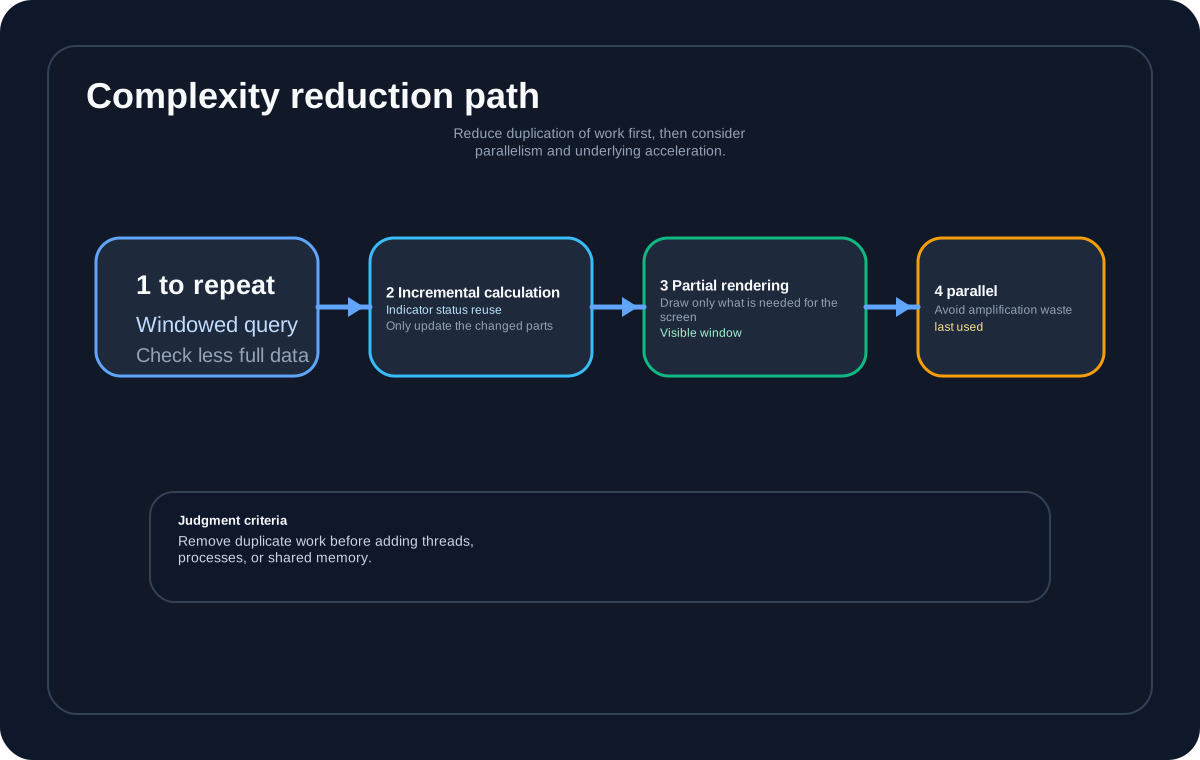
The first principle of algorithm optimization is to delete duplicate work first and then talk about acceleration methods. Many performance problems look like “Python is slow”. In fact, the same historical data is scanned repeatedly, the same DataFrame is created repeatedly, and the same timestamp is searched linearly repeatedly. At this time, using Numba or multiple processes can only make the wasteful execution faster, but cannot fundamentally reduce the complexity.
Readers can first use the following path to judge the order of optimization: if you can query in a window, do not check the entire amount repeatedly; if you can incrementally maintain the state, do not recalculate the history every time; if you can render locally, do not create all drawing objects; only when repeated work has been reduced to a reasonable range, enter parallelism, JIT or shared memory.
Case 1: Indicator calculation optimization
Original implementation (Pandas vectorization):
import pandas as pd  # illustrative code, not production code

def calculate_ma_pandas(bars, period):
    df = pd.DataFrame([bar.__dict__ for bar in bars])
    df['ma'] = df['close'].rolling(window=period).mean()
    return df['ma'].values
Problem Analysis:
pd.DataFramecreation: O(n) memory allocationrolling().mean(): O(n) calculation, but internal optimization- The DataFrame is recreated every time it is called
Optimized implementation (incremental calculation):
from collections import deque  # illustrative code, not production code

class IncrementalMA:
    def __init__(self, period):
        self.period = period
        self.values = deque(maxlen=period)
        self.sum = 0

    def update(self, bar):
        if len(self.values) == self.period:
            self.sum -= self.values[0]
        self.values.append(bar.close)
        self.sum += bar.close

        if len(self.values) < self.period:
            return None  # datainsufficient

        return self.sum / self.period
The key to this implementation is not as simple as “faster than Pandas”, but that it changes the workload: the Pandas solution recalculates the entire window every time, and the incremental implementation only updates the state once when a new K line arrives. Therefore, the numbers here cannot be directly understood as horizontal comparisons of the same thing.
Performance comparison (different workloads):
| workload | plan | time | Memory usage |
|---|---|---|---|
| 10,000 K lines constructed/recalculated for the first time | Pandas | 150 ms | 50 MB |
| Status update after adding 1 new K line | Incremental calculation | 5 ms | 0.5 MB |
in conclusion:
- Pandas is more suitable for recalculating the history window in one go.
- Incremental computing is better suited for new data updates arriving in real time.
5 msrefers to the caliber of “single update”, not the caliber of “full recalculation of 10,000 K lines”.
Case 2: layered data normalization
Original implementation (double loop):
def align_timeframes(bars_1m, bars_5m, bars_30m):  # illustrative code, not production code
    result = []
    for bar_1m in bars_1m:
        # 5m bar
        bar_5m = find_bar_by_time(bars_5m, bar_1m.time)
        # 30m bar
        bar_30m = find_bar_by_time(bars_30m, bar_1m.time)
        result.append((bar_1m, bar_5m, bar_30m))
    return result

# O(n * m * k) - repeated search across all timeframe lists
Optimized implementation (double pointers):
def align_timeframes_optimized(bars_1m, bars_5m, bars_30m):  # illustrative code, not production code
    result = []
    idx_5m, idx_30m = 0, 0

    for bar_1m in bars_1m:
        # 5m
        while idx_5m < len(bars_5m) - 1 and \
              bars_5m[idx_5m + 1].time <= bar_1m.time:
            idx_5m += 1

        # 30m
        while idx_30m < len(bars_30m) - 1 and \
              bars_30m[idx_30m + 1].time <= bar_1m.time:
            idx_30m += 1

        result.append((bar_1m, bars_5m[idx_5m], bars_30m[idx_30m]))

    return result

# O(n + m + k) - each timeframe cursor only moves forward
Performance comparison (under the same data scale):
| plan | 10,000 K lines | time complexity |
|---|---|---|
| double loop | 2500 ms | O(n²) |
| double pointer | 15 ms | O(n) |
| promote | 167x | - |
Case 3: Highest price/lowest price within fixed period K-line
The highest price and lowest price within a fixed period are very common basic calculations in trading systems. It will appear in logic such as channel breakthroughs, range oscillations, stop loss bands, N-day high and low points, rolling risk control thresholds, etc. This problem seems simple: every time a new K line comes, look at the highest high and the lowest low among the past period K lines. But if the window is rescanned every time, the system will change “add a new piece of data” to “review the history window”.
Original implementation (fixed window for each rescan):
def rolling_high_low_naive(bars, period):  # illustrative code, not production code
    highs = []
    lows = []

    for i in range(len(bars)):
        if i + 1 < period:
            highs.append(None)
            lows.append(None)
            continue

        window = bars[i - period + 1:i + 1]
        highs.append(max(bar.high for bar in window))
        lows.append(min(bar.low for bar in window))

    return highs, lows

# O(n * period) - each output rescans the whole fixed window
This implementation is not a “bug”, it is clear enough when the data volume is small, the window is short, and the offline calculation is only done once. But in real-time charts or layered indicators, period may be 20, 60, 120, or even longer; if the window is scanned repeatedly for every period, every indicator, and every refresh, fixed period highs and lows will become hidden repetitive work.
Optimized implementation (monotone queue maintenance window extreme):
from collections import deque  # illustrative code, not production code

def rolling_high_low_deque(bars, period):
    max_queue = deque()  # candidate indexes for the current window high
    min_queue = deque()  # candidate indexes for the current window low
    highs = []
    lows = []

    for i, bar in enumerate(bars):
        # remove indexes outside the window
        while max_queue and max_queue[0] <= i - period:
            max_queue.popleft()
        while min_queue and min_queue[0] <= i - period:
            min_queue.popleft()

        # keep the high queue monotonic decreasing
        while max_queue and bars[max_queue[-1]].high <= bar.high:
            max_queue.pop()
        max_queue.append(i)

        # keep the low queue monotonic increasing
        while min_queue and bars[min_queue[-1]].low >= bar.low:
            min_queue.pop()
        min_queue.append(i)

        if i + 1 < period:
            highs.append(None)
            lows.append(None)
        else:
            highs.append(bars[max_queue[0]].high)
            lows.append(bars[min_queue[0]].low)

    return highs, lows

# O(n) - each bar enters and leaves each queue at most once
The key to this type of optimization is not to “reduce all algorithms to O(n)”, but to identify which repeated scans can be maintained statefully. The monotonic queue can be established because the window length is fixed, the K-line enters in chronological order, the window only slides forward, and the high and low price query only requires the extreme value of the current window. If the window will be arbitrarily modified, historical K-lines will be frequently replenished, or any interval query needs to be supported, line segment trees, sparse tables, block indexes or recalculation must be considered instead of directly applying monotonic queues.
Performance comparison (fixed window, same data scale):
| plan | workload | time complexity | applicable boundary |
|---|---|---|---|
| Re-scan the window each time | Each K-line scans the nearest period root | O(n * period) | Very short window, one-time calculation offline |
| monotonic queue | Each K line maintains candidate extreme values | O(n) amortization | Fixed window, sequential append, sliding query |
in conclusion:
- The fixed period high/low price is a typical “repeated scan can be eliminated” scenario.
- Monotonic queues are not a universal replacement and rely on fixed windows and sequential appending.
- If historical data is replenished or the window is not fixed and sliding, the data structure must be re-evaluated.
Case 4: The highest price and lowest price of real-time large cycle K-line
The high and low prices of real-time large-cycle K-lines are another scene that is easily confused with the fixed window. The fixed window question focuses on “the highest and lowest prices in the recent period K-line”; the real-time large cycle question focuses on “the 5-minute, 30-minute, 1-hour or 4-hour K-line currently being formed”. This large cycle K-line has not yet been sealed, but charts and strategies may already need to see its temporary open/high/low/close/volume.
The most direct way to write it is to re-scan all the data in the current large-period bucket every time a low-period K-line comes:
def rebuild_realtime_large_bar(base_bars, period_rule, current_start):  # illustrative code, not production code
    current_end = period_rule.end_of(current_start)
    bars_in_period = [
        bar for bar in base_bars
        if current_start <= bar.datetime < current_end
    ]

    return {
        "datetime": current_start,
        "open": bars_in_period[0].open,
        "high": max(bar.high for bar in bars_in_period),
        "low": min(bar.low for bar in bars_in_period),
        "close": bars_in_period[-1].close,
        "volume": sum(bar.volume for bar in bars_in_period),
        "complete": False,
    }

# Updatecurrentperiod
The semantics of this code are clear, but the real-time link will continue to amplify the repetitive work. Take the 1-hour K-line as an example. If it consists of 60 1-minute K-lines, then every 1-minute K-line in this hour will rescan the current hour window, and the same batch of low-period data will be read repeatedly. The more varieties, more chart cycles, and more frequent real-time refreshes, the easier it is for this cost to be hidden in UI freezes or indicator refresh delays.
This scenario is more suitable for incremental maintenance of temporary state variables. As long as the current large period bucket is not switched, the new low period K line only needs to be compared with the current current_high/current_low once; when the bucket is switched, the previous large period K line is first sealed, and then the new low period K line is used to initialize the next large period state.
class RealtimeLargeBarBuilder:  # illustrative code, not production code
    def __init__(self, period_rule):
        self.period_rule = period_rule
        self.current_start = None
        self.current_open = None
        self.current_high = None
        self.current_low = None
        self.current_close = None
        self.current_volume = 0

    def update(self, base_bar):
        period_start = self.period_rule.start_of(base_bar.datetime)

        if self.current_start != period_start:
            sealed_bar = self.snapshot(complete=True) if self.current_start else None
            self.current_start = period_start
            self.current_open = base_bar.open
            self.current_high = base_bar.high
            self.current_low = base_bar.low
            self.current_close = base_bar.close
            self.current_volume = base_bar.volume
            return sealed_bar, self.snapshot(complete=False)

        self.current_high = max(self.current_high, base_bar.high)
        self.current_low = min(self.current_low, base_bar.low)
        self.current_close = base_bar.close
        self.current_volume += base_bar.volume
        return None, self.snapshot(complete=False)

    def snapshot(self, complete):
        return {
            "datetime": self.current_start,
            "open": self.current_open,
            "high": self.current_high,
            "low": self.current_low,
            "close": self.current_close,
            "volume": self.current_volume,
            "complete": complete,
        }
The cost caliber of this type of incremental maintenance must be made clear: on a real-time path where low-cycle data is appended in chronological order, cycle boundaries are stable, and historical data is not supplemented, temporary variables are only updated once for each event, so the high/low update of the current large-cycle K-line is O(1). However, if low-cycle data arrives out of order, or a certain K-line in the current large-cycle bucket is corrected, it is not safe to rely solely on current_high/current_low. For example, the original highest price came from a K-line that was later revised or deleted, and the temporary variable will not automatically drop; in this case, the corresponding large-cycle bucket must be marked as dirty, and the low-cycle data in the bucket must be partially recalculated.
| scene | Processing method | Cost caliber |
|---|---|---|
| Real-time sequential append | Update current_high/current_low temporary variables | O(1) per event |
| Low period data replenishment in the current bucket | Mark the current large-cycle bucket dirty and then perform partial recalculation. | O(k), k is the number of low cycles in the bucket |
| Out-of-order market arrival | Recalculate the corresponding large period bucket after insertion | O(k) |
| Cycle boundary rule changes | Re-cut the barrel and recalculate the affected area | Depends on affected time frame |
The real risk in this case is not in max() and min(), but in the bucket boundaries. Real-time large-period K-lines cannot be divided only on the hour of natural time. Night trading, lunch break, half-day trading, holidays and exchange time zones will all affect the results of period_rule.start_of(). If the bucket boundaries are wrong, incremental maintenance can get wrong high/low very quickly.
in conclusion:
- The
high/lowof real-time large-period K-line is suitable for incremental maintenance with temporary variables. - This optimization only applies to the current bucket live path of sequential appends.
- Backfilling, out-of-order or period boundary corrections must trigger local recalculation and cannot silently overwrite the state.
Fixed window high and low points and real-time large period high and low points both reduce repeated scanning, but they are not the same model. The former maintains the rolling extreme values of the “latest N roots” and is suitable for monotonic queues; the latter maintains “a large period K line currently being formed” and is suitable for temporary variable state machines. Only by clearly distinguishing these two models can we avoid using the correct algorithm on the wrong problem.
Case Five: Data Search Optimization
Original implementation (list lookup):
def find_bar(bars, timestamp):  # illustrative code, not production code
    for bar in bars:
        if bar.timestamp == timestamp:
            return bar
    return None

# O(n)
Optimized implementation (binary search):
from bisect import bisect_left  # illustrative code, not production code

class BarIndex:
    def __init__(self, bars):
        self.bars = bars
        self.timestamps = [bar.timestamp for bar in bars]

    def find(self, timestamp):
        idx = bisect_left(self.timestamps, timestamp)
        if idx < len(self.bars) and self.bars[idx].timestamp == timestamp:
            return self.bars[idx]
        return None

# O(log n)
Optimized implementation (hash index):
class BarHashIndex:  # illustrative code, not production code
    def __init__(self, bars):
        self.bar_map = {bar.timestamp: bar for bar in bars}

    def find(self, timestamp):
        return self.bar_map.get(timestamp)

# O(1), memory usage
Select Strategy:
- Large amount of data and frequent searches → Hash index
- Data orderly, memory sensitive → binary search
- Small data, simple scenario → list search
Part 3: Data structure optimization - choosing the right tool saves half the time
Case 1: List vs Array
Scenario: Store the closing prices of 10,000 K lines
# list  # illustrative code, not production code
prices_list = [bar.close for bar in bars]

# (array.array)
from array import array
prices_array = array('d', [bar.close for bar in bars])

# NumPy
import numpy as np
prices_numpy = np.array([bar.close for bar in bars])
Capacity estimate:
You can’t just look at “all float” here. In CPython, list[float] saves an object reference, and the element itself is an independent Python float object; array('d') and ndarray(dtype=float64) are closer to a continuous 8-byte double-precision buffer. The following numbers are used to help readers understand object model differences and are not equivalent to precise measurements in all operating environments.
| type | 10000 float | 1,000,000 floats |
|---|---|---|
| list[float] | ~80 KB reference array + ~240 KB float object | ~8 MB reference array + ~24 MB float object |
| array(‘d’) | ~80 KB contiguous buffer | ~8 MB contiguous buffer |
| ndarray(float64) | ~80 KB contiguous buffer + small amount of array metadata | ~8 MB contiguous buffer + small amount of array metadata |
Performance comparison (sum):
| type | 10000 | 1,000,000 |
|---|---|---|
| list | 0.2 ms | 20 ms |
| array | 0.2 ms | 20 ms |
| numpy | 0.005 ms | 0.5 ms |
in conclusion:
- Pure Python calculation: list/array is not much different
- In this set of summation microbenchmarks, NumPy’s advantage comes from contiguous memory and C-level loops; don’t extrapolate “40x” to all numerical computations.
Case 2: Dictionary vs slots
Original implementation (normal class):
class BarData:  # illustrative code, not production code
    def __init__(self, symbol, timestamp, open, high, low, close):
        self.symbol = symbol
        self.timestamp = timestamp
        self.open = open
        self.high = high
        self.low = low
        self.close = close
Optimized implementation (slots):
class BarData:  # illustrative code, not production code
    __slots__ = ['symbol', 'timestamp', 'open', 'high', 'low', 'close']

    def __init__(self, symbol, timestamp, open, high, low, close):
        self.symbol = symbol
        self.timestamp = timestamp
        self.open = open
        self.high = high
        self.low = low
        self.close = close
Memory comparison:
| accomplish | single object | 100,000 objects |
|---|---|---|
| Ordinary class | 56 bytes + attributes | 8.5 MB |
| slots | 56 bytes | 5.6 MB |
| save | - | 34% |
Case 3: Pandas vs NumPy vs native Python
The core classification of this section is not “who is faster, Pandas, NumPy, or native Python”, but whether the current workload is a full recalculation or a stateful incremental update. Pandas, NumPy, and native Python can all participate in different implementations, and performance semantics cannot be directly bound by library name. A more rigorous reading is: the full window recalculation compares the cost of “recalculating the entire history”, while the single incremental update compares the cost of “updating the latest status after the arrival of new data”.
Scenario A: Full recalculation of RSI indicator
# Pandas implementation  # illustrative code, not production code
def rsi_pandas(prices, period=14):
    delta = prices.diff()
    gain = (delta.where(delta > 0, 0)).rolling(window=period).mean()
    loss = (-delta.where(delta < 0, 0)).rolling(window=period).mean()
    rs = gain / loss
    return 100 - (100 / (1 + rs))

# NumPy implementation
def rsi_numpy(prices, period=14):
    deltas = np.diff(prices)
    gains = np.where(deltas > 0, deltas, 0)
    losses = np.where(deltas < 0, -deltas, 0)
    avg_gains = np.convolve(gains, np.ones(period)/period, mode='valid')
    avg_losses = np.convolve(losses, np.ones(period)/period, mode='valid')
    rs = avg_gains / avg_losses
    return 100 - (100 / (1 + rs))
Performance comparison (10,000 K-lines, full recalculation):
| plan | time | Memory |
|---|---|---|
| Pandas | 150 ms | 50 MB |
| NumPy | 20 ms | 20 MB |
in conclusion:
- If you want to recompute an entire history, NumPy is often better suited than Pandas for purely numerical batch computations.
- Pandas is better suited for expression composition, alignment, and data cleaning.
- Both of these belong to “full recalculation” semantics and cannot be directly mixed with incremental updates.
Scenario B: Single incremental update of RSI status
# Python Update  # illustrative code, not production code
class IncrementalRSI:
    def update(self, price):
        # Updatestatus, recalculationhistory
        # K
        ...
**Performance comparison (added 1 new K line, only updated the latest status): **
| plan | time | Memory |
|---|---|---|
| Native Python increment | 5 ms | 0.5 MB |
Applicable prerequisites:
- Incremental updates only work if the indicator can be broken down into a persistable state.
- If first loading, historical playback or parameter changes require recalculation of the entire window, this number cannot be used directly.
- Therefore, “5 ms” describes a single incremental update, not a full recalculation.
Final conclusion:
- Batch recalculation prioritizes comparison of NumPy/Pandas expressiveness, memory layout, and vectorization costs; incremental refresh prioritizes comparison of state definition, recovery logic, and correctness verification.
- The real comparison dimension is not “who is faster”, but “whether the current task is to recalculate the history or update the latest value.”
- As long as the semantics are different, performance numbers cannot be directly compared side by side.
Part 4: Compilation optimization - Numba and Cython
Get started quickly with Numba
Numba is suitable for processing hotspot loops with stable types and mainly numerical arrays. When the nopython mode can be established, it can compile such Python functions into machine code; if the function is mixed with complex Python objects, dynamic types, or unsupported library calls, the benefits will decrease, and the target compilation path will not even be entered.
from numba import jit  # illustrative code, not production code
import numpy as np

# original version
def calculate_ma_python(prices, period):
    result = []
    for i in range(len(prices)):
        if i < period - 1:
            result.append(np.nan)
        else:
            result.append(np.mean(prices[i-period+1:i+1]))
    return np.array(result)

# Numba
@jit(nopython=True)
def calculate_ma_numba(prices, period):
    result = np.empty(len(prices))
    for i in range(len(prices)):
        if i < period - 1:
            result[i] = np.nan
        else:
            result[i] = np.mean(prices[i-period+1:i+1])
    return result
Performance comparison (steady-state, excluding first JIT compilation overhead):
| plan | 100,000 K lines | Speedup ratio |
|---|---|---|
| Python | 2500 ms | 1x |
| Numba | 45 ms | 55x |
This set of data illustrates the one-time calculation cost after the thermal path is stabilized. Numba also needs to compile the function the first time it is called; if the call frequency is infrequent, the first-time compilation cost may offset the runtime gain.
Numba Advanced Techniques
1. Caching compilation results
@jit(nopython=True, cache=True)  # illustrative code, not production code
def calculate_indicator(prices, period):
    # cache=True result,
    pass
2. Parallel computing
from numba import prange  # illustrative code, not production code

@jit(nopython=True, parallel=True)
def calculate_multiple_indicators(data, period):
    n = data.shape[0]
    results = np.empty(n)
    for i in prange(n):  # parallel loop
        results[i] = calculate_single(data[i], period)
    return results
3. Fast math functions
from numba import jit  # illustrative code, not production code
import math

@jit(nopython=True, fastmath=True)  # fastmath
def calculate_complex_formula(x, y):
    return math.sqrt(x*x + y*y)
Numba usage restrictions
Can be accelerated:
- NumPy array operations
- Numerical calculation (int, float)
- Loops and conditions
Cannot be accelerated:
- String operations
- Dictionaries, lists (replaced with NumPy arrays)
- Custom class (using numpy structured array)
Cython in-depth optimization
For scenarios that Numba cannot handle, Cython can be used.
# indicator.pyx  # illustrative code, not production code
import numpy as np
cimport numpy as np
from libc.math cimport NAN

def calculate_ma_cython(double[:] prices, int period):
    cdef int n = len(prices)
    cdef double[:] result = np.empty(n)
    cdef int i
    cdef double sum_val

    for i in range(n):
        if i < period - 1:
            result[i] = NAN
        else:
            sum_val = 0
            for j in range(i-period+1, i+1):
                sum_val += prices[j]
            result[i] = sum_val / period

    return np.array(result)
Compile:
python setup.py build_ext --inplacePerformance comparison (steady-state, excluding Cython build time):
| plan | 100,000 K lines |
|---|---|
| Python | 2500 ms |
| Numba | 45 ms |
| Cython | 35 ms |
In this set of type-constrained loops, Cython’s steady-state is slightly less time-consuming, but it requires additional type declarations, construction processes, and maintenance costs. A more prudent order is to use Numba to handle pure numerical hot spots first; only move to Cython when type boundaries, object models, or Numba limitations have become clear bottlenecks.
Part 5: Caching and precomputing - trading space for time
Multi-level caching strategy
from functools import lru_cache  # illustrative code, not production code
import hashlib

class IndicatorCache:
    """cache: memory ->  ->"""

    def __init__(self):
        self._memory_cache = {}
        self._disk_cache_dir = ".cache/indicators"

    def get(self, key, compute_func, use_cache=True):
        if not use_cache:
            return compute_func()

        # L1: memorycache
        if key in self._memory_cache:
            return self._memory_cache[key]

        # L2: cache
        disk_path = f"{self._disk_cache_dir}/{key}.npy"
        if os.path.exists(disk_path):
            result = np.load(disk_path)
            self._memory_cache[key] = result
            return result

        # L3:
        result = compute_func()

        # writescache
        self._memory_cache[key] = result
        np.save(disk_path, result)

        return result
Precomputation strategy
Scenario: A large number of historical indicators need to be loaded when starting the strategy
class PrecomputedIndicators:  # illustrative code, not production code
    """indicator,"""

    def __init__(self, symbol):
        self.symbol = symbol
        self._precompute()

    def _precompute(self):
        # calculate once at startup
        bars = load_historical_bars(self.symbol, days=252)

        self.ma_5 = calculate_ma(bars, period=5)
        self.ma_10 = calculate_ma(bars, period=10)
        self.ma_20 = calculate_ma(bars, period=20)
        self.rsi_14 = calculate_rsi(bars, period=14)
        # ...

    def get(self, indicator_name, timestamp):
        # O(1)
        return self._indicators[indicator_name][timestamp]
Effect:
- Policy startup time: reduced from 30 seconds to 2 seconds
- Real-time computing latency: from 50ms to <1ms
LRU cache decorator
from functools import lru_cache  # illustrative code, not production code

@lru_cache(maxsize=128)
def calculate_fibonacci(n):
    """cache"""
    if n < 2:
        return n
    return calculate_fibonacci(n-1) + calculate_fibonacci(n-2)

# first call:
# second call: directreturncacheresult
Part 6: Memory Optimization - Don’t let GC be your performance killer
memory pool mode
class BarPool:  # illustrative code, not production code
    """, create"""

    def __init__(self, size=1000):
        self._pool = [BarData() for _ in range(size)]
        self._available = set(range(size))

    def acquire(self, **kwargs):
        if self._available:
            idx = self._available.pop()
            bar = self._pool[idx]
            # status
            for key, value in kwargs.items():
                setattr(bar, key, value)
            return bar
        else:
            # , create
            return BarData(**kwargs)

    def release(self, bar):
        # mark as available
        idx = self._pool.index(bar)
        self._available.add(idx)
Generator alternative list
# do not(memory)  # illustrative code, not production code
def process_bars(bars):
    results = []
    for bar in bars:
        results.append(heavy_calculation(bar))
    return results

# (handle)
def process_bars_generator(bars):
    for bar in bars:
        yield heavy_calculation(bar)

# use
for result in process_bars_generator(million_bars):
    process(result)
memory mapped file
When dealing with very large files, avoid loading them all into memory:
import mmap  # illustrative code, not production code

# memory
with open('large_data.bin', 'rb') as f:
    with mmap.mmap(f.fileno(), 0, access=mmap.ACCESS_READ) as mm:
        # operationmemoryoperation
        data = mm[0:1000]  # reads 1000
Memory monitoring code
import tracemalloc  # illustrative code, not production code
import gc

def monitor_memory(threshold_mb=100):
    """memory,"""
    tracemalloc.start()

    while True:
        current, peak = tracemalloc.get_traced_memory()
        current_mb = current / 1024 / 1024

        if current_mb > threshold_mb:
            logger.warning(f"Memory usage: {current_mb:.1f}MB")

            # memoryassign
            snapshot = tracemalloc.take_snapshot()
            top_stats = snapshot.statistics('lineno')
            for stat in top_stats[:5]:
                logger.warning(str(stat))

            # force garbage collection
            gc.collect()

        time.sleep(60)
Part 7: Database query optimization - from 541 times/minute to 1 time/minute
Real case: Query optimization of candlestick charts
Problem background:
Database optimization of candlestick charts is often misjudged as “the database is not fast enough”. The real issue is usually not single-query latency, but query semantics drifting away from transaction boundary semantics. In a candlestick chart, ticks within the same minute share the same 1m opening price, and the large-period K-line only needs refresh at boundary rollover. If 5m, 1H, and 4H opening prices are re-queried on every tick, the system is using the database to compensate for missing boundary control.
In the candlestick chart function, each tick will trigger multiple database queries to obtain the opening price:
- About 180 ticks per minute
- Query 3 times per tick (5m/1H/4H large cycle)
- Database queries per minute: 541
Original implementation:
def update_tick(self, tick):  # illustrative code, not production code
    # minute 180
    for interval in [Interval.MINUTE_5, Interval.HOUR, Interval.HOUR_4]:
        open_price = database.load_bar_data(
            symbol=tick.symbol,
            interval=interval,
            start=tick.datetime
        )[0].open_price
        # ... use open_price
Problem Analysis:
- Ticks within the same minute share the same opening price
- Large period K lines only need to be queried when a new period begins
- Frequent disk IO becomes a bottleneck
Optimized implementation (multi-level cache):
class MultiTimeframeWidget:  # illustrative code, not production code
    def __init__(self):
        # 1minutemarket opencache
        self._open_price_cache: dict[datetime, float] = {}
        # periodmarket opencache
        self._large_timeframe_open_price_cache: dict[tuple[Interval, datetime], float] = {}

    def _get_large_timeframe_open_price(
        self, large_bar_datetime, interval, current_open_price
    ) -> float:
        cache_key = (interval, large_bar_datetime)

        # L1: memorycache
        if cache_key in self._large_timeframe_open_price_cache:
            return self._large_timeframe_open_price_cache[cache_key]

        # L2: Database query(period)
        open_price = database.load_bar_data(
            symbol=self._vt_symbol,
            interval=interval,
            start=large_bar_datetime,
            end=large_bar_datetime
        )

        if open_price:
            result = open_price[0].open_price
            self._large_timeframe_open_price_cache[cache_key] = result
            return result

        return current_open_price
**Optimization effect (real data, query link statistics based on layered opening price): **
| index | Before optimization | After optimization | Rigorous caliber |
|---|---|---|---|
| Number of database queries | 541 times/minute (original record: 541 times/minute) | 1-4 times/minute (original record: 1-4 times/minute) | Query count dropped approximately 99.3%-99.8% |
| Query triggering semantics | Each tick may trigger a large period query | Only triggered on cycle boundaries or cache invalidations | Change from tick driver to period boundary driver |
| Tick main link pressure | Inquiries may be queued for market processing | read-only cache for most ticks | Still need to use P95/P99 delayed verification |
| Residual Risk | Query is logically focused but repetitive | High cache hit rate but requires invalidation protocol | Historical completion and trading session changes must be actively invalidated |
Key Insights:
- Ticks within the same minute share the same opening price
- For large cycle K lines, you only need to query the opening price when a new cycle begins.
- Cache strategy: use (interval, datetime) as key
The residual cost in this case must also be made clear: caching reduces the number of queries, but it introduces invalidation strategy, cycle-boundary, and data-correction responsibilities. If historical data is backfilled or trading-session rules change, the cache must be actively invalidated. A high hit rate is not a success if the cached key points to the wrong period boundary; in that case, latency optimization turns directly into a data-quality bug.
Batch query vs single query
don’t want:
for symbol in symbols:  # illustrative code, not production code
    result = db.query(f"SELECT * FROM bars WHERE symbol = '{symbol}'")
want:
# # illustrative code, not production code
placeholders = ','.join(['?'] * len(symbols))
results = db.query(
    f"SELECT * FROM bars WHERE symbol IN ({placeholders})",
    symbols
)
Index optimization
-- create
CREATE INDEX idx_bars_symbol_time ON bars(symbol, datetime);
CREATE INDEX idx_bars_interval ON bars(interval, datetime);

-- ()
CREATE INDEX idx_bars_composite ON bars(symbol, interval, datetime);
Part 8: Chart Rendering Optimization—Virtualization and Incremental Updates
Problem background
Chart rendering optimization and database optimization share the same boundary principle: don’t pay the full cost of what the user can’t currently see. In a candlestick chart, 1-minute, 5-minute, 1-hour, 4-hour, and daily lines may exist at the same time. When loading 6-month historical data, the visible window only covers a small segment, but the traditional implementation will create drawing items for all historical K-lines.
In the candlestick chart function, multiple periods of K-lines (1 minute, 5 minutes, 1 hour, 4 hours, daily lines) need to be displayed at the same time. When loading 6 months of historical data:
- There are approximately 1080 K lines in a 4-hour period
- There are approximately 4320 K lines in a 1-hour period
- There are approximately 51,840 K lines in a 5-minute period
Performance bottleneck:
- In this 6-month layered desktop chart example, it takes ~90 seconds to create all plots (80%-90% of total time)
- Memory usage: all drawing items are kept in memory
- Even invisible candlesticks create draw items
Virtualized Rendering
Core idea: Only the K-line in the visible area is rendered, and the content outside the screen is not rendered.
class VirtualizedCandleRenderer:  # illustrative code, not production code
    """Candlestick renderer that draws only the visible viewport."""

    def __init__(self, buffer_size=50, cache_size=1000):
        self.buffer_size = buffer_size  # buffer zone
        self.cache_size = cache_size    # cache
        self._bars = None
        self._visible_range = (0, 0)
        self._render_cache = {}

    def set_bars(self, bars: list):
        """Set the full candlestick data source."""
        self._bars = bars
        self._render_cache.clear()

    def set_visible_range(self, min_ix: int, max_ix: int):
        """Set the visible index range."""
        self._visible_range = (min_ix, max_ix)

    def render(self, painter, rect):
        """Render visible bars plus a small buffer zone."""
        visible_min, visible_max = self._visible_range

        # calculate the render range: visible area plus buffer
        render_start = max(0, visible_min - self.buffer_size)
        render_end = min(len(self._bars), visible_max + self.buffer_size)

        # render only bars inside the viewport budget
        for ix in range(render_start, render_end):
            if ix in self._render_cache:
                # reuse cached drawing primitive
                self._render_cache[ix].paint(painter)
            else:
                # create and cache the drawing primitive
                item = self._create_bar_item(ix, self._bars[ix])
                self._render_cache[ix] = item
                item.paint(painter)

        # remove cache entries that are far outside the viewport
        self._cleanup_cache(visible_min, visible_max)
Incremental Update
Core idea: Only update the changed K-line, without re-rendering the entire chart.
class CrossIndexCandleItem:  # illustrative code, not production code
    """Candlestick item that supports incremental updates."""

    def __init__(self):
        self._bar_items = {}  # bar index -> rendered item
        self._last_bar_count = 0

    def update_bar(self, bar: BarData):
        """Update one bar without rebuilding the whole chart."""
        ix = self._manager.get_bar_ix(bar.datetime)

        if ix in self._bar_items:
            # update an existing rendered bar
            self._bar_items[ix].update_data(bar)
        else:
            # create a new bar
            item = self._create_bar_item(ix, bar)
            self._bar_items[ix] = item

        # repaint the affected chart area
        self.update()

    def update_history(self, history: list):
        """Update historical bars with either virtualized or incremental rendering."""
        if self._use_virtualized_rendering:
            # virtualized path: refresh data source and viewport only
            self._virtualized_renderer.set_bars(history)
            self._virtualized_renderer.set_visible_range(
                *self.get_visible_range()
            )
        else:
            # non-virtualized path: create only newly appended bars
            for bar in history[self._last_bar_count:]:
                self.update_bar(bar)

        self._last_bar_count = len(history)
Performance optimization effect
Before optimization (same data scale and desktop chart interaction scenario):
- 6 months data load: ~90 seconds
- Memory usage: all drawing items are stored in memory
- Scrolling lag: frame rate < 10fps
After optimization (virtualization + incremental update, comparison in the same scenario):
- 6 months data load: ~10-20 seconds (80-90% reduction)
- Memory usage: only save drawing items in the visible area (80-90% reduction)
- Smooth scrolling: frame rate 30-60fps
This set of data only applies to the hardware, window size, number of K lines and rendering implementation of the current case and cannot be directly used as a cross-device commitment. The residual cost of virtualization is the window protocol: visible areas, buffers, cache cleanup, and real-time incremental updates must respect the same set of boundaries. If the cache invalidation strategy is too aggressive when dragging, users will see flickering; if the cache is retained too much, the memory will return to before optimization. Therefore, virtualization should not only look at the first screen load time, but also the drag delay, zoom response, real-time tick refresh and memory limit.
Part 9: Multi-process architecture - Breaking through Python GIL
Limitations of the Python GIL
The concurrency model cannot be determined by “unified architecture”, but must start from the bottleneck type. I/O waits are suitable for threads or async; CPU-intensive calculations require multi-processing, vectorization or JIT; shared memory is only needed when large arrays are transferred repeatedly between processes. Stuffing all tasks into the thread pool, or changing all problems to multi-process, will create new complexity.
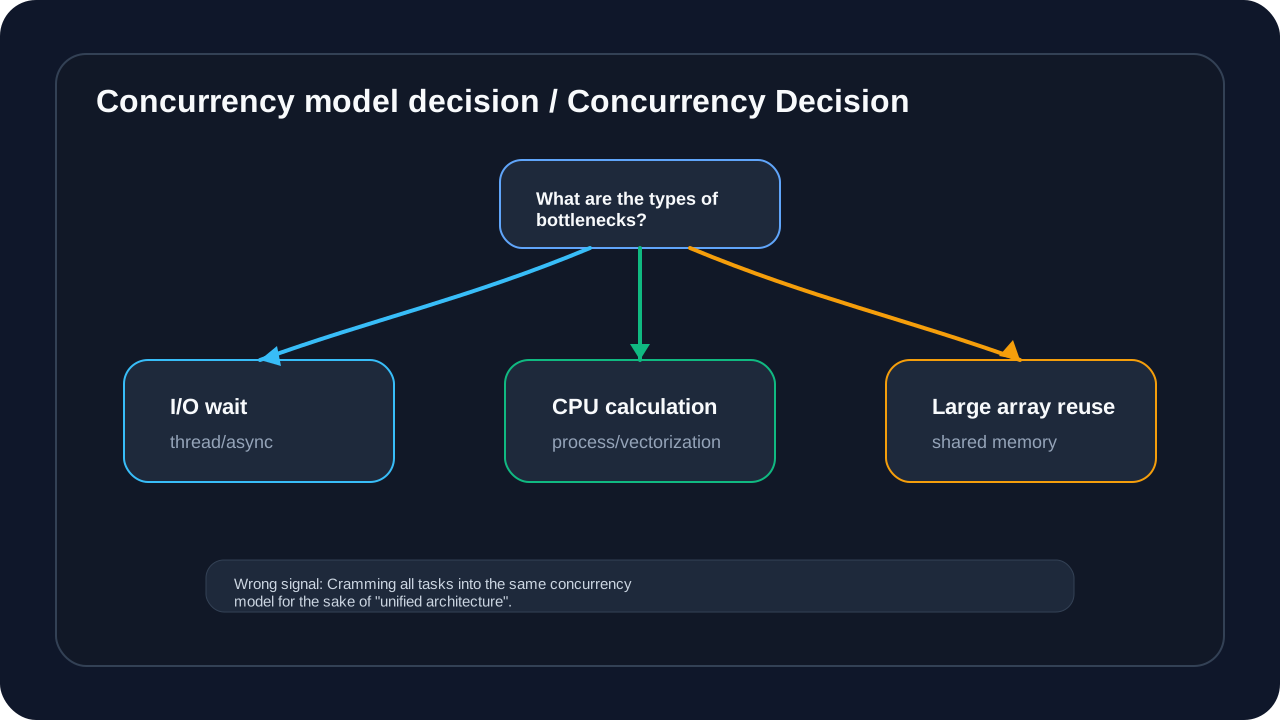
Python’s Global Interpreter Lock (GIL) limits only one thread to executing Python bytecode at a time. This means: If the hotspot is mostly pure Python bytecode, the thread pool cannot turn it into a multi-core parallel computation. But if the calculation logic enters a C extension, Numba compilation path, or external library that releases the GIL, the conclusion needs to be re-verified against the actual execution path.
Problem scenario:
- Calculating complex indicators (winding theory, trend transition flow) requires a lot of CPU calculations
- After pure Python hotspots are put into the thread pool, multiple threads still cannot execute Python bytecode at the same time.
- For indicator calculation of 1 million pieces of data, a single thread takes several seconds
Architecture comparison: thread pool vs multi-process
The difference between thread pool and multi-process is not “which one is more advanced”, but which one is more suitable for the bottleneck nature. Thread pools are suitable for tasks waiting for I/O, because threads can give up execution during the waiting period; pure Python CPU hot spots cannot obtain multi-core parallelism through thread pools under GIL constraints, and multiple threads will increase switching costs. Multiple processes can take advantage of multi-core CPUs, but must bear the management costs of IPC, serialization, shared memory lifetime, and log correlation.
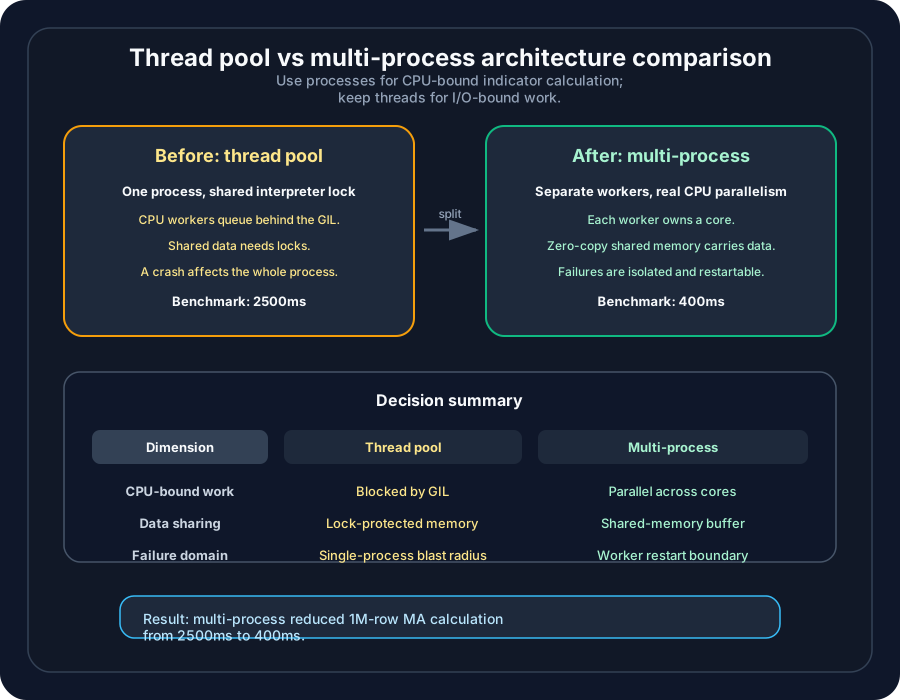
Comparative analysis
| Dimensions | Thread pool (single process) | multi-process |
|---|---|---|
| Execution Parallelism | I/O wait friendly; pure Python CPU hot spots are GIL bound | Independent tasks can be executed in parallel across CPU cores |
| Data Sharing | Object references are shared within processes, but shared mutable state needs to be protected | No shared address space, requires IPC or shared memory |
| Synchronization Complexity | Lock, Queue, and event sequence are prone to errors | Shared memory, result merging and lifecycle still require agreement |
| CPU intensive pure Python | Not suitable as the main means of acceleration | Suitable for isolation and parallelization |
| I/O intensive | usually lighter weight | Maybe over-designed |
| Crash Impact | Thread exceptions may pollute the state within the same process | Process isolation makes it easier to set up downgrades and restarts |
| Code Complexity | The more shared state there is, the harder it is to reason about it | Higher cost for IPC, serialization, log correlation and resource release |
Zero-Copy shared memory implementation
The core idea of Zero-Copy is very simple: the main process places a large array in the shared memory area, and the Worker process only gets the view and metadata of this area, trying to avoid repeatedly serializing, copying, and deserializing the K-line, indicator input, or large period index. For readers, the point is not a specific API, but the change in data ownership: the main process is responsible for creating, updating, and publishing versions, and the Worker only reads the published data view and returns the calculation results.
This design is only worth introducing when one condition holds: the data passed across processes is large enough, accessed frequently enough, and the data itself can be organized into a contiguous array or structured buffer. If only a small number of parameters are passed per task, the cost of ordinary IPC is already low enough, and forcibly introducing shared memory will only increase the complexity of life cycle management and troubleshooting. Conversely, if each worker has to repeatedly read hundreds of thousands to millions of candlesticks, Zero-Copy can usually significantly reduce the cost of copying large arrays across processes.
A more prudent solution selection principle is not to pursue the “fastest” underlying capabilities, but to satisfy four constraints at the same time:
| Selection principle | Questions readers need to confirm | The risk of not being satisfied |
|---|---|---|
| Clear data boundaries | Who writes, who reads only, when new versions are released | Worker reads half-updated data |
| Controllable life cycle | When is shared memory created, referenced, and released? | Memory leak or wild pointer access |
| IPC semantics are simple | Only tasks, version numbers and results are transferred between processes | Large objects are still copied in the channel |
| Fault can be located | Can Worker crashes, timeouts, and abnormal results be tracked? | UI stuck and calculation failure mixed together |
When implemented, the architecture can be divided into three layers for understanding. The upper layer is business semantics, which is responsible for deciding which K lines, which cycles, and which indicators need to be calculated; the middle layer is shared data abstraction, which is responsible for encapsulating “which piece of data to read” and “what is the current version” into a stable interface; the bottom layer is the specific shared memory or mmap capabilities. This prevents business code from being bound to a certain library, and also facilitates subsequent replacement of shared memory, mmap, or other continuous buffer implementations.
This layering also solves a common misunderstanding: Zero-Copy is not “no synchronization”. Shared memory only provides direct access capabilities and life cycle management. It does not automatically provide atomic snapshots or automatically prevent read and write races. When the main process updates the shared array, it needs to clarify double buffering, read-write locks, RCU-style publishing, or the protocol of “atomically switching versions after writing a new buffer”; Worker can only detect part of the race condition by reading and verifying versions before and after reading, and cannot replace the publishing protocol itself. When the results are returned, the input version must be included to prevent the old calculation results from overwriting the new market conditions. In other words, Zero-Copy reduces data transfer costs and increases consistency protocol requirements.
For quantized terminals, the most reasonable shared memory link usually looks like this:
| stage | Main process responsibilities | Worker Responsibilities | key constraints |
|---|---|---|---|
| Data preparation | Maintain K-line array, release buffer and version number | Do not modify master data directly | Write boundaries must be single |
| Task release | Send symbol, period, window and version | Receive lightweight task description | IPC does not pass large arrays |
| Indicator calculation | Keep UI and market event loop responsive | Read and calculate from published view | Read-only access, read protocol must be explicit |
| Result return | Verify versions and merge results | Return indicator values and diagnostic information | Expired results must be discarded |
| Troubleshooting | Timeout, restart, downgrade or rollback | Output traceable errors on failure | Can’t bring down the main interface |
The benefits of this link come from three places. First, large arrays are no longer copied between processes, and the waiting time before indicator calculation starts decreases. Second, Worker executes CPU-intensive logic in a separate process, which can circumvent GIL’s restrictions on Python bytecode parallelism. Third, the main process can continue to process the UI, market conditions, and user operations without being blocked by long-term calculations.
But the price must also be clearly stated. Shared memory will turn “function call problems” into “resource management problems”: memory segments will leak if they are not released; old data will be read if the version number design is unclear; references need to be cleaned up when the Worker crashes; the log must be able to string together tasks, versions, input windows and output results. Without this governance, Zero-Copy simply exchanges performance problems for more insidious consistency problems.
Therefore, readers can use the following judgment criteria to decide whether to introduce it:
- If the bottleneck comes from I/O waits, don’t introduce shared memory yet.
- If the bottleneck comes from frequent calls to small objects, optimize task batching and scheduling granularity first.
- Only consider Zero-Copy if the bottleneck comes from copying large arrays across processes.
- If the correctness of the results is not protected by benchmark testing, first make up the test and then change the concurrency boundary.
- If the team cannot clearly describe the creation, reference, release and fallback paths, do not put the shared memory into the real disk main link.
On the benchmark, you can’t just look at how much faster the multi-process version is than the single-thread version. A more reliable acceptance criteria should include: P50, P95, maximum time consumption, peak memory, number of expired result discards, number of Worker restarts, and correctness assertions. Only when these indicators are stable, multi-process plus Zero-Copy can truly reduce system risks, rather than shifting risks from CPU time to data consistency and operation and maintenance troubleshooting.
The residual cost of the multi-process solution cannot be ignored: process startup, task distribution, exception propagation, result return, shared memory release and log correlation all need to be managed. Multi-processing is a reasonable choice only when CPU-intensive computation has become a clear bottleneck and the benchmark can prove that the benefits cover the cost of collaboration.
Part 10: Vectorized Computation—The Transition from Scalar to Matrix
Problem background
The original trend transition flow implementation uses Python’s for loop to traverse each K-line and calculate the indicator one by one. When processing 1 million pieces of data:
def compute_trend_state_machine_scalar(bars, is_uptrend, is_downtrend, ...):  # illustrative code, not production code
    """implementation: bars"""
    n = len(bars)
    current_trend = np.zeros(n)

    for i in range(1, n):  # 100
        prev = current_trend[i-1]

        # many branch checks
        if is_uptrend[i] and in_range(barslast_uptrend[i], 1, 20):
            new_state = 1
        elif is_downtrend[i] and in_range(barslast_downtrend[i], 1, 20):
            new_state = -1
        # ... condition

        current_trend[i] = new_state

    return current_trend
Performance Issues:
- Python loops are expensive (1 million iterations)
- High branch prediction failure rate
- Unable to take advantage of CPU’s SIMD instructions
NumPy vectorization implementation
import numpy as np  # illustrative code, not production code

def compute_trend_state_machine_vectorized(
    is_uptrend: np.ndarray,
    is_downtrend: np.ndarray,
    is_uptrendover: np.ndarray,
    is_downtrendover: np.ndarray,
    barslast_uptrend: np.ndarray,
    barslast_downtrend: np.ndarray,
    barslast_uptrendover: np.ndarray,
    barslast_downtrendover: np.ndarray,
    min_bars: int = 20
) -> np.ndarray:
    """implementation: handlehas data"""

    n = len(is_uptrend)
    current_trend = np.zeros(n)

    # condition()
    in_range_1_20 = lambda x: (x >= 1) & (x <= 20)
    in_range_0_30 = lambda x: (x >= 0) & (x <= 30)

    # condition1:
    cond1 = is_uptrend & in_range_1_20(barslast_uptrend)

    # condition2:
    cond2 = is_downtrend & in_range_1_20(barslast_downtrend)

    # condition3:
    cond3_over = is_uptrendover & in_range_0_30(barslast_uptrendover)
    cond4_over = is_downtrendover & in_range_0_30(barslast_downtrendover)

    # ... condition

    # use np.select status
    choices = [1, -1, 0.5, -0.5, 2, -2, 3, -3, 0]
    conditions = [
        cond1, cond2, cond3, cond4, cond5, cond6, cond7, cond8, True
    ]

    current_trend = np.select(conditions, choices)

    return current_trend
Numba JIT acceleration
For logic that cannot be fully vectorized (such as a state machine that requires a previous dependency), use Numba JIT compilation:
from numba import njit  # illustrative code, not production code
import numpy as np

@njit(cache=True)
def _run_trend_state_loop(
    is_uptrend: np.ndarray,
    is_uptrendover: np.ndarray,
    is_downtrend: np.ndarray,
    is_downtrendover: np.ndarray,
    is_weak_uptrend: np.ndarray,
    is_weak_downtrend: np.ndarray,
    barslast_uptrend: np.ndarray,
    barslast_downtrend: np.ndarray,
    barslast_uptrendover: np.ndarray,
    barslast_downtrendover: np.ndarray,
    min_bars: int,
    current_trend: np.ndarray
) -> None:
    """Numba JIT status"""

    n = len(is_uptrend)
    current_trend[0] = 0.0

    for i in range(1, n):
        prev = current_trend[i-1]
        new_state = np.nan  # sentinel value

        # in_range function(Numba )
        bl_up = barslast_uptrend[i]
        bl_down = barslast_downtrend[i]
        bl_up_over = barslast_uptrendover[i]
        bl_down_over = barslast_downtrendover[i]

        # state transition logic
        if is_uptrend[i] and (1 <= bl_up <= min_bars):
            new_state = 1.0
        elif is_downtrend[i] and (1 <= bl_down <= min_bars):
            new_state = -1.0
        elif is_uptrendover[i] and (0 <= bl_up_over <= 30):
            new_state = 0.5
        # ... condition

        # Updatestatus
        if not np.isnan(new_state):
            current_trend[i] = new_state
        else:
            current_trend[i] = prev
Performance comparison
trend transition flow calculation (1 million pieces of data):
| Implementation method | time consuming | Speedup ratio | Remark |
|---|---|---|---|
| Python scalar loop | 5000 ms | 1x | 1 million iterations |
| NumPy vectorization (part) | 1500 ms | 3.3x | Conditional calculation vectorization |
| Numba JIT (complete) | 500 ms | 10x | Compile to machine code |
| Numba + vectorization combination | 200 ms | 25x | optimal solution |
Key optimization strategies:
-
Vectorize first, then JIT
- For independent calculations (such as conditional judgment), first use NumPy vectorization
- For dependent computations (such as state machines), use Numba JIT
-
Reduce Python object access
- Cache array elements into local variables
- Avoid accessing object properties inside a loop
-
Use sentinel value instead of None
- Numba does not support Python’s
None - Use
np.nanas sentinel value
- Numba does not support Python’s
-
Pre-allocated output array
- Avoid dynamically allocating memory inside a loop
- Preallocation
current_trend = np.zeros(n)
Vectorized search: numpy.searchsorted
In the layered normalization of micang-trader, the timestamp locator key needs to be searched frequently. Two costs must be distinguished here: locator structure build cost and single lookup cost on existing locator structure. If DatetimeLocatorTable is temporarily built for each lookup, “build + lookup” is measured; if the locator structure has been pre-built, the query itself can be compared.
# 1: Pandas DatetimeIndex   # illustrative code, not production code
def build_pandas_index(timestamps):
    return pd.DatetimeIndex(timestamps)

def find_index_pandas(index, target):
    idx = index.get_loc(target)
    return idx

# 2: NumPy searchsorted
def find_index_numpy(timestamps, target):
    idx = np.searchsorted(timestamps, target, side='left')
    return idx
Performance comparison (1 million pieces of data):
| caliber | method | single search | 1000 searches | Remark |
|---|---|---|---|---|
| Live index + search | pd.DatetimeIndex(timestamps).get_loc(target) | 50 μs | 50 ms | Contains index construction costs and cannot directly represent get_loc query costs |
| Sorted array search | np.searchsorted(timestamps, target) | 1 μs | 1 ms | ~50x faster in this array lookup benchmark |
| Sorted array search | bisect | 5 μs | 5 ms | Pure Python binary search |
Key Insights:
np.searchsortedBinary search implemented in C- If the Pandas index is built fresh every time, the main cost may come from the index construction rather than
get_locitself - For sorted time series,
searchsortedis one of the low-cost options; if you have maintained a Pandas index, you should also separately predict the query cost after building the index
Summary: Checklist for performance optimization
analysis stage
- Use cProfile/line_profiler to locate bottlenecks
- Distinguish CPU bottleneck vs memory bottleneck vs IO bottleneck
- Establish performance benchmark (benchmark)
- Use py-spy to generate flame graphs
Algorithm optimization
- Is there an O(n²) nested loop?
- Is it possible to use dual pointers and sliding window optimization?
- Is it possible to optimize the search using a hash table?
- Is it possible to use binary search instead of linear search?
data structure
- NumPy for large-scale numerical calculations
- Frequently created objects use slots
- Use dict or bisect for search operations
- Use array instead of list in memory-sensitive scenarios
Compilation optimization
- Numba for pure numerical calculations @jit
- Use cache=True to cache compilation results
- Use parallel=True for parallel calculations
- Use Cython for scenarios not supported by Numba.
caching strategy
- Whether the calculation result can be cached
- Multi-level cache (memory -> disk)
- Precompute common indicators
- Using the LRU cache decorator
Memory optimization
- Use generator instead of list
- Streaming processing for big data
- Monitor memory usage regularly
- Use object pool to reduce GC pressure
- Use memory mapped files to process large files
Database optimization
- Batch query instead of single query
- Create appropriate indexes
- Use multi-level caching to reduce queries
- Avoid N+1 query problem
Rendering optimization
- Only render visible area (virtualization)
- Incremental update, do not redraw all
- Use LRU cache
- Buffer strategy reduces rendering times
parallel architecture
- Multiprocessing for CPU-intensive tasks (bypassing the GIL)
- Multi-threading/coroutine for IO-intensive tasks
- Shared memory implementation Zero-Copy
- Process isolation improves stability
vectorized computation
- Circular logic should be vectorized as much as possible
- NumPy replacement for Python loops
- Numba JIT compiles hot code
- Use searchsorted instead of linear search
Performance data overview
The final acceptance cannot only look at the “average time-consuming reduction”. The trading system is more concerned about tail latency, extreme values and correctness assertions: P50 explains daily experience, P95 explains stability under high load, the maximum value exposes occasional freezes, and correctness assertions ensure that optimization does not change the strategy input. If any dimension is missing, the performance data will not be enough to support real link changes.
The table below is the result index of different cases in this article, not the horizontal ranking of the same set of benchmarks. Each row must go back to the corresponding scenario to look at the data scale, hardware, warmup, sampling times and correctness assertions; “the number of database queries has decreased” and “the time taken to calculate the indicator has decreased” cannot be regarded as the same performance benefit comparison.
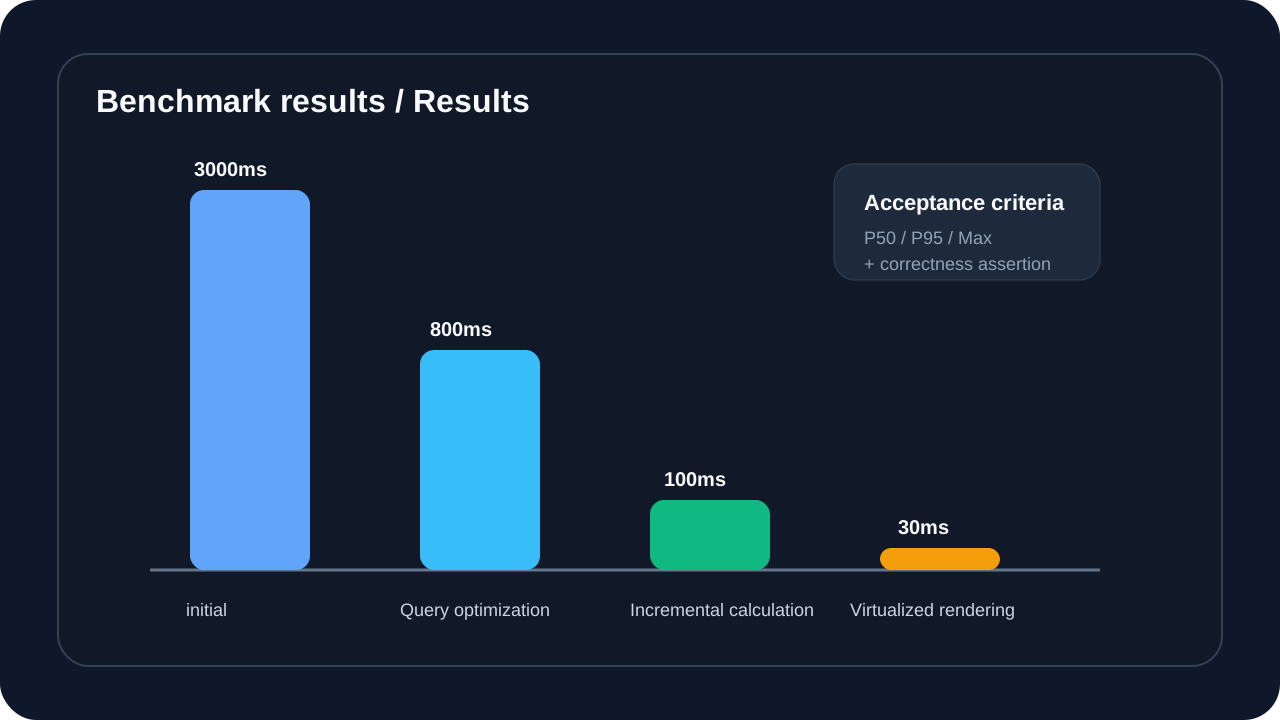
| Optimization items | Scene caliber | Before optimization | After optimization | How should readers interpret |
|---|---|---|---|---|
| K line loading | 10,000 K-line loading links | 3000 ms | 30 ms | End-to-end results after delay budget splitting |
| Indicator calculation | Stateful update of a single piece of newly added data, not a full recalculation | 2500 ms full recalculation | 5 ms single update | Workload changes, cannot be calculated based on the same task 500x |
| data normalization | layered timestamp normalization | 2500 ms | 15 ms | Algorithm complexity is reduced from repeated scanning to linear/near linear |
| Database query | layered query trigger times | 541 times/minute (original record: 541 times/minute) | 1-4 times/minute (original record: 1-4 times/minute) | Query count dropped by about 99.3%-99.8%, cache invalidation still needs to be verified |
| Worker side rolling calculation | CPU intensive rolling tasks steady-state | 234 s | 45 s | Only represents this computing task, not all Worker tasks |
| Chart rendering | 6-month layered desktop chart | 90 s | 10-20 s | Dependent on window size, hardware and rendering implementation |
| Memory usage | Same chart loading scenario | 2 GB | 500 MB | Need to observe peaks, releases and cache caps simultaneously |
Next article preview
“Record of Quantitative Trading System Development (6): Architecture Evolution and Reconstruction Decisions”
The next article will go into architecture evolution and refactoring decisions: when to refactor, how to evaluate the benefits of refactoring, and how to incorporate performance, testing, and technical debt into long-term governance.
Reference resources
- Python Profiling documentation: https://docs.python.org/3/library/profile.html
- Numba documentation: https://numba.readthedocs.io/
- Cython documentation: https://cython.readthedocs.io/
- High Performance Python (book)
- Python’s GIL and multi-process programming practice
Series context
You are reading: Quantitative trading system development record
This is article 5 of 7. Reading progress is stored only in this browser so the full series page can resume from the right entry.
Series Path
Current series chapters
Chapter clicks store reading progress only in this browser so the series page can resume from the right entry.
- Quantitative trading system development record (1): five key decisions in project startup and architecture design Taking Micang Trader as an example, this article starts from system boundaries, data flow, trading-session ownership, unified backtesting/live-trading interfaces, and AI collaboration boundaries to establish the architecture thread for the quantitative trading system series.
- Quantitative trading system development record (2): Python Pitfalls practical pitfall avoidance guide (1) Reorganize Python traps from a long list into an engineering risk reference for quantitative trading systems: how to amplify the three types of risks, syntax and scope, type and state, concurrency and state, into real trading system problems.
- Record of Quantitative Trading System Development (Part 3): Python Pitfalls Practical Pitfalls Avoidance Guide (Part 2) Continuing to reorganize Python risks into a reference piece: how GUI lifecycles, asynchronous network failures, security boundaries, and deployment infrastructure affect the long-term stability of quantitative trading systems.
- Quantitative trading system development record (4): test-driven agile development (AI Agent assistance) Starting from a cross-night trading day boundary bug, we reconstruct the test defense line of the quantitative trading system: defect-oriented testing pyramid, AI TDD division of labor, boundary time, data lineage and CI Gate.
- Quantitative trading system development record (5): Python performance tuning practice Transform performance optimization from empirical guesswork into a verifiable investigation process: start from the 3-second chart delay, locate the real bottleneck, compare optimization solutions, and establish benchmarks and rollback strategies.
- Record of Quantitative Trading System Development (6): Architecture Evolution and Reconstruction Decisions Review the five refactorings of Micang Trader, explaining how the system evolved from the initial snapshot to a clearer target architecture, and incorporated technical debt and ADR decisions into long-term governance.
- Quantitative trading system development record (7): AI engineering implementation - from speckit to BMAD Taking the trading calendar and daily aggregation requirements as a single case, explain how AI engineering can enter the delivery of real quantitative systems through specification drive, BMAD role handover and manual quality gate control.
Reading path
Continue along this topic path
Follow the recommended order for Quantitative system development practice instead of jumping through random articles in the same topic.
Next step
Go deeper into this topic
If this article is useful, continue from the topic page or subscribe to follow later updates.
Loading comments...
Comments and discussion
Sign in with GitHub to join the discussion. Comments are synced to GitHub Discussions