Article
Record of Quantitative Trading System Development (Part 3): Python Pitfalls Practical Pitfalls Avoidance Guide (Part 2)
Continuing to reorganize Python risks into a reference piece: how GUI lifecycles, asynchronous network failures, security boundaries, and deployment infrastructure affect the long-term stability of quantitative trading systems.
Readers can regard this article as the next article in the Python engineering risk reference article: GUI, runtime, network, security boundary and deployment issues will enter the transaction link from the infrastructure layer, and must be positioned according to risk groups first, and then return to the specific Trap. Trap 51-100 will not change the strategy formula itself, but will determine whether the trading terminal can run for a long time, whether abnormalities can be diagnosed, and whether faults can be recovered.
Series reading order
Part1 -> Part2 -> Part3 -> Part4 -> Part5 -> Part6 -> Part7. Part3 then enters Part4 because real defects must first be converted into test defense lines instead of directly entering performance optimization or refactoring.
Reading method: First locate risks according to the infrastructure layer
Part2 is closer to the Python language layer and application logic layer, and Part3 is closer to the system running environment. Circular imports, shared memory, database connections, asynchronous cancellation, WebSocket reconnection, file descriptor leaks, plug-in loading and configuration parsing may all appear as “minor problems” in the development environment, but in the real transaction terminal they will affect startup, subscription, running, downgrade, recovery and shutdown.
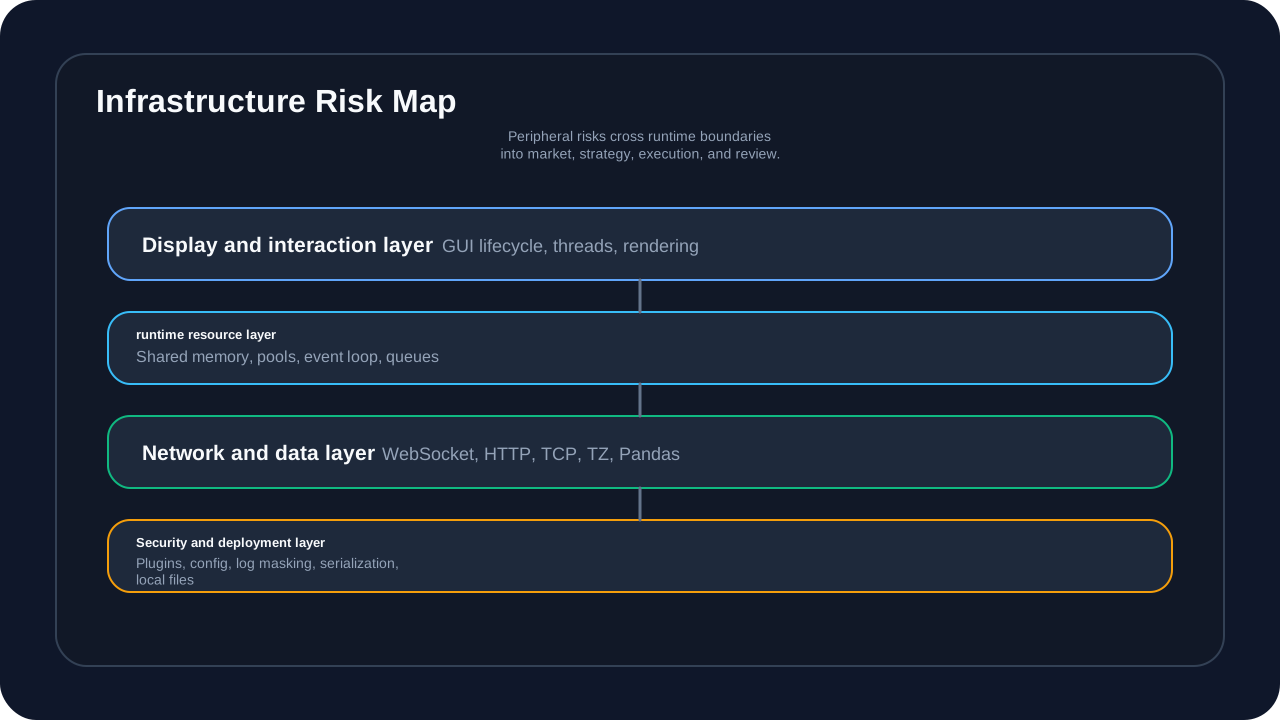
This picture answers the question “Why are peripheral issues not peripheral trivial matters?” GUI threads, network connections, security credentials, configuration files, and local resources do not directly generate trading signals, but they will determine whether the system can continue to receive market data, whether it can display status correctly, whether it can recover after an exception, and whether the log is sufficient to support review.
Readers are not required to memorize Trap 51-100 in one sitting. A more effective way to read it is to first determine which level the fault belongs to: runtime resources, time series data, GUI life cycle, asynchronous network, or security boundary. After locating the level, go back to the specific Trap to see the triggering scenarios, Python principles, repair methods, and anti-regression suggestions.
Risk Group 1: Runtime, storage and resource life cycle risks (Trap 51-60)
This set of Traps covers circular imports, singleton thread safety, shared memory, LMDB, PyArrow, DuckDB, ZeroMQ, shared memory races, and asyncio task handling. They jointly answer one question: Who creates system resources, who closes them, and who is responsible for recovering them when exceptions occur.
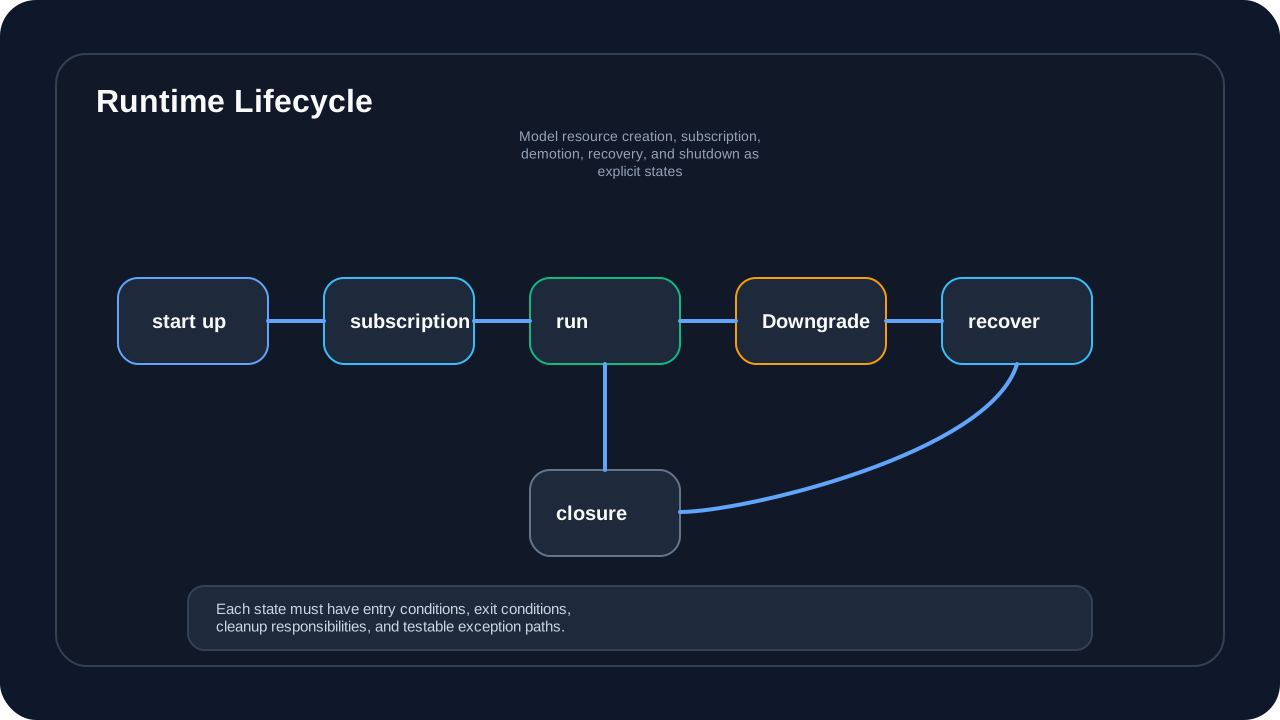
This diagram answers the question “How runtime failures should be modeled explicitly”. Start, subscribe, run, downgrade, resume, and shut down are not log strings, but system states. When the status is unclear, shared memory leaks, connection pool reuse, asynchronous task cancellation, and context closing will become sporadic problems; when the status is clear, readers can map each Trap to entry conditions, exit conditions, and cleanup responsibilities.
Trap 51: Circular Import
Real case: In the early version of micang-trader, the chart module and the datafeed module imported each other.
# illustrative code, not production code
# vnpy/chart/widget.py
from vnpy.datafeed.indicator_worker_pool import IndicatorWorkerPool

# vnpy/datafeed/indicator_worker_pool.py
from vnpy.chart.widget import ChartWidget  # circular import
Principle analysis:
Python executes module code when imported. Circular imports can cause modules to be used before initialization is completed, causing AttributeError or partial imports. Python will add the module being imported to sys.modules, but the module content may be incomplete at this time.
AI guidance suggestions:
Prompt: "When generating code for Trap 51: Circular Import, keep the safe pattern in this section, make the failure mode explicit, and add a regression check for the edge case."Solution:
# illustrative code, not production code
# safe approach
from typing import TYPE_CHECKING

if TYPE_CHECKING:
    from vnpy.chart.widget import ChartWidget

class IndicatorWorkerPool:
    def __init__(self):
        from vnpy.chart.widget import ChartWidget  # local import
        self.chart = ChartWidget()
Trap 52: Thread safety of singleton pattern
# illustrative code, not production code
# unsafe code
class EventEngine:
    _instance = None

    def __new__(cls):
        if cls._instance is None:
            cls._instance = super().__new__(cls)
        return cls._instance

# multiple instances may be created under multithreading
Principle analysis:
Simple singleton implementation is not safe under multi-threading. Two threads may check _instance is None at the same time and both create instances. This is a typical race condition for the Check-Then-Act pattern.
AI guidance suggestions:
Prompt: "When generating code for Trap 52: Thread safety of singleton pattern, keep the safe pattern in this section, make the failure mode explicit, and add a regression check for the edge case."Solution:
# illustrative code, not production code
# safe approach: thread
import threading

class EventEngine:
    _instance = None
    _lock = threading.Lock()

    def __new__(cls):
        if cls._instance is None:
            with cls._lock:
                if cls._instance is None:  # double check
                    cls._instance = super().__new__(cls)
        return cls._instance
Trap 53: Shared memory life cycle management
Real case: When using multiprocessing.shared_memory in micang-trader, the main process unexpectedly exited, causing the shared memory block to leak.
# illustrative code, not production code
# unsafe code
shm = shared_memory.SharedMemory(create=True, size=1024)
# process crashes, shmis not unlinked; shared memory leaks
Principle analysis:
The shared memory created by Python’s multiprocessing.shared_memory is a system-level resource and is not automatically cleaned when the process exits. If the creator does not call unlink(), the shared memory block will always exist in the system (until reboot).
AI guidance suggestions:
Prompt: "When generating code for Trap 53: Shared memory life cycle management, keep the safe pattern in this section, make the failure mode explicit, and add a regression check for the edge case."Solution:
# illustrative code, not production code
# safe approach
import atexit

class SharedMemoryManager:
    def __init__(self):
        self._shms = []
        atexit.register(self.cleanup)

    def create(self, size):
        shm = shared_memory.SharedMemory(create=True, size=size)
        self._shms.append(shm)
        return shm

    def cleanup(self):
        for shm in self._shms:
            try:
                shm.close()
                shm.unlink()
            except Exception:
                pass
Trap 54: LMDB map_size improperly set
Real case: micang-trader’s LMDB storage caused an MDB_MAP_FULL error due to improper map_size setting.
# illustrative code, not production code
# unsafe code
env = lmdb.open(path, map_size=1024*1024*1024)  # 1GB, may be insufficient
# after storing large indicator data: MDB_MAP_FULL
Principle analysis: LMDB uses memory mapped files, map_size is fixed at creation time and cannot be increased later (unless recreated). If the amount of data exceeds map_size, an MDB_MAP_FULL error will be thrown.
AI guidance suggestions:
Prompt: "When generating code for Trap 54: LMDB mapsize improperly set, keep the safe pattern in this section, make the failure mode explicit, and add a regression check for the edge case."Solution:
# illustrative code, not production code
# safe approach
import lmdb

# set a sufficiently large map_size
map_size = 100 * 1024 * 1024 * 1024  # 100GB

env = lmdb.open(
    path,
    map_size=map_size,
    max_readers=126,
)
Trap 55: PyArrow memory mapping trap
Real case: When micang-trader uses PyArrow shared memory, BufferReader is not released correctly after reading.
# illustrative code, not production code
# unsafe code
reader = ipc.open_stream(pa.BufferReader(buf))
batch = reader.read_next_batch()
# reader and batch hold references to the underlying buffer
Principle analysis: PyArrow’s BufferReader and the result of the read (RecordBatch) may hold references to the underlying memory. If it is not released in time, the memory will not be recycled.
AI guidance suggestions:
Prompt: "When generating code for Trap 55: PyArrow memory mapping trap, keep the safe pattern in this section, make the failure mode explicit, and add a regression check for the edge case."Solution:
# illustrative code, not production code
# safe approach
with ipc.open_stream(pa.BufferReader(buf)) as reader:
    batch = reader.read_next_batch()
    data = batch.column(0).to_pylist()
# reader closes automatically when the context exits
Trap 56: DuckDB connection pool management
Real case: micang-trader’s DuckDBManager improperly manages connections in high concurrency scenarios.
# illustrative code, not production code
# unsafe code
class DuckDBManager:
    def __init__(self):
        self._conn = duckdb.connect(db_path)  # one connection per instance

    def query(self, sql):
        return self._conn.execute(sql).fetchall()

# sharing one connection across threads raises errors
Principle analysis: DuckDB connections are not thread-safe and cannot be shared between multiple threads. Each thread should have its own connection, or use a connection pool.
AI guidance suggestions:
Prompt: "When generating code for Trap 56: DuckDB connection pool management, keep the safe pattern in this section, make the failure mode explicit, and add a regression check for the edge case."Solution:
# illustrative code, not production code
# safe approach
import threading

class DuckDBManager:
    def __init__(self, db_path):
        self._db_path = db_path
        self._local = threading.local()

    def _get_conn(self):
        if not hasattr(self._local, 'conn'):
            self._local.conn = duckdb.connect(self._db_path)
        return self._local.conn

    def query(self, sql):
        return self._get_conn().execute(sql).fetchall()
Trap 57: ZeroMQ context sharing
Real Case: micang-trader’s RPC client incorrectly shared the ZMQ context.
# illustrative code, not production code
# unsafe code
context = zmq.Context()  # shared globally

def worker():
    socket = context.socket(zmq.REQ)  # multiple threads share one context
    # ZeroMQ context is not fully thread-safe
Principle analysis: ZMQ’s Context can be shared among multiple threads, but Socket cannot. In addition, Context’s term() must be called after all Sockets are closed. Wrong sharing mode can lead to deadlock or message loss.
AI guidance suggestions:
Prompt: "When generating code for Trap 57: ZeroMQ context sharing, keep the safe pattern in this section, make the failure mode explicit, and add a regression check for the edge case."Solution:
# illustrative code, not production code
# safe approach
import zmq

context = zmq.Context()

def worker():
    socket = context.socket(zmq.REQ)  # threadcreatesocket
    try:
        socket.connect("tcp://localhost:5555")
        socket.send(b"Hello")
    finally:
        socket.close()  # ensureclose
Trap 58: Shared memory race condition
Real Case: micang-trader’s SharedMemoryStore is not synchronized correctly when reading and writing.
# illustrative code, not production code
# unsafe code
# processAwrites
shm.buf[:4] = struct.pack('I', value)

# processBreads
value = struct.unpack('I', shm.buf[:4])[0]  # partwritesdata
Principle analysis:
multiprocessing.shared_memory provides raw memory access, but does not provide a synchronization mechanism. Multiple processes reading and writing the same location at the same time will cause data contention. Additional synchronization primitives (such as Lock, Semaphore) need to be used.
AI guidance suggestions:
Prompt: "When generating code for Trap 58: Shared memory race condition, keep the safe pattern in this section, make the failure mode explicit, and add a regression check for the edge case."Solution:
# illustrative code, not production code
# safe approach
from multiprocessing import Lock

lock = Lock()

# writes
with lock:
    shm.buf[:4] = struct.pack('I', value)

# reads
with lock:
    value = struct.unpack('I', shm.buf[:4])[0]
Trap 59: asyncio task canceled
# illustrative code, not production code
# unsafe code
async def task():
    try:
        await asyncio.sleep(10)
    except asyncio.CancelledError:
        pass  # error
    await cleanup()  # statusExecutecleanup
Principle analysis:
After asyncio.CancelledError (Python 3.8+ inherits from BaseException) is caught, the task remains in a canceled state. Continuing to perform other operations may result in unexpected behavior. The correct thing to do is to rethrow or handle cleanup properly.
AI guidance suggestions:
Prompt: "When generating code for Trap 59: asyncio task canceled, keep the safe pattern in this section, make the failure mode explicit, and add a regression check for the edge case."Solution:
# illustrative code, not production code
# safe approach
async def task():
    try:
        await asyncio.sleep(10)
    finally:
        await cleanup()  # ensurecleanupExecute
Trap 60: asyncio gather exception handling
# illustrative code, not production code
# unsafe code
results = await asyncio.gather(
    task1(),
    task2(),
    task3()
)
# iftask2failure, task1 and task3,  result
Principle analysis:
The default behavior of asyncio.gather is to return the first exception immediately and cancel other outstanding tasks. This means that some tasks may have been completed, but you will not be able to obtain their results.
AI guidance suggestions:
Prompt: "When generating code for Trap 60: asyncio gather exception handling, keep the safe pattern in this section, make the failure mode explicit, and add a regression check for the edge case."Solution:
# illustrative code, not production code
# safe approach
results = await asyncio.gather(
    task1(),
    task2(),
    task3(),
    return_exceptions=True  # error, resultreturn
)

for result in results:
    if isinstance(result, Exception):
        logger.error(f"Task failed: {result}")
    else:
        process(result)
Risk Group 2: Time Series and Numerical Data Risks (Trap 61-70)
This set of traps covers daylight saving time, time zone aware/naive, floating point comparisons, Pandas boolean indexing, apply return types, NumPy broadcasts, multikey merges, groupby aggregations, shift/rolling bounds, and random seeds. Readers can think of them as data semantic risks: the code may not crash, but it can quietly drift historical data, indicator windows, or backtest results.
Trap 61: Daylight Savings Time Trap for Time Zone Conversion
Real case: When micang-trader processes historical data, it converts UTC time to US Eastern Time and encounters duplicate or missing hours on the daylight saving time conversion day.
# illustrative code, not production code
# unsafe code
import pytz
from datetime import datetime

ny_tz = pytz.timezone('America/New_York')
utc_time = datetime(2023, 3, 12, 2, 30)  # daylight-saving transition day
ny_time = utc_time.replace(tzinfo=pytz.UTC).astimezone(ny_tz)
# actual()
Principle analysis:
When daylight saving time (DST) switches, clocks are adjusted forward or backward one hour. Using the replace() method to add time zone information and then convert may result in non-existent time points (when switching in spring) or duplicate time points (when switching in autumn). pytz’s localize() method handles these cases correctly.
AI guidance suggestions:
Prompt: "When generating code for Trap 61: Daylight Savings Time Trap for Time Zone Conversion, keep the safe pattern in this section, make the failure mode explicit, and add a regression check for the edge case."Solution:
# illustrative code, not production code
# safe approach
import pytz
from datetime import datetime

ny_tz = pytz.timezone('America/New_York')
utc_time = datetime(2023, 3, 12, 2, 30)

# : localize
ny_time = ny_tz.localize(utc_time.replace(tzinfo=None))
utc_time_correct = ny_time.astimezone(pytz.UTC)

# : useUTC,
def to_display_time(utc_dt, tz_name='America/New_York'):
    tz = pytz.timezone(tz_name)
    return utc_dt.astimezone(tz)
Trap 62: Pandas time zone awareness mixed with naive
Real case: When micang-trader’s BarData is merged, the time zone-aware datetime index cannot be aligned with the time zone-naive DataFrame.
# illustrative code, not production code
# unsafe code
import pandas as pd

# datareturnUTC-aware
df_aware = pd.DataFrame({'price': [100, 101]},
                        index=pd.to_datetime(['2024-01-01 10:00:00+00:00',
                                              '2024-01-01 10:01:00+00:00']))
# generatenaive
df_naive = pd.DataFrame({'volume': [1000, 2000]},
                        index=pd.to_datetime(['2024-01-01 10:00:00',
                                              '2024-01-01 10:01:00']))

# cannot merge correctly
merged = df_aware.join(df_naive)  # result!
Principle analysis: Pandas timezone-aware indexes and naive datetime indexes cannot be compared or aligned directly. An aware index carries timezone information, while a naive index does not, so Pandas treats them as different data types. Merge operations require uniform timezone handling.
AI guidance suggestions:
Prompt: "When generating code for Trap 62: Pandas time zone awareness mixed with naive, keep the safe pattern in this section, make the failure mode explicit, and add a regression check for the edge case."Solution:
# illustrative code, not production code
# safe approach
# 1: unifyaware(UTC)
df_naive_utc = df_naive.tz_localize('UTC')
merged = df_aware.join(df_naive_utc)

# 2: unifynaive(recommended, )
df_aware_naive = df_aware.tz_convert('UTC').tz_localize(None)
merged = df_aware_naive.join(df_naive)

# Option 3: normalize timezone handling in the database layer
Trap 63: NumPy floating point number comparison accuracy problem
Real case: In the conditional judgment of micang-trader, the calculated floating point number failed to compare with the expected value.
# illustrative code, not production code
# unsafe code
import numpy as np

price = 0.1 + 0.2  # 0.30000000000000004
if price == 0.3:  # False!
    execute_order()
Principle analysis:
Under the IEEE 754 floating-point number standard, many decimal fractions cannot be represented accurately. 0.1 + 0.2 is actually equal to 0.30000000000000004, not exactly 0.3. Using == directly to compare floating point numbers can lead to unexpected logic errors.
AI guidance suggestions:
Prompt: "When generating code for Trap 63: NumPy floating point number comparison accuracy problem, keep the safe pattern in this section, make the failure mode explicit, and add a regression check for the edge case."Solution:
# illustrative code, not production code
# safe approach
import math
import numpy as np

# 1: usemath.isclose()
if math.isclose(price, 0.3, rel_tol=1e-9):
    execute_order()

# 2: usenumpy.isclose()
if np.isclose(price, 0.3):
    execute_order()

# 3: useDecimal
from decimal import Decimal
price = Decimal('0.1') + Decimal('0.2')  # 0.3
Trap 64: Pandas DataFrame boolean index chaining operation
Real case: In the data filtering of micang-trader, the original data was not updated after the view returned by the Boolean index was modified.
# illustrative code, not production code
# unsafe code
import pandas as pd

df = pd.DataFrame({'symbol': ['AAPL', 'GOOGL', 'AAPL'],
                   'price': [100, 200, 101]})
# modifyAAPL
df[df.symbol == 'AAPL']['price'] = 150  # SettingWithCopyWarning!
# dfactualmodify
Principle analysis:
Chained index df[mask][col] will first return a temporary DataFrame slice and then index its columns. This slice may be a view or a copy, Pandas cannot determine, so a warning is issued. Assignments to the copy are not reflected on the original DataFrame.
AI guidance suggestions:
Prompt: "When generating code for Trap 64: Pandas DataFrame boolean index chaining operation, keep the safe pattern in this section, make the failure mode explicit, and add a regression check for the edge case."Solution:
# illustrative code, not production code
# safe approach
# 1: use.loc
mask = df.symbol == 'AAPL'
df.loc[mask, 'price'] = 150

# Method 2: use assign to create a new DataFrame
df = df.assign(price=lambda x: np.where(x.symbol == 'AAPL', 150, x.price))

# 3: useupdate
update_df = pd.DataFrame({'price': [150, 150]}, index=[0, 2])
df.update(update_df)
Trap 65: Pandas apply return type is inconsistent
Real case: When micang-trader uses apply to process data, the return value type changes with the data, causing subsequent processing errors.
# illustrative code, not production code
# unsafe code
import pandas as pd

def calculate(row):
    if row['type'] == 'stock':
        return row['price'] * row['quantity']
    else:
        return None  # float, None

df['total'] = df.apply(calculate, axis=1)
# if all values are optional, the result may become object instead of float
Principle analysis: The return type of pandas apply is determined by the function return value. If the return value mixes different types (such as float and None), Pandas will store it as an object type instead of a numeric type, causing subsequent numeric operations to fail or degrade performance.
AI guidance suggestions:
Prompt: "When generating code for Trap 65: Pandas apply return type is inconsistent, keep the safe pattern in this section, make the failure mode explicit, and add a regression check for the edge case."Solution:
# illustrative code, not production code
# safe approach
import numpy as np

# 1: usenp.nancompatibility
def calculate(row):
    if row['type'] == 'stock':
        return row['price'] * row['quantity']
    return np.nan  # usenanNone

df['total'] = df.apply(calculate, axis=1)

# 2: use()
df['total'] = np.where(df['type'] == 'stock',
                       df['price'] * df['quantity'],
                       np.nan)

# Method 3: use astype to enforce the type
df['total'] = df.apply(calculate, axis=1).astype('float64')
Trap 66: NumPy array broadcast dimensions mismatch
Real case: When micang-trader vectorizes calculations, the broadcast of one-dimensional array and two-dimensional array fails.
# illustrative code, not production code
# unsafe code
import numpy as np

prices = np.array([[100, 101], [102, 103]])  # shape (2, 2)
weights = np.array([0.5, 0.5])  # shape (2,)

# try to calculate weighted price
result = prices * weights  # ValueError!
Principle analysis: NumPy broadcasting rules require that the dimensions are compared from back to front and either are equal or one of them is 1. In the above example, the shape of prices is (2,2), and the weights are (2,). When broadcasting, the last dimension (2 vs 2) matches, but the first dimension (2 vs empty) does not match. The weights need to be reshaped to (2,1).
AI guidance suggestions:
Prompt: "When generating code for Trap 66: NumPy array broadcast dimensions mismatch, keep the safe pattern in this section, make the failure mode explicit, and add a regression check for the edge case."Solution:
# illustrative code, not production code
# safe approach
# 1: reshape
weights_col = weights.reshape(-1, 1)  # shape (2, 1)
result = prices * weights_col  # broadcast succeeds

# 2: usenewaxis
result = prices * weights[:, np.newaxis]

# 3: useexpand_dims
result = prices * np.expand_dims(weights, axis=1)

# 4: useexplicit
weights_row = weights.reshape(1, -1)  # shape (1, 2)
result = prices * weights_row  # broadcast by row
Trap 67: Pandas merge on multiple duplicate key-value pairs
Real case: When micang-trader merges order data and transaction data, multiple key values are used but there are repeated combinations, resulting in Cartesian product.
# illustrative code, not production code
# unsafe code
orders = pd.DataFrame({
    'symbol': ['AAPL', 'AAPL', 'GOOGL'],
    'order_id': [1, 1, 2],  # symbol+order_id
    'price': [100, 100, 200]
})

fills = pd.DataFrame({
    'symbol': ['AAPL', 'AAPL', 'GOOGL'],
    'order_id': [1, 1, 2],
    'fill_qty': [10, 20, 30]
})

# merge creates a Cartesian product
merged = orders.merge(fills, on=['symbol', 'order_id'])
# AAPL order_id=1 4(2x2)2!
Principle analysis: When the on key values of merge are duplicated in both DataFrames, a Cartesian product (m*n rows) will be generated. This is generally not desired behavior and can lead to seriously erroneous data analysis results.
AI guidance suggestions:
Prompt: "When generating code for Trap 67: Pandas merge on multiple duplicate key-value pairs, keep the safe pattern in this section, make the failure mode explicit, and add a regression check for the edge case."Solution:
# illustrative code, not production code
# safe approach
# 1: verify
try:
    merged = orders.merge(fills, on=['symbol', 'order_id'],
                          validate='one_to_many')
except Exception as e:
    print("unique!")

# 2:
orders_unique = orders.drop_duplicates(subset=['symbol', 'order_id'])
merged = orders_unique.merge(fills, on=['symbol', 'order_id'])

# 3: useindex(ifsettings)
orders_idx = orders.set_index(['symbol', 'order_id'])
fills_idx = fills.set_index(['symbol', 'order_id'])
merged = orders_idx.join(fills_idx, how='inner')
Trap 68: Pandas groupby and agg perform different operations on multiple columns
Real case: When micang-trader aggregates K-line data, an error occurs when applying different aggregation functions to different columns.
# illustrative code, not production code
# unsafe code
import pandas as pd

bars = pd.DataFrame({
    'symbol': ['AAPL', 'AAPL', 'GOOGL'],
    'open': [100, 101, 200],
    'high': [105, 106, 205],
    'low': [99, 100, 199],
    'close': [104, 105, 204],
    'volume': [1000, 2000, 3000]
})

# aggregation
agg_dict = {
    'open': 'first',
    'high': 'max',
    'low': 'min',
    'close': 'last',
    'volume': 'sum'
}
result = bars.groupby('symbol').agg(agg_dict)  # type
Principle analysis: The agg method can accept dictionary-specified columns and aggregate functions, but you need to pay attention to the consistency of the data type returned. In some cases, a single-column aggregation may return a scalar instead of a Series, resulting in an inconsistent result structure.
AI guidance suggestions:
Prompt: "When generating code for Trap 68: Pandas groupby and agg perform different operations on multiple columns, keep the safe pattern in this section, make the failure mode explicit, and add a regression check for the edge case."Solution:
# illustrative code, not production code
# safe approach
# 1: agg()
agg_dict = {
    'open': 'first',
    'high': 'max',
    'low': 'min',
    'close': 'last',
    'volume': 'sum'
}
result = bars.groupby('symbol').agg(agg_dict)

# 2: useaggregation()
result = bars.groupby('symbol').agg(
    open_price=('open', 'first'),
    high_price=('high', 'max'),
    low_price=('low', 'min'),
    close_price=('close', 'last'),
    total_volume=('volume', 'sum')
)

# 3: function
def ohlcv_agg(group):
    return pd.Series({
        'open': group['open'].iloc[0],
        'high': group['high'].max(),
        'low': group['low'].min(),
        'close': group['close'].iloc[-1],
        'volume': group['volume'].sum()
    })

result = bars.groupby('symbol').apply(ohlcv_agg)
Trap 69: Pandas shift and rolling window boundary issues
Real case: When micang-trader calculates the moving average, NaN is generated at the window boundary, causing subsequent calculation errors.
# illustrative code, not production code
# unsafe code
import pandas as pd

prices = pd.Series([100, 101, 102, 103, 104])
ma = prices.rolling(window=3).mean()  # [NaN, NaN, 101, 102, 103]

# directuse
returns = prices / ma - 1  # NaN,
Principle analysis: Rolling and shift operations produce NaN values at boundaries. The rolling window returns NaN when there is insufficient data, and the boundary also becomes NaN after the shift operation moves the data. If these NaN are not processed, subsequent calculations and model training will be affected.
AI guidance suggestions:
Prompt: "When generating code for Trap 69: Pandas shift and rolling window boundary issues, keep the safe pattern in this section, make the failure mode explicit, and add a regression check for the edge case."Solution:
# illustrative code, not production code
# safe approach
# 1: settingsmin_periods
ma = prices.rolling(window=3, min_periods=1).mean()  # at least1data

# 2: usecenter
ma_centered = prices.rolling(window=3, center=True).mean()

# 3: NaN
ma_filled = prices.rolling(window=3).mean().fillna(method='bfill')  # backward fill

# 4: useexpanding()
expanding_mean = prices.expanding(min_periods=1).mean()
Trap 70: NumPy random does not set the seed, resulting in irreproducible results
Real case: The backtest of micang-trader uses random data generation, and the results are different each time it is run.
# illustrative code, not production code
# unsafe code
import numpy as np

# generate
random_prices = np.random.randn(100) * 10 + 100
# result, result
Principle analysis: If NumPy’s random number generator does not set a seed, it will use the system time or other entropy source as the initial state, resulting in a different random sequence for each run. This can cause serious problems when backtesting and debugging.
AI guidance suggestions:
Prompt: "When generating code for Trap 70: NumPy random does not set the seed, resulting in irreproducible results, keep the safe pattern in this section, make the failure mode explicit, and add a regression check for the edge case."Solution:
# illustrative code, not production code
# safe approach
# 1: settings(recommendedcode)
np.random.seed(42)
random_prices = np.random.randn(100) * 10 + 100

# 2: useGenerator API(recommended)
rng = np.random.default_rng(seed=42)
random_prices = rng.normal(loc=100, scale=10, size=100)

# 3: function
def generate_random_prices(n, seed=None):
    rng = np.random.default_rng(seed=seed)
    return rng.normal(loc=100, scale=10, size=n)

# 4: contextmanage()
from contextlib import contextmanager

@contextmanager
def temp_seed(seed):
    state = np.random.get_state()
    np.random.seed(seed)
    try:
        yield
    finally:
        np.random.set_state(state)
Risk group three: Qt/GUI life cycle risk (Trap 71-80)
GUI risks can’t just be treated as interface code problems. QObject thread affinity, signal slot connection type, QPainter usage location, QTimer thread, parent-child relationship, QThread model, circular reference, recursive event loop, custom properties and QApplication singleton will all affect whether the trading terminal can stably display market prices, indicators and alarm status.
Trap 71: QObject thread affinity (Thread Affinity)
Real case: In the GUI module of micang-trader, directly operating the QWidget created by the main thread from the worker thread caused a crash.
# illustrative code, not production code
# unsafe code
from PySide6.QtWidgets import QWidget, QApplication
from PySide6.QtCore import QThread

class WorkerThread(QThread):
    def __init__(self, widget):
        super().__init__()
        self.widget = widget  # threadcreatewidget

    def run(self):
        # directly operate on the widget from a worker thread
        self.widget.setText("Update")  # crashGUIcreatethread
Principle analysis: Qt’s QObject has Thread Affinity, that is, each QObject belongs to the thread that created it. GUI elements can only be operated on the main thread (GUI thread). Direct access from other threads results in undefined behavior, usually manifesting as a crash or deadlock.
AI guidance suggestions:
Prompt: "When generating code for Trap 71: QObject thread affinity (Thread Affinity), keep the safe pattern in this section, make the failure mode explicit, and add a regression check for the edge case."Solution:
# illustrative code, not production code
# safe approach: use/
from PySide6.QtCore import Signal, QObject

class Worker(QObject):
    # define signals
    update_text = Signal(str)

    def do_work(self):
        # threadExecute
        result = self.calculate()
        # threadUpdateUI
        self.update_text.emit(result)

class MainWindow(QWidget):
    def __init__(self):
        super().__init__()
        self.worker = Worker()
        self.worker.moveToThread(self.worker_thread)
        # UIUpdate
        self.worker.update_text.connect(self.on_update_text)

    def on_update_text(self, text):
        # threadUpdateUI
        self.label.setText(text)
Trap 72: Signal slot connection type mismatch
Real case: In micang-trader, the cross-thread signal uses a direct connection (DirectConnection), causing GUI updates to be executed on the working thread.
# illustrative code, not production code
# unsafe code
class Worker(QObject):
    finished = Signal()

    def run(self):
        self.process_data()
        # , useDirectConnection
        self.finished.emit()  # threadExecutefunction

# DirectConnection
worker.finished.connect(self.on_finished, type=Qt.DirectConnection)
Principle analysis: Qt signal slots have 5 connection types:
- AutoConnection: Automatic selection (Direct for the same thread, Queued for cross-threads)
- DirectConnection: Directly call the slot function (same thread)
- QueuedConnection: Put the slot function into the event queue of the receiving thread
- BlockingQueuedConnection: Blocking and waiting for the slot function to complete execution
- UniqueConnection: Ensure unique connection
QueuedConnection must be used when crossing threads, otherwise GUI operations will be executed on the wrong thread.
AI guidance suggestions:
Prompt: "When generating code for Trap 72: Signal slot connection type mismatch, keep the safe pattern in this section, make the failure mode explicit, and add a regression check for the edge case."Solution:
# illustrative code, not production code
# safe approach: threaduseQueuedConnection
worker.finished.connect(self.on_finished, type=Qt.QueuedConnection)

# Qt(recommended)
worker.finished.connect(self.on_finished)  # AutoConnection

# ifneedwaitresult, useBlockingQueuedConnection(, lock)
worker.result_ready.connect(self.process_result, type=Qt.BlockingQueuedConnection)
Trap 73: QPainter not used in paintEvent
Real case: In the K-line chart component of micang-trader, a QPainter drawing is created directly in the button click event.
# illustrative code, not production code
# unsafe code
class ChartWidget(QWidget):
    def on_refresh_clicked(self):
        # : paintEventcreateQPainter
        painter = QPainter(self)
        painter.drawLine(0, 0, 100, 100)
        # rendering may fail because the widget is not ready to draw
Principle analysis: QPainter can only be used in the paintEvent or paint() method. Using QPainter outside of these methods may result in:
- Drawing content is not displayed
- Rendering exception or crash
- Conflict with Qt’s rendering pipeline Qt’s rendering requires specific context settings, and these contexts are already prepared when paintEvent is called by the framework.
AI guidance suggestions:
Prompt: "When generating code for Trap 73: QPainter not used in paintEvent, keep the safe pattern in this section, make the failure mode explicit, and add a regression check for the edge case."Solution:
# illustrative code, not production code
# safe approach: paintEvent
class ChartWidget(QWidget):
    def __init__(self):
        super().__init__()
        self.data_points = []

    def update_data(self, points):
        self.data_points = points
        self.update()  # request, QtpaintEvent

    def paintEvent(self, event):
        # location
        painter = QPainter(self)
        painter.setRenderHint(QPainter.Antialiasing)

        # logic
        for point in self.data_points:
            painter.drawPoint(point)

    # useQGraphicsView/QGraphicsScene(recommendedchart)
Trap 74: QTimer created across threads
Real case: QTimer was created in the indicator calculation thread of micang-trader, causing the timer to fail to trigger.
# illustrative code, not production code
# unsafe code
class Worker(QObject):
    def start(self):
        # threadcreateQTimer
        self.timer = QTimer()
        self.timer.timeout.connect(self.on_timeout)
        self.timer.start(1000)  # timer will not fire!

    def on_timeout(self):
        print("timeout")
Principle analysis: QTimer relies on the event loop (Event Loop) to run. Worker threads usually don’t have event loops, so QTimer cannot fire. QTimer can only be used in a thread with an event loop (usually the main thread).
AI guidance suggestions:
Prompt: "When generating code for Trap 74: QTimer created across threads, keep the safe pattern in this section, make the failure mode explicit, and add a regression check for the edge case."Solution:
# illustrative code, not production code
# safe approach1: threadcreate
class MainWindow(QWidget):
    def __init__(self):
        super().__init__()
        self.timer = QTimer(self)
        self.timer.timeout.connect(self.update_data)
        self.timer.start(1000)

    def update_data(self):
        # thread
        self.worker.do_work()

# safe approach2: threadusesleep
class Worker(QThread):
    def run(self):
        while self.running:
            self.process_data()
            self.msleep(1000)  # threadsleep

# safe approach3: use
class Worker(QObject):
    schedule_timer = Signal()

    def setup_timer(self):
        # threadsettings
        self.schedule_timer.emit()
Trap 75: QObject parent-child relationship and memory leaks
Real Case: The dialog component of micang-trader did not set a parent object, resulting in the memory not being released after closing.
# illustrative code, not production code
# unsafe code
class MainWindow(QWidget):
    def open_dialog(self):
        dialog = QDialog()  # no
        dialog.exec()
        # memory is not released after the dialog closes if Python references are retained
Principle analysis: Qt uses parent-child object relationship to manage memory. When the parent object is deleted, all child objects are automatically deleted. If QObject does not set a parent object, its life cycle needs to be managed manually, otherwise it may cause memory leaks.
AI guidance suggestions:
Prompt: "When generating code for Trap 75: QObject parent-child relationship and memory leaks, keep the safe pattern in this section, make the failure mode explicit, and add a regression check for the edge case."Solution:
# illustrative code, not production code
# safe approach1: settings
class MainWindow(QWidget):
    def open_dialog(self):
        dialog = QDialog(self)  # settingsself
        dialog.exec()
        # after the dialog closes, cleanup happens when the parent is destroyed

# safe approach2: usedeleteOnClose
    def open_temp_dialog(self):
        dialog = QDialog(self)
        dialog.setAttribute(Qt.WA_DeleteOnClose)  # close
        dialog.show()

# safe approach3: contextmanage
    @contextmanager
    def temporary_dialog(self):
        dialog = QDialog(self)
        try:
            yield dialog
        finally:
            dialog.deleteLater()  # deferred deletion
Trap 76: QThread run is confused with moveToThread
Real case: The two modes of inheriting QThread and moveToThread are used in micang-trader at the same time, resulting in code confusion and bugs.
# illustrative code, not production code
# unsafe code: use
class Worker(QObject):
    def do_work(self):
        while True:
            self.process()

class WorkerThread(QThread):  # inheritance pattern
    def run(self):
        # run
        self.process()

# mixed pattern: subclass QThread and also use moveToThread
worker = Worker()
thread = QThread()
worker.moveToThread(thread)
# but WorkerThread also has its own run method...
Principle analysis: QThread has two usage modes:
- Inheritance mode: Inherit QThread and override the run() method
- Combined mode: QObject + moveToThread()
Mixed usage can lead to confusion: moveToThread moves the object to the thread, but QThread’s own run method may not execute.
AI guidance suggestions:
Prompt: "When generating code for Trap 76: QThread run is confused with moveToThread, keep the safe pattern in this section, make the failure mode explicit, and add a regression check for the edge case."Solution:
# illustrative code, not production code
# ✅ recommended: moveToThread
class Worker(QObject):
    finished = Signal()
    result_ready = Signal(object)

    @Slot()
    def do_work(self):
        # execute in the target thread
        result = self.process_data()
        self.result_ready.emit(result)
        self.finished.emit()

# use
self.worker = Worker()
self.thread = QThread()
self.worker.moveToThread(self.thread)
self.worker.finished.connect(self.thread.quit)
self.worker.finished.connect(self.worker.deleteLater)
self.thread.started.connect(self.worker.do_work)
self.thread.start()

# ✅: inheritance pattern()
class CustomThread(QThread):
    def run(self):
        # runimplementation
        self.process_data()
Trap 77: Signal and slot circular reference
Real case: In the micang-trader component, objects that reference each other are connected through signal slots, resulting in failure to be garbage collected.
# illustrative code, not production code
# unsafe code
class ComponentA(QObject):
    signal_a = Signal()

    def __init__(self):
        super().__init__()
        self.b = ComponentB(self)
        self.signal_a.connect(self.b.handle_a)

class ComponentB(QObject):
    signal_b = Signal()

    def __init__(self, a):
        super().__init__()
        self.a = a
        self.signal_b.connect(a.handle_b)  # reference cycle!
Principle analysis: A signal-slot connection maintains a reference to the object to which the slot function belongs. If two objects hold references to each other and are connected through signals and slots, a cyclic reference will be formed, causing the Python garbage collector to be unable to reclaim these objects.
AI guidance suggestions:
Prompt: "When generating code for Trap 77: Signal and slot circular reference, keep the safe pattern in this section, make the failure mode explicit, and add a regression check for the edge case."Solution:
# illustrative code, not production code
# safe approach1: explicitly
class ComponentA(QObject):
    def __init__(self):
        super().__init__()
        self.b = ComponentB()
        self.b.setParent(self)  # AB
        self.signal_a.connect(self.b.handle_a)
        # BA

# safe approach2:
    def cleanup(self):
        self.signal_a.disconnect(self.b.handle_a)
        self.b.deleteLater()
        self.b = None

# safe approach3: useweak reference
import weakref

class ComponentB(QObject):
    def __init__(self, a):
        super().__init__()
        self._a_ref = weakref.ref(a)  # weak reference
Trap 78: QEventLoop recursive call
Real case: In the modal dialog box of micang-trader, starting the local event loop again in the event processing function caused a stack overflow.
# illustrative code, not production code
# unsafe code
def process_events(self):
    # create
    loop = QEventLoop()
    QTimer.singleShot(1000, loop.quit)
    loop.exec()  # call

    # if this method is itself called inside a slot function
    # layer...
Principle analysis: Qt allows nested event loops, but they need to be used with caution. Recursive calls to QEventLoop.exec() may result in:
- Stack depth increases
- The order of event processing is confusing
- Potential stack overflow risk
AI guidance suggestions:
Prompt: "When generating code for Trap 78: QEventLoop recursive call, keep the safe pattern in this section, make the failure mode explicit, and add a regression check for the edge case."Solution:
# illustrative code, not production code
# safe approach1: useQDialog.exec()
    def show_modal(self):
        dialog = QDialog(self)
        if dialog.exec() == QDialog.Accepted:
            self.process_result(dialog.result)

# safe approach2: usewait
    def async_operation(self):
        self.worker.finished.connect(self.on_operation_complete)
        self.worker.start()

    def on_operation_complete(self, result):
        self.process_result(result)

# safe approach3: useQEventLoop(timeout)
    def wait_for_signal(self, signal, timeout=5000):
        from PySide6.QtCore import QEventLoop
        loop = QEventLoop()
        signal.connect(loop.quit)
        QTimer.singleShot(timeout, loop.quit)
        loop.exec()
Trap 79: Custom property (setProperty) type problem
Real case: micang-trader’s custom QObject property is used in QML, and type conversion results in data loss.
# illustrative code, not production code
# unsafe code
class DataModel(QObject):
    def set_data(self, data):
        # settingsPython
        self.setProperty("data", data)  # PythonQML

# QML
// property var modelData undefined
Principle analysis: The Qt attribute system supports basic types (int, str, bool, list, dict, etc.), but complex Python objects may not be converted correctly at the Qt/C++ layer. QVariant can store arbitrary data, but may have problems accessing it in QML or other Qt components.
AI guidance suggestions:
Prompt: "When generating code for Trap 79: Custom property (setProperty) type problem, keep the safe pattern in this section, make the failure mode explicit, and add a regression check for the edge case."Solution:
# illustrative code, not production code
# safe approach1: usetype
    def set_data(self, data):
        # Qttype
        self.setProperty("data", dict(data))  # QVariantMap

# safe approach2: useJSON
    import json

    def set_complex_data(self, obj):
        self.setProperty("data_json", json.dumps(obj))

    def get_complex_data(self):
        return json.loads(self.property("data_json"))

# safe approach3: Q_PROPERTY(PySide6)
from PySide6.QtCore import Property

class DataModel(QObject):
    def __init__(self):
        super().__init__()
        self._value = 0

    def get_value(self):
        return self._value

    def set_value(self, value):
        self._value = value

    value = Property(int, get_value, set_value)
Trap 80: QApplication singleton and multi-threading
Real case: In the unit test of micang-trader, creating QApplication multiple times caused a crash.
# illustrative code, not production code
# unsafe code
class TestWidget(unittest.TestCase):
    def test_1(self):
        app = QApplication([])  # create
        widget = MyWidget()
        # ...

    def test_2(self):
        app = QApplication([])  # : must notcreate
        # : QApplication already exists
Principle analysis: QApplication is a global singleton, and a process can only have one instance. Trying to create a second QApplication throws an exception. In addition, QApplication must be created on the main thread.
AI guidance suggestions:
Prompt: "When generating code for Trap 80: QApplication singleton and multi-threading, keep the safe pattern in this section, make the failure mode explicit, and add a regression check for the edge case."Solution:
# illustrative code, not production code
# safe approach1:
import sys
from PySide6.QtWidgets import QApplication

_app = None

def get_application():
    global _app
    if _app is None:
        _app = QApplication(sys.argv)
    return _app

# safe approach2: testhandle
class WidgetTest(unittest.TestCase):
    @classmethod
    def setUpClass(cls):
        cls.app = QApplication.instance() or QApplication([])

    @classmethod
    def tearDownClass(cls):
        # do not, testuse
        pass

# safe approach3: usepytest fixtures
@pytest.fixture(scope="session")
def qapp():
    app = QApplication.instance()
    if app is None:
        app = QApplication([])
    yield app
Risk Group 4: Concurrency, Asynchronous Networks and Failure Recovery Risks (Trap 81-95)
This group of traps are most likely to be exposed during long runs and network fluctuations. Deadlocks, Conditions, Semaphore, Barriers, Futures, Orphaned Coroutines, Async Locks, Fairness, Synchronous Blocking, WebSocket Reconnect Storms, HTTP Connection Pools, TCP Sticky Packets, SSL Verification, File Descriptor Leaks, Bounded Queues, and Process Pool Task Submissions all require explicit failure status, rather than relying on log guesses after the fact.
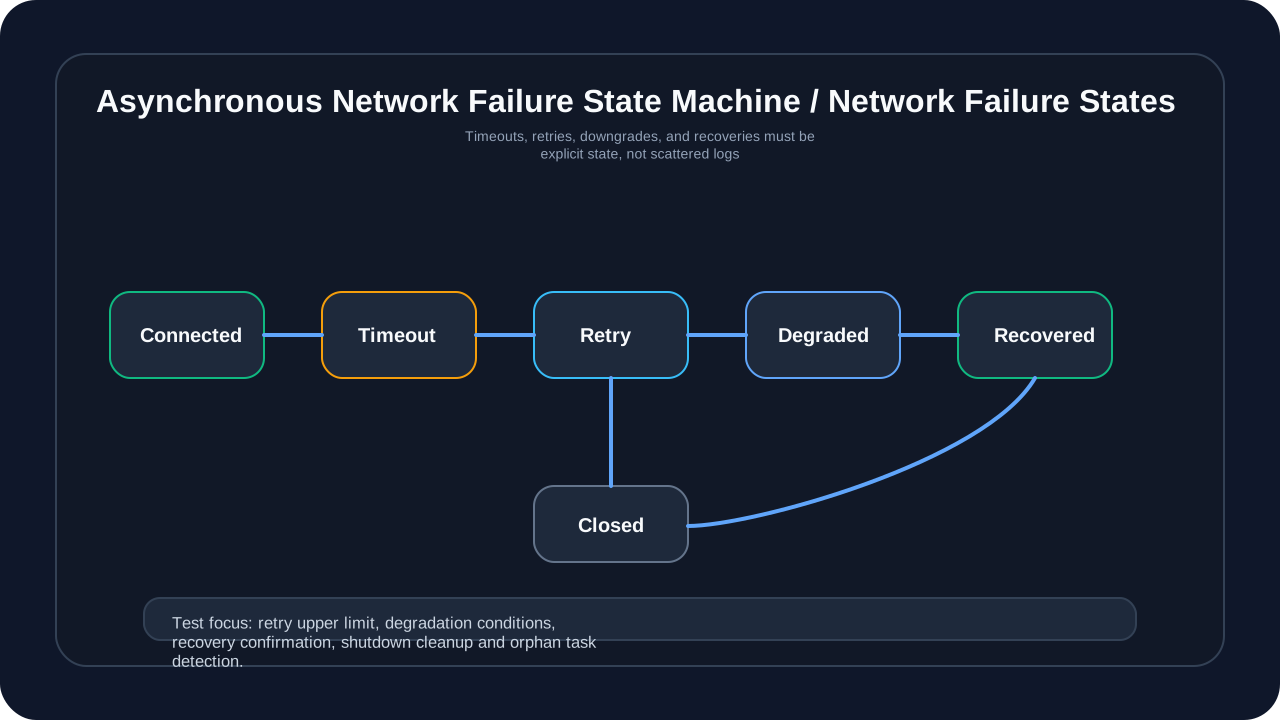
This picture answers “How should the asynchronous network enter the state machine when it fails?” There should be clear transfer conditions for connection success, timeout, retry, downgrade, recovery and shutdown. In the absence of a state machine, reconnection storms, exception swallowing, isolated tasks, and resource leaks will amplify each other; in the presence of a state machine, testing can cover every state transition, and operation and maintenance logs can also locate the step where the system is stuck.
Trap 81: threading.Lock deadlock
Real case: In the multi-threaded indicator calculation of micang-trader, nested calls lead to deadlock.
# illustrative code, not production code
# unsafe code
class DataCache:
    def __init__(self):
        self._lock = threading.Lock()
        self._data = {}

    def get(self, key):
        with self._lock:
            if key not in self._data:
                self._data[key] = self.compute(key)  # call another locked method
            return self._data[key]

    def compute(self, key):
        with self._lock:  # deadlock: the lock is already held in get
            return expensive_computation(key)
Principle analysis: threading.Lock is a non-reentrant lock. Trying to acquire an already held lock again by the same thread can lead to a deadlock. This situation is common when:
- Nested calls to locking methods
- Acquire the lock again in the callback function
- Trying to lock during signal processing
AI guidance suggestions:
Prompt: "When generating code for Trap 81: threading.Lock deadlock, keep the safe pattern in this section, make the failure mode explicit, and add a regression check for the edge case."Solution:
# illustrative code, not production code
# safe approach1: useRLock
class DataCache:
    def __init__(self):
        self._lock = threading.RLock()  # lock
        self._data = {}

    def get(self, key):
        with self._lock:
            if key not in self._data:
                self._data[key] = self.compute(key)  # now it can be called safely
            return self._data[key]

    def compute(self, key):
        with self._lock:  # RLockthread
            return expensive_computation(key)

# safe approach2: ()
    def get(self, key):
        with self._lock:
            if key in self._data:
                return self._data[key]
        # lock
        result = expensive_computation(key)
        with self._lock:
            self._data[key] = result
            return result
Trap 82: Misuse of Condition variable
Real case: In the producer-consumer model of micang-trader, the wrong conditional judgment is used.
# illustrative code, not production code
# unsafe code
class Queue:
    def __init__(self):
        self._lock = threading.Lock()
        self._cond = threading.Condition(self._lock)
        self._queue = []

    def get(self):
        with self._cond:
            if len(self._queue) == 0:  # shouldwhileif
                self._cond.wait()
            return self._queue.pop(0)  # otherthread
Principle analysis: After threading.Condition.wait() is awakened, the condition must be rechecked. because:
- Spurious wakeups can occur
- Multiple waiting threads may compete and conditions may have been changed by other threads
Therefore a
whileloop must be used instead of anifstatement.
AI guidance suggestions:
Prompt: "When generating code for Trap 82: Misuse of Condition variable, keep the safe pattern in this section, make the failure mode explicit, and add a regression check for the edge case."Solution:
# illustrative code, not production code
# safe approach: usewhile
    def get(self):
        with self._cond:
            while len(self._queue) == 0:  # whileif
                self._cond.wait()
            return self._queue.pop(0)

    def put(self, item):
        with self._cond:
            self._queue.append(item)
            self._cond.notify()  # wait

# ✅: usequeue.Queue(thread)
import queue

class BetterQueue:
    def __init__(self):
        self._queue = queue.Queue()

    def get(self):
        return self._queue.get()  # implementationcondition

    def put(self, item):
        self._queue.put(item)
Trap 83: Improper use of Semaphore leads to resource leakage
Real case: In the concurrent downloader of micang-trader, the Semaphore was not released under abnormal circumstances, resulting in the inability to execute subsequent tasks.
# illustrative code, not production code
# unsafe code
class Downloader:
    def __init__(self, max_concurrent=5):
        self._sem = threading.Semaphore(max_concurrent)

    def download(self, url):
        self._sem.acquire()
        try:
            return self._fetch(url)
        except Exception as e:
            raise e
        # errorreleasesemaphore!
Principle analysis: Semaphore is used to limit the number of concurrent accesses. If an exception occurs after acquire() and release() is not called, the Semaphore’s counter will not be restored, causing the available slots to be permanently reduced, and eventually all tasks may be blocked.
AI guidance suggestions:
Prompt: "When generating code for Trap 83: Improper use of Semaphore leads to resource leakage, keep the safe pattern in this section, make the failure mode explicit, and add a regression check for the edge case."Solution:
# illustrative code, not production code
# safe approach1: use a context manager
    def download(self, url):
        with self._sem:  # acquire and release
            return self._fetch(url)

# safe approach2: try-finally
    def download(self, url):
        self._sem.acquire()
        try:
            return self._fetch(url)
        finally:
            self._sem.release()

# safe approach3: BoundedSemaphore(release)
class SafeDownloader:
    def __init__(self, max_concurrent=5):
        self._sem = threading.BoundedSemaphore(max_concurrent)
Trap 84: Barrier timeout processing
Real case: In the multi-stage calculation of micang-trader, the Barrier wait timeout caused some threads to continue and other threads to block.
# illustrative code, not production code
# unsafe code
barrier = threading.Barrier(3)

def worker():
    try:
        barrier.wait()  # no timeout by default
        process_phase_1()
        barrier.wait()  # may block forever
        process_phase_2()
    except Exception:
        pass  # errorhandle
Principle analysis: threading.Barrier is used to synchronize the execution phases of multiple threads. If a thread does not reach the Barrier, other threads will wait forever. After timeout, Barrier will enter broken state, and subsequent wait() will throw BrokenBarrierError.
AI guidance suggestions:
Prompt: "When generating code for Trap 84: Barrier timeout processing, keep the safe pattern in this section, make the failure mode explicit, and add a regression check for the edge case."Solution:
# illustrative code, not production code
# safe approach: timeout and errorhandle
barrier = threading.Barrier(3)

def worker(thread_id):
    try:
        # settingstimeout
        barrier.wait(timeout=5.0)
        process_phase_1()

        barrier.wait(timeout=5.0)
        process_phase_2()

    except threading.BrokenBarrierError:
        logging.error(f"Thread {thread_id}: Barrier broken, aborting")
        cleanup_and_exit()
    except TimeoutError:
        logging.error(f"Thread {thread_id}: Barrier timeout")
        raise

# ✅ useresetbarrier
    except threading.BrokenBarrierError:
        barrier.reset()  # barrier
Trap 85: concurrent.futures exception lost
Real case: When micang-trader used ThreadPoolExecutor, the Future result was not checked, causing the exception to be silently ignored.
# illustrative code, not production code
# unsafe code
with ThreadPoolExecutor(max_workers=4) as executor:
    futures = [executor.submit(task, i) for i in range(10)]
    # callresult(), error!
    print("All tasks submitted")
# context, completeFuture, error
Principle analysis: In concurrent.futures, exceptions are stored in Future objects and will only be thrown when result() or exception() is called. Exceptions may be silently ignored if the result is not checked explicitly.
AI guidance suggestions:
Prompt: "When generating code for Trap 85: concurrent.futures exception lost, keep the safe pattern in this section, make the failure mode explicit, and add a regression check for the edge case."Solution:
# illustrative code, not production code
# safe approach1: result
from concurrent.futures import ThreadPoolExecutor, as_completed

with ThreadPoolExecutor(max_workers=4) as executor:
    futures = {executor.submit(task, i): i for i in range(10)}

    for future in as_completed(futures):
        i = futures[future]
        try:
            result = future.result()
            print(f"Task {i}: {result}")
        except Exception as e:
            print(f"Task {i} failed: {e}")

# safe approach2: usemap(error)
with ThreadPoolExecutor(max_workers=4) as executor:
    results = list(executor.map(task, range(10)))
    # maperror
Trap 86: asyncio task orphans (Orphaned Tasks)
Real case: In the asynchronous component of micang-trader, a background task was created but the reference was not saved, causing the task to be unable to be traced when it was abnormal.
# illustrative code, not production code
# unsafe code
async def start_background_task(self):
    asyncio.create_task(self.background_worker())  # does not retain the task reference
    # iftaskerror,  asyncioerror
    # task
Principle analysis: If the Task created by asyncio.create_task() does not save the reference, it will become an orphan task. When a task is completed or an exception occurs, the Python garbage collector may delay cleaning and exception information may be ignored. What’s more, these tasks cannot be canceled or monitored.
AI guidance suggestions:
Prompt: "When generating code for Trap 86: asyncio task orphans (Orphaned Tasks), keep the safe pattern in this section, make the failure mode explicit, and add a regression check for the edge case."Solution:
# illustrative code, not production code
# safe approach1: task
class AsyncComponent:
    def __init__(self):
        self._tasks = set()

    def start_task(self, coro):
        task = asyncio.create_task(coro)
        self._tasks.add(task)
        task.add_done_callback(self._tasks.discard)
        return task

    async def cleanup(self):
        for task in self._tasks:
            task.cancel()
        await asyncio.gather(*self._tasks, return_exceptions=True)

# safe approach2: useTaskGroup(Python 3.11+)
    async def run_tasks(self):
        async with asyncio.TaskGroup() as tg:
            tg.create_task(self.worker1())
            tg.create_task(self.worker2())
        # waittask, failureothertask
Trap 87: Fairness of asyncio lock between coroutines
Real case: In the asynchronous data processor of micang-trader, some coroutines hold locks for a long time, causing other coroutines to starve.
# illustrative code, not production code
# unsafe code
class AsyncCache:
    def __init__(self):
        self._lock = asyncio.Lock()

    async def get(self, key):
        async with self._lock:
            await asyncio.sleep(1)  # IO
            return self._data[key]

    async def update(self, key, value):
        async with self._lock:
            await asyncio.sleep(0.5)
            self._data[key] = value
Principle analysis: asyncio.Lock is unfair by default (Python 3.10+ can be set via the fair parameter). When competition is fierce, the coroutine that has just released the lock may immediately reacquire the lock, causing other waiting coroutines to be unable to execute (starved) for a long time.
AI guidance suggestions:
Prompt: "When generating code for Trap 87: Fairness of asyncio lock between coroutines, keep the safe pattern in this section, make the failure mode explicit, and add a regression check for the edge case."Solution:
# illustrative code, not production code
# safe approach1: lockIO
    async def get(self, key):
        async with self._lock:
            data = self._data.get(key)

        if data is None:
            data = await self.fetch_from_db(key)  # IOlock
            async with self._lock:
                self._data[key] = data
        return data

# safe approach2: useQueuelock
class AsyncCache:
    def __init__(self):
        self._queue = asyncio.Queue()
        self._data = {}
        self._worker_task = asyncio.create_task(self._worker())

    async def _worker(self):
        while True:
            op, key, value, future = await self._queue.get()
            if op == "get":
                future.set_result(self._data.get(key))
            elif op == "set":
                self._data[key] = value
                future.set_result(None)
Trap 88: Mixing blocking with asyncio and synchronous code
Real case: A synchronous database query was called in the asynchronous interface of micang-trader, causing the entire event loop to block.
# illustrative code, not production code
# unsafe code
async def get_data(self):
    # functioncalloperation
    data = self.db.query("SELECT * FROM ticks")  # blocking!
    return data
Principle analysis: The asyncio event loop is single-threaded. If synchronous blocking operations (such as database query, file IO, time.sleep) are performed in a coroutine, the entire event loop will be blocked, and all other coroutines will be unable to execute, losing the advantage of asynchronous operation.
AI guidance suggestions:
Prompt: "When generating code for Trap 88: Mixing blocking with asyncio and synchronous code, keep the safe pattern in this section, make the failure mode explicit, and add a regression check for the edge case."Solution:
# illustrative code, not production code
# safe approach1: useto_thread
    async def get_data(self):
        data = await asyncio.to_thread(
            self.db.query, "SELECT * FROM ticks"
        )
        return data

# safe approach2: use
    import aiosqlite

    async def get_data(self):
        async with aiosqlite.connect("ticks.db") as db:
            async with db.execute("SELECT * FROM ticks") as cursor:
                return await cursor.fetchall()

# safe approach3: userun_in_executor()
    async def get_data(self):
        loop = asyncio.get_event_loop()
        data = await loop.run_in_executor(
            None,  # usethread
            self.db.query,
            "SELECT * FROM ticks"
        )
        return data
Trap 89: WebSocket reconnection storm
Real case: When the data source connection of micang-trader is disconnected, it immediately reconnects, causing the server to think it is a DDoS attack.
# illustrative code, not production code
# unsafe code
async def connect(self):
    while True:
        try:
            self.ws = await websockets.connect(uri)
            await self.receive_loop()
        except Exception:
            pass  # reconnect immediately
Principle analysis: Immediate reconnection when a network failure occurs may lead to reconnection storm:
- The server may not be ready to accept new connections
- A large number of reconnection requests may be identified as an attack
- May exhaust local resources
AI guidance suggestions:
Prompt: "When generating code for Trap 89: WebSocket reconnection storm, keep the safe pattern in this section, make the failure mode explicit, and add a regression check for the edge case."Solution:
# illustrative code, not production code
# safe approach:
import random

async def connect_with_backoff(self):
    max_retries = 10
    base_delay = 1.0

    for attempt in range(max_retries):
        try:
            self.ws = await websockets.connect(uri)
            logging.info("Connected")
            await self.receive_loop()
            # connection succeeded; reset the delay
            base_delay = 1.0
        except Exception as e:
            delay = min(base_delay * (2 ** attempt), 60)  # 60seconds
            delay += random.uniform(0, 1)  # add
            logging.warning(f"Connection failed, retrying in {delay:.1f}s")
            await asyncio.sleep(delay)

    raise ConnectionError("Max retries exceeded")
Trap 90: HTTP connection pool is not reused
Real case: micang-trader’s HTTP client creates a new connection with every request, causing connection exhaustion.
# illustrative code, not production code
# unsafe code
async def fetch_data(self, url):
    async with aiohttp.ClientSession() as session:  # createsession
        async with session.get(url) as response:
            return await response.json()

# callfetch_datacreate
Principle analysis: aiohttp.ClientSession manages the connection pool and should be reused. Frequently creating and destroying Sessions will result in:
- Connections cannot be reused (TCP handshake overhead)
- Port exhausted (TIME_WAIT state)
- memory fragmentation
AI guidance suggestions:
Prompt: "When generating code for Trap 90: HTTP connection pool is not reused, keep the safe pattern in this section, make the failure mode explicit, and add a regression check for the edge case."Solution:
# illustrative code, not production code
# safe approach1: reuseSession
class HttpClient:
    def __init__(self):
        self.session = aiohttp.ClientSession(
            timeout=aiohttp.ClientTimeout(total=30)
        )

    async def fetch(self, url):
        async with self.session.get(url) as response:
            return await response.json()

    async def close(self):
        await self.session.close()

# safe approach2: use a context manager
    async def __aenter__(self):
        self.session = aiohttp.ClientSession()
        return self

    async def __aexit__(self, *args):
        await self.session.close()
Trap 91: TCP sticky packet processing
Real case: In micang-trader’s custom TCP protocol, sticky packets were not processed when receiving data, resulting in a parsing error.
# illustrative code, not production code
# unsafe code
async def receive(self):
    while True:
        data = await self.reader.read(1024)  # may receive multiple packets
        self.parser.parse(data)  # parsefailure
Principle analysis: TCP is a Streaming Protocol and does not guarantee message boundaries. The data returned by read() may include:
- Multiple complete messages (sticky packets)
- Partial message (unpacking)
- Mix both
A custom protocol is required to define message boundaries (such as fixed length, delimiter, length prefix).
AI guidance suggestions:
Prompt: "When generating code for Trap 91: TCP sticky packet processing, keep the safe pattern in this section, make the failure mode explicit, and add a regression check for the edge case."Solution:
# illustrative code, not production code
# safe approach:
async def send_message(self, data: bytes):
    length = len(data)
    header = struct.pack('!I', length)  # 4
    self.writer.write(header + data)
    await self.writer.drain()

async def receive_message(self) -> bytes:
    # reads4
    header = await self.reader.readexactly(4)
    length = struct.unpack('!I', header)[0]
    # readsmessage
    data = await self.reader.readexactly(length)
    return data

# ✅ use
async def receive_lines(self):
    while True:
        line = await self.reader.readuntil(b'\n')
        yield line.strip()
Trap 92: SSL certificate verification disabled
Real case: SSL verification was disabled in the test code of micang-trader for convenience and was accidentally submitted to the production environment.
# illustrative code, not production code
# unsafe code
async def fetch_api(self, url):
    async with aiohttp.ClientSession() as session:
        async with session.get(url, ssl=False) as response:  # dangerous!
            return await response.json()
Principle analysis: Disabling SSL verification makes the application vulnerable to Man-in-the-middle attack (MITM). An attacker can:
- Interception of communication content
- Tampering with data
- Steal authentication information
AI guidance suggestions:
Prompt: "When generating code for Trap 92: SSL certificate verification disabled, keep the safe pattern in this section, make the failure mode explicit, and add a regression check for the edge case."Solution:
# illustrative code, not production code
# safe approach1: verify
    async def fetch_api(self, url):
        async with aiohttp.ClientSession() as session:
            async with session.get(url) as response:  # verifySSL
                return await response.json()

# safe approach2: useCA
    import ssl
    import certifi

    def create_ssl_context(self):
        context = ssl.create_default_context(cafile=certifi.where())
        return context

    async def fetch_with_custom_ca(self, url):
        ssl_context = self.create_ssl_context()
        connector = aiohttp.TCPConnector(ssl=ssl_context)
        async with aiohttp.ClientSession(connector=connector) as session:
            async with session.get(url) as response:
                return await response.json()
Trap 93: selectors/epoll file descriptor leak
Real Case: In the high-frequency trading component of micang-trader, a large number of connections were not closed properly, causing file descriptors to be exhausted.
# illustrative code, not production code
# unsafe code
class ConnectionPool:
    def get_connection(self, host):
        sock = socket.socket(socket.AF_INET, socket.SOCK_STREAM)
        sock.connect((host, 8080))
        # errorclosesocket
        return sock
Principle analysis: Each socket occupies a File Descriptor (FD), and the system has a limit on the number of FDs (usually 1024 or 65535). Unclosed sockets can cause:
- FD exhausted, new connection cannot be created
- “Too many open files” error
- Resource leak
AI guidance suggestions:
Prompt: "When generating code for Trap 93: selectors/epoll file descriptor leak, keep the safe pattern in this section, make the failure mode explicit, and add a regression check for the edge case."Solution:
# illustrative code, not production code
# safe approach1: contextmanage
    def get_connection(self, host):
        sock = socket.socket(socket.AF_INET, socket.SOCK_STREAM)
        try:
            sock.connect((host, 8080))
            return sock
        except:
            sock.close()
            raise

    # use
    with self.get_connection(host) as sock:
        sock.send(data)

# ✅ safe approach 2: socket context manager
    def get_connection(self, host):
        sock = socket.create_connection((host, 8080))
        return contextlib.closing(sock)

    with self.get_connection(host) as sock:
        sock.send(data)
        # close
Trap 94: Multi-process shared queue is too large
Real Case: The data producer of micang-trader is much faster than the consumer, causing the queue memory usage to continue to grow.
# illustrative code, not production code
# unsafe code
from multiprocessing import Queue, Process

queue = Queue()  # unbounded queue

def producer():
    while True:
        data = generate_data()
        queue.put(data)  # never blocks

def consumer():
    while True:
        data = queue.get()
        process(data)
Principle analysis: multiprocessing.Queue is an unbounded queue (actually an inter-process pipeline), and put() will not block. If the producer outpaces the consumer, the queue will grow indefinitely, eventually running out of memory.
AI guidance suggestions:
Prompt: "When generating code for Trap 94: Multi-process shared queue is too large, keep the safe pattern in this section, make the failure mode explicit, and add a regression check for the edge case."Solution:
# illustrative code, not production code
# safe approach1:
queue = Queue(maxsize=1000)  # constraint

def producer():
    while True:
        data = generate_data()
        queue.put(data)  # blocks when the queue is full

# safe approach2: useJoinableQueue
from multiprocessing import JoinableQueue

queue = JoinableQueue(maxsize=1000)

def producer():
    for i in range(10000):
        queue.put(i)
    queue.join()  # wait until tasks are processed

def consumer():
    while True:
        data = queue.get()
        process(data)
        queue.task_done()  # taskcomplete
Trap 95: Process pool tasks are submitted too quickly
Real case: In batch data processing of micang-trader, millions of tasks were submitted to ProcessPoolExecutor, causing memory overflow.
# illustrative code, not production code
# unsafe code
with ProcessPoolExecutor(max_workers=4) as executor:
    futures = []
    for i in range(1000000):  # task
        future = executor.submit(process_item, i)
        futures.append(future)  # Futurememory
Principle analysis: ProcessPoolExecutor’s internal queue caches tasks. If the submission rate far exceeds the processing rate, the queue will grow indefinitely. Each Future object also takes up memory. A large number of tasks can result in:
- Increased memory usage
- Task queue is too long
- Increased startup latency
AI guidance suggestions:
Prompt: "When generating code for Trap 95: Process pool tasks are submitted too quickly, keep the safe pattern in this section, make the failure mode explicit, and add a regression check for the edge case."Solution:
# illustrative code, not production code
# safe approach1: handle
with ProcessPoolExecutor(max_workers=4) as executor:
    futures = (executor.submit(process_item, i) for i in range(1000000))
    for future in concurrent.futures.as_completed(futures):
        result = future.result()
        # handle

# safe approach2: usechunksize
with ProcessPoolExecutor(max_workers=4) as executor:
    results = executor.map(process_item, range(1000000), chunksize=100)
    for result in results:
        pass

# safe approach3:
from itertools import islice

def chunked(iterable, size):
    it = iter(iterable)
    return iter(lambda: list(islice(it, size)), [])

with ProcessPoolExecutor(max_workers=4) as executor:
    for batch in chunked(range(1000000), 1000):
        futures = [executor.submit(process_item, i) for i in batch]
        for future in concurrent.futures.as_completed(futures):
            pass
Risk Group 5: Safety Boundary and Dynamic Expansion Risk (Trap 96-100)
The last set of Traps covers plugin import, configuration parsing, log injection, dynamic property access, and serialization security. They are not just “concepts in security articles”, but trust boundaries that trading systems must face: who can load code, who can change configurations, whether unmasked data can appear in logs, whether APIs can access internal methods, and whether cache files can be tampered with.
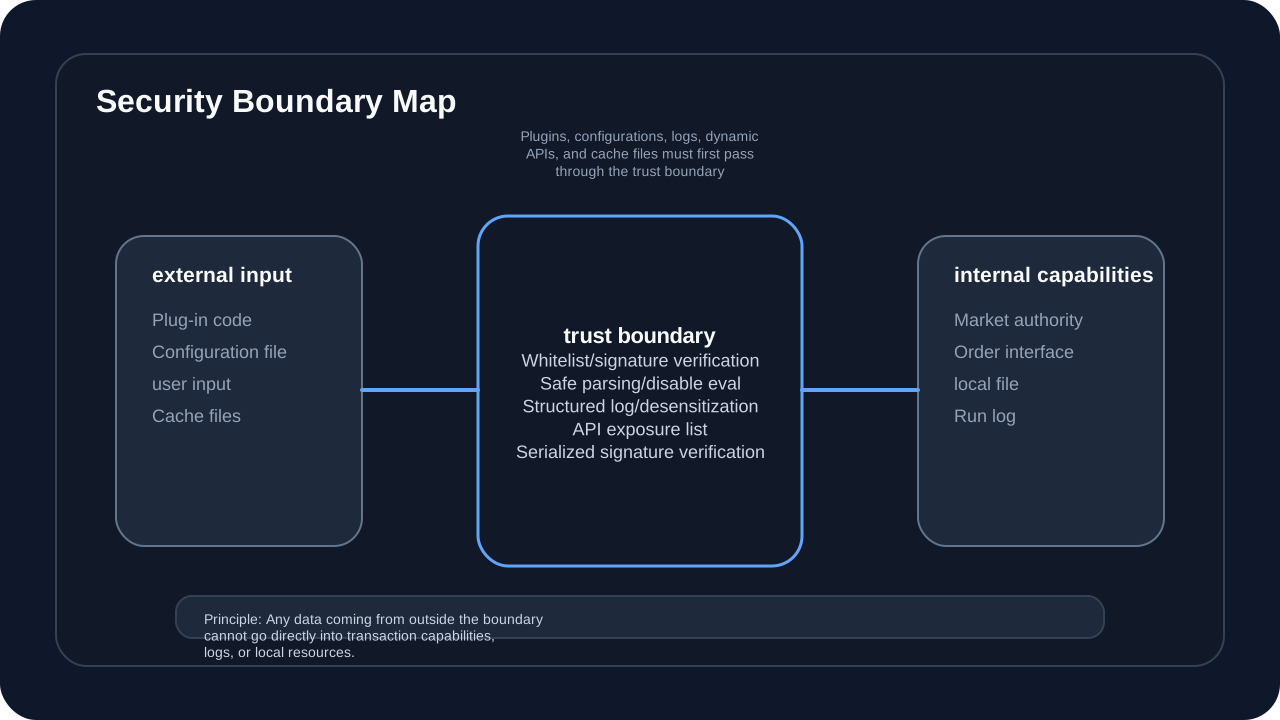
This diagram answers the question “Which inputs cannot be considered trusted internal data”. Plugin code, configuration files, user input, log fields, cache files, and dynamic API names all come from outside the trust boundary. When readers fix this type of problem, they should not just replace strings, but also establish whitelists, signature verification, security parsing, structured logs, and desensitization rules.
Trap 96: Plug-in system import safety
Real Case: The plug-in system of micang-trader allows loading of Python files provided by users, without security verification, resulting in code execution risks.
# illustrative code, not production code
# unsafe code
def load_plugin(self, plugin_path):
    spec = importlib.util.spec_from_file_location("plugin", plugin_path)
    module = importlib.util.module_from_spec(spec)
    spec.loader.exec_module(module)  # execute code!
    return module
Principle analysis: If the dynamic import mechanism does not impose restrictions on plug-in code, malicious plug-ins can:
- Execute any system command
- Access sensitive files
- Modify the runtime environment
- Implant backdoor
AI guidance suggestions:
Prompt: "When generating code for Trap 96: Plug-in system import safety, keep the safe pattern in this section, make the failure mode explicit, and add a regression check for the edge case."Solution:
# illustrative code, not production code
# safe approach1: constraintmodule
import sys

class RestrictedImporter:
    ALLOWED_MODULES = {'numpy', 'pandas', 'typing'}

    def find_module(self, name, path=None):
        if name.split('.')[0] not in self.ALLOWED_MODULES:
            raise ImportError(f"Module {name} not allowed")
        return None

# install before loading plugins
sys.meta_path.insert(0, RestrictedImporter())

# safe approach2: useprocess
import subprocess

def run_plugin_sandbox(plugin_code):
    result = subprocess.run(
        ['python', '-c', plugin_code],
        capture_output=True,
        timeout=30,
        # useconstraintsystem
    )
    return result.stdout

# safe approach3: verify
import hashlib
import hmac

def verify_plugin(self, plugin_path, signature, secret):
    with open(plugin_path, 'rb') as f:
        content = f.read()
    expected = hmac.new(secret, content, hashlib.sha256).hexdigest()
    if not hmac.compare_digest(expected, signature):
        raise SecurityError("Plugin signature invalid")
Trap 97: Configuration file parsing security
Real case: micang-trader uses eval() to parse user configuration files, resulting in arbitrary code execution vulnerability.
# illustrative code, not production code
# unsafe code
def load_config(self, path):
    with open(path) as f:
        content = f.read()
    config = eval(content)  # dangerous: executes code
    return config
Principle analysis: Using eval() or exec() to parse untrusted input can lead to a code injection vulnerability. An attacker can embed malicious code in configuration files.
AI guidance suggestions:
Prompt: "When generating code for Trap 97: Configuration file parsing security, keep the safe pattern in this section, make the failure mode explicit, and add a regression check for the edge case."Solution:
# illustrative code, not production code
# safe approach 1: use JSON
import json

def load_config(self, path):
    with open(path) as f:
        return json.load(f)

# safe approach2: YAML
import yaml

def load_config(self, path):
    with open(path) as f:
        return yaml.safe_load(f)  # yaml.load

# safe approach 3: TOML, recommended configuration
import tomllib  # Python 3.11+

def load_config(self, path):
    with open(path, 'rb') as f:
        return tomllib.load(f)

# safe approach4: ifneedeval
import ast

def safe_eval(self, expr):
    node = ast.parse(expr, mode='eval')
    # type
    allowed = (ast.Expression, ast.Num, ast.Str, ast.Name,
               ast.List, ast.Dict, ast.Tuple, ast.Call)
    if not all(isinstance(n, allowed) for n in ast.walk(node)):
        raise ValueError("Unsafe expression")
    return eval(compile(node, '<string>', 'eval'))
Trap 98: Log injection attack
Real case: micang-trader’s logging did not process user input, resulting in log forgery and information leakage.
# illustrative code, not production code
# unsafe code
def log_order(self, user_input):
    # ifuser_input,
    logging.info(f"Order received: {user_input}")
    # input: "normal\n2024-01-01 ERROR: system"
    # ERROR
Principle analysis: Unhandled user input injection logs can cause:
- Log Forgery: Insert fake log entries
- Log Obfuscation: Change the log format to hide the real problem
- Sensitive information leakage: If the log is leaked, sensitive data will be leaked
AI guidance suggestions:
Prompt: "When generating code for Trap 98: Log injection attack, keep the safe pattern in this section, make the failure mode explicit, and add a regression check for the edge case."Solution:
# illustrative code, not production code
# safe approach1: cleanupinput
import re

def sanitize_for_log(self, text):
    # replace control characters
    return re.sub(r'[\x00-\x1F\x7F]', '', str(text))

    def log_order(self, user_input):
        safe_input = self.sanitize_for_log(user_input)
        logging.info("Order received: %s", safe_input)

# safe approach2: use
import structlog

logger = structlog.get_logger()

    def log_order(self, order_id, symbol, quantity):
        logger.info(
            "order_received",
            order_id=order_id,
            symbol=symbol,
            quantity=quantity,  # handletype
        )

# ✅ safe approach 3: sensitive-data redaction
    def log_user_action(self, user_id, action):
        masked_id = user_id[:4] + "****"  # redaction
        logging.info(f"User {masked_id} performed {action}")
Trap 99: Unauthorized access to dynamic attributes
Real case: micang-trader’s API framework uses getattr to dynamically access object attributes, allowing access to private methods.
# illustrative code, not production code
# unsafe code
class APIHandler:
    def handle(self, obj_name, method_name):
        obj = self.get_object(obj_name)
        method = getattr(obj, method_name)  # can access any attribute
        return method()

# : method_name="_secret_method"
Principle analysis: Unrestricted getattr allows access to all attributes of an object, including:
- Private method (_method)
- internal implementation method
- Python special methods (dict, class, etc.)
- Sensitive data
AI guidance suggestions:
Prompt: "When generating code for Trap 99: Unauthorized access to dynamic attributes, keep the safe pattern in this section, make the failure mode explicit, and add a regression check for the edge case."Solution:
# illustrative code, not production code
# safe approach1:
class APIHandler:
    ALLOWED_METHODS = {'get_price', 'get_volume', 'get_history'}

    def handle(self, obj_name, method_name):
        if method_name not in self.ALLOWED_METHODS:
            raise PermissionError(f"Method {method_name} not allowed")

        obj = self.get_object(obj_name)
        method = getattr(obj, method_name)
        return method()

# safe approach2: API
class Service:
    @api_exposed
    def get_price(self, symbol):
        return self._fetch_price(symbol)

    def _secret_method(self):  # not decorated, not accessible
        pass

# check
    def handle(self, obj, method_name):
        method = getattr(obj, method_name, None)
        if not getattr(method, '_api_exposed', False):
            raise PermissionError("Not an API method")
        return method()

# safe approach3: use__slots__constraint
class SecureService:
    __slots__ = ['_data']  # constraintadd

    def __init__(self):
        self._data = {}
Trap 100: Serialization and deserialization safety
Real case: micang-trader uses pickle cache objects, and attackers can execute arbitrary code by tampering with cache files.
# illustrative code, not production code
# unsafe code
def load_cache(self, path):
    with open(path, 'rb') as f:
        return pickle.load(f)  # executes code!

# pickledata
Principle analysis: pickle will execute arbitrary Python code when deserializing. Maliciously constructed data can:
- Execute system commands
- Modify global status
- Import malicious modules
- Override class definition
AI guidance suggestions:
Prompt: "When generating code for Trap 100: Serialization and deserialization safety, keep the safe pattern in this section, make the failure mode explicit, and add a regression check for the edge case."Solution:
# illustrative code, not production code
# safe approach 1: use JSON
import json

def save_cache(self, data, path):
    with open(path, 'w') as f:
        json.dump(data, f)

def load_cache(self, path):
    with open(path) as f:
        return json.load(f)

# safe approach2: ifmustpickle, verify
import pickle
import hmac
import hashlib

def save_cache_secure(self, data, path, secret):
    pickled = pickle.dumps(data)
    signature = hmac.new(secret, pickled, hashlib.sha256).digest()
    with open(path, 'wb') as f:
        f.write(signature + pickled)

def load_cache_secure(self, path, secret):
    with open(path, 'rb') as f:
        content = f.read()

    signature = content[:32]
    pickled = content[32:]

    expected = hmac.new(secret, pickled, hashlib.sha256).digest()
    if not hmac.compare_digest(signature, expected):
        raise SecurityError("Cache tampered")

    return pickle.loads(pickled)

# safe approach3: use
import jsonpickle

def save_cache(self, data, path):
    with open(path, 'w') as f:
        jsonpickle.dump(data, f)

def load_cache(self, path):
    with open(path) as f:
        return jsonpickle.load(f)  # pickle
Trap 51-100 Risk Index
This index is used to help readers quickly locate risk groups during investigation. It does not replace the previous 50 Trap details, it only compresses the judgment of “where to look first and what evidence to add first.”
| scope | risk groups | Typical questions | Prioritize reinforcement |
|---|---|---|---|
| 51-60 | Runtime, storage and resource lifecycle | Circular import, shared memory, connection pool, asyncio cancellation | Life cycle cleanup, resource ownership, exception recording |
| 61-70 | Time series and numerical data | Time zones, floating point, Pandas/NumPy bounds | Data semantic assertions, boundary samples, reproducible fixtures |
| 71-80 | Qt/GUI life cycle | Thread affinity, signals and slots, QPainter, QTimer | Main thread constraints, object parent-child relationship, shutdown process |
| 81-95 | Concurrency, asynchronous networks and failure recovery | Lock, Future, WebSocket, HTTP, FD, Queue | State machines, retry caps, backpressure and fault injection |
| 96-100 | Security Boundaries and Dynamic Expansion | Plugin, configuration, log, getattr, pickle | Whitelist, signature verification, security analysis, desensitization |
Summary: Turn peripheral risks into runtime lines of defense
The 50 Traps in Part 3 can be summed up in one sentence: the reliability of the trading system not only depends on the strategy logic, but also depends on whether the peripheral infrastructure has clear boundaries. GUI, network, security, configuration and local resources may seem far away from the strategy, but they will determine whether the system can continue to operate, whether it can recover after a failure, and whether it can recover after an incident.
Readers can use this article as input for the Part 4 test defense line: runtime resources must have teardown tests, time series must have boundary fixtures, GUI must have main thread constraints, asynchronous networks must have state machines and fault injection, and security boundaries must have whitelists and desensitized assertions. In this way, Trap 51-100 is no longer just a debugging index, but a source of evidence that can enter testing, review, and architecture governance.
Reference resources
- Python official documentation - Language reference
- Qt for Python Documentation - PySide6/PyQt5
- Pandas Documentation - Data processing
- NumPy Documentation - Numerical calculations
- asyncio Documentation - Asynchronous IO
Series context
You are reading: Quantitative trading system development record
This is article 3 of 7. Reading progress is stored only in this browser so the full series page can resume from the right entry.
Series Path
Current series chapters
Chapter clicks store reading progress only in this browser so the series page can resume from the right entry.
- Quantitative trading system development record (1): five key decisions in project startup and architecture design Taking Micang Trader as an example, this article starts from system boundaries, data flow, trading-session ownership, unified backtesting/live-trading interfaces, and AI collaboration boundaries to establish the architecture thread for the quantitative trading system series.
- Quantitative trading system development record (2): Python Pitfalls practical pitfall avoidance guide (1) Reorganize Python traps from a long list into an engineering risk reference for quantitative trading systems: how to amplify the three types of risks, syntax and scope, type and state, concurrency and state, into real trading system problems.
- Record of Quantitative Trading System Development (Part 3): Python Pitfalls Practical Pitfalls Avoidance Guide (Part 2) Continuing to reorganize Python risks into a reference piece: how GUI lifecycles, asynchronous network failures, security boundaries, and deployment infrastructure affect the long-term stability of quantitative trading systems.
- Quantitative trading system development record (4): test-driven agile development (AI Agent assistance) Starting from a cross-night trading day boundary bug, we reconstruct the test defense line of the quantitative trading system: defect-oriented testing pyramid, AI TDD division of labor, boundary time, data lineage and CI Gate.
- Quantitative trading system development record (5): Python performance tuning practice Transform performance optimization from empirical guesswork into a verifiable investigation process: start from the 3-second chart delay, locate the real bottleneck, compare optimization solutions, and establish benchmarks and rollback strategies.
- Record of Quantitative Trading System Development (6): Architecture Evolution and Reconstruction Decisions Review the five refactorings of Micang Trader, explaining how the system evolved from the initial snapshot to a clearer target architecture, and incorporated technical debt and ADR decisions into long-term governance.
- Quantitative trading system development record (7): AI engineering implementation - from speckit to BMAD Taking the trading calendar and daily aggregation requirements as a single case, explain how AI engineering can enter the delivery of real quantitative systems through specification drive, BMAD role handover and manual quality gate control.
Reading path
Continue along this topic path
Follow the recommended order for Quantitative system development practice instead of jumping through random articles in the same topic.
Next step
Go deeper into this topic
If this article is useful, continue from the topic page or subscribe to follow later updates.
Loading comments...
Comments and discussion
Sign in with GitHub to join the discussion. Comments are synced to GitHub Discussions