Article
Quantitative trading system development record (2): Python Pitfalls practical pitfall avoidance guide (1)
Reorganize Python traps from a long list into an engineering risk reference for quantitative trading systems: how to amplify the three types of risks, syntax and scope, type and state, concurrency and state, into real trading system problems.
Readers can regard this article as the first part of the Python engineering risk reference: first use risk groups to create an index, and then view Trap 1-50 one by one to see how a small Python problem can be magnified into a trading system risk. All traps come from real repair experience. The focus of reading is not to memorize grammar, but to put the language layer, type layer, state layer and GUI life cycle issues back into the operating boundary of the trading system to understand.
Series reading order
Part1 -> Part2 -> Part3 -> Part4 -> Part5 -> Part6 -> Part7. Read Part2/Part3 first after reading Part1, in order to first see how the system will fail, and then understand why testing defense lines, performance management, architecture reconstruction, and AI engineering must exist.
Reading method: First locate the risk group, and then return to the specific Trap
50 Traps should not be read as a flat list. A more effective way is to first determine which risk group the problem belongs to, and then go back to the specific Trap to view the triggering scenarios, Python principles, repair methods, and anti-regression suggestions.
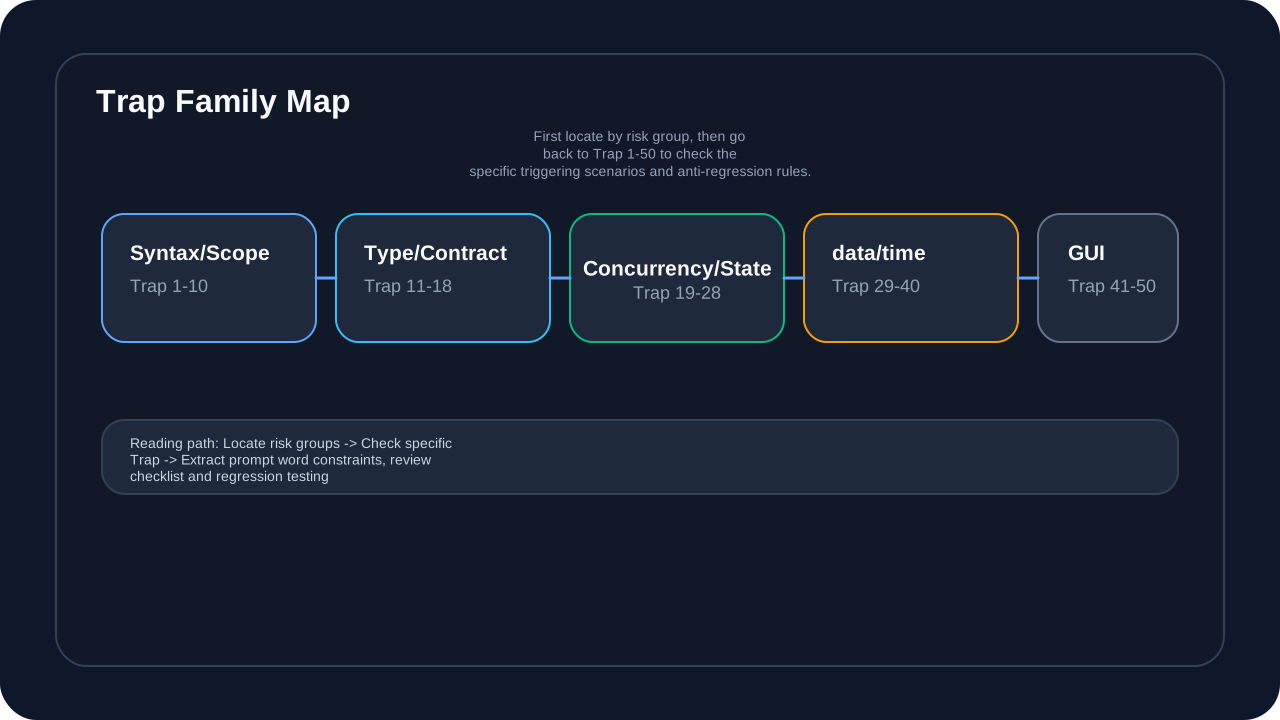
This picture answers the question “When readers encounter a Python problem, what type of risks should they look at first?” Syntax and scope issues are usually exposed during the startup phase. Type and interface contract issues are more likely to accumulate in market callbacks and data conversions. State life cycle issues will be magnified in the GUI, cache, indicators, and event subscriptions. Concurrency and exception propagation issues often only become apparent under real market pressure.
Each case retains triggering scenarios, principle analysis, repair methods and anti-regression suggestions. Readers can translate these regression prevention suggestions directly into prompt word constraints, code review checklists, and test case sources. Especially when AI is involved in coding, the risk does not necessarily come from the model “not understanding syntax”, but from it generating code that seems reasonable but lacks the contextual constraints of the trading system.
Introduction: Why Python is a double-edged sword for quantitative development
Python is the mainstream language for quantitative trading development. It has a rich ecosystem, fast development speed, and low enough trial and error costs. But these advantages also bring a set of risks that must be faced: dynamic typing, runtime property lookup, mutable objects, implicit scope, GIL, event loops, GUI thread affinity and Pandas/NumPy data semantics can all magnify small errors into real risks in the trading system.
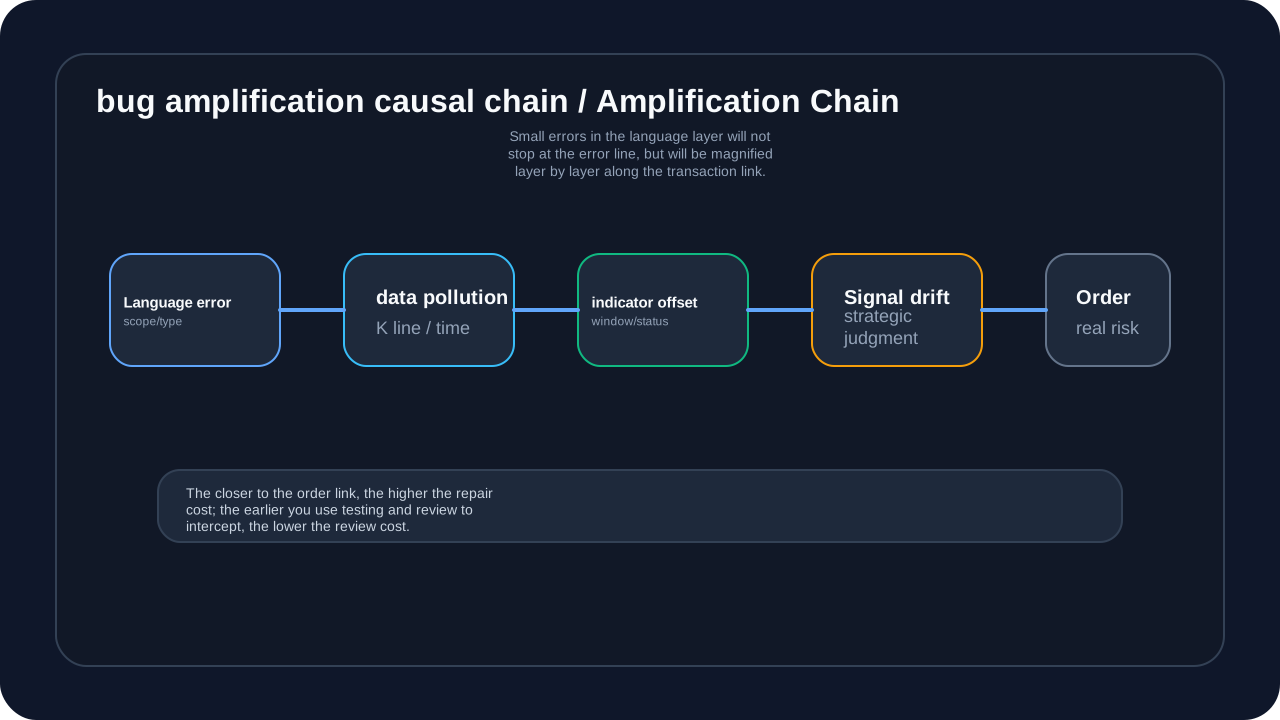
This diagram answers the question “Why a small Python bug deserves to be taken seriously”. In ordinary scripts, default parameters, closure binding, exception swallowing or DataFrame boundary issues may be just a local error; in a trading system, it may first pollute the data, then cause the indicator to drift, ultimately affecting strategy signals and order behavior. The closer to the order link, the higher the repair cost and the greater the difficulty of review.
Therefore, this article is not to criticize Python, but to systematically organize the details that are easy to remember only after fixing bugs in the real system. From syntax traps to type boundaries, from concurrency states to data processing, from Qt/GUI lifecycle to AI-assisted development, each Trap should be read as an engineering risk rule rather than isolated syntax knowledge.
Risk Group 1: Syntax and Scope Risks (Trap 1-10)
This group of Traps mainly occurs in the function compilation, scope determination, default value evaluation, exception matching and expression evaluation phases. They look like basic Python syntax issues, but in trading systems often affect startup paths, configuration loading, chart updates, and strategy callbacks.
Trap 1: Repeated imports within the function cause UnboundLocalError
Real case: In drawing_order.py, PriceLineType has been imported at the beginning of the file, but it is imported repeatedly inside the function, causing an error when running.
from .price_line import PriceLineItem, PriceLineManager, PriceLineType  # illustrative code, not production code
# already imported at file top
from .price_line import PriceLineItem, PriceLineManager, PriceLineType

def update_line_from_order(self, order: OrderData) -> bool:
    # line 1071: use the file-level PriceLineType import
    if line.get_line_type() == PriceLineType.ENTRY:  # ❌ error!
        ...

    # 1539: duplicate import inside the function after use
    from .price_line import PriceLineType  # this line causes the issue
Error message: UnboundLocalError: cannot access local variable 'PriceLineType'
Principle: When Python parses a function, it finds that there is an import statement in the function (which is regarded as an assignment operation), and the variable will be marked as a local variable. Even if it is imported later in the code, the previous use will be regarded as an access to the local variable - and the local variable has not yet been assigned a value.
Principle analysis:
Python scans the entire function body for symbol references when compiling a function. When an import statement is found within a function (which is considered an assignment operation), Python will mark the variable as a local variable. Even if it is imported later in the code, the previous use will be regarded as an access to the local variable - and the local variable has not yet been assigned a value. This is caused by Python’s static scope analysis mechanism.
AI guidance suggestions:
Prompt: "When generating code for Trap 1: Repeated imports within the function cause UnboundLocalError, keep the safe pattern in this section, make the failure mode explicit, and add a regression check for the edge case."Solution:
# illustrative code, not production code
# safe approach: import once at file top
from .price_line import PriceLineItem, PriceLineManager, PriceLineType

def update_line_from_order(self, order: OrderData) -> bool:
    if line.get_line_type() == PriceLineType.ENTRY:  # uses the file-level import
        ...
    # do not import again inside the function
Trap 2: Mutable object trap with default parameters
Problem: Using mutable objects (list, dict) as default parameters will cause all instances to share the same object.
# illustrative code, not production code
# unsafe code
def process_bars(bars, result=[]):  # all calls share the same list
    result.append(bars)
    return result

# first call
print(process_bars([1, 2, 3]))  # [[1, 2, 3]]
# second call
print(process_bars([4, 5, 6]))  # [[1, 2, 3], [4, 5, 6]] !
Real Impact: In data processors, this can cause historical data to accumulate and memory to grow indefinitely.
Principle analysis:
Python’s default parameters are evaluated when the function is defined, not when it is called. This means that default parameters are properties of the function object, stored in __defaults__. When a mutable object is used as the default parameter, all calls share a reference to the same object, leading to unexpected side effects.
AI guidance suggestions:
Prompt: "When generating code for Trap 2: Mutable object trap with default parameters, keep the safe pattern in this section, make the failure mode explicit, and add a regression check for the edge case."Solution:
# illustrative code, not production code
# safe approach
def process_bars(bars, result=None):
    if result is None:
        result = []  # create a new list for each call
    result.append(bars)
    return result
Trap 3: Modify dictionary size while traversing dictionary
Real case: The _animated_lines dictionary is traversed when the animation is updated, and another operation deletes the items in it.
# illustrative code, not production code
# unsafe code
def _update_animation(self) -> None:
    for line in self._animated_lines.values():  # may be modified during iteration
        line.update_animation()  # RuntimeError: dictionary changed size during iteration
Principle analysis: Python’s dictionary maintains an internal iterator when traversing it. When the dictionary size changes (keys are added or deleted), the iterator becomes invalid. This is a safety mechanism implemented by Python dictionaries to prevent data structure changes during traversal from causing inconsistent states.
AI guidance suggestions:
Prompt: "When generating code for Trap 3: Modify dictionary size while traversing dictionary, keep the safe pattern in this section, make the failure mode explicit, and add a regression check for the edge case."Solution:
# illustrative code, not production code
# safe approach: create a snapshot
for line in list(self._animated_lines.values()):
    line.update_animation()
Trap 4: Conditional expression priority confusion
# illustrative code, not production code
# unsafe code
flag = True
result = flag and 'a' or 'b'# expected'a', but what happens when flag is False?

# effectively equivalent to
result = (flag and 'a') or 'b'  # if 'a' is falsy, return 'b'
Principle analysis:
Python’s and and or operators follow the short-circuit evaluation rule. flag and 'a' or 'b' is actually equivalent to (flag and 'a') or 'b'. When flag is True, 'a' is returned; but when 'a' is a false value (such as an empty string, 0, None), 'b' will continue to be evaluated, leading to unexpected results.
AI guidance suggestions:
Prompt: "When generating code for Trap 4: Conditional expression priority confusion, keep the safe pattern in this section, make the failure mode explicit, and add a regression check for the edge case."Solution:
# illustrative code, not production code
# safe approach: use a conditional expression
result = 'a' if flag else 'b'
Trap 5: is vs == confusion
# illustrative code, not production code
# unsafe code
if price is 0:  # may work, but is not guaranteed
    ...

# safe approach
if price == 0:  # value comparison
    ...

if config is None:  # identity comparison, only for None, True, and False
    ...
Principle analysis:
is compares the memory address (identity) of the object, while == compares the value of the object. Python performs caching optimizations for singleton objects such as small integers (-5 to 256) and None, making is sometimes appear to work normally, but this is only an implementation detail and should not be relied upon. For numeric comparisons, == should always be used.
AI guidance suggestions:
Prompt: "When generating code for Trap 5: is vs == confusion, keep the safe pattern in this section, make the failure mode explicit, and add a regression check for the edge case."Trap 6: List multiplication copy reference
# illustrative code, not production code
# unsafe code
matrix = [[0] * 3] * 3  # creates three references to the same list
matrix[0][0] = 1
print(matrix)  # [[1, 0, 0], [1, 0, 0], [1, 0, 0]] !
Principle analysis:
Python’s list multiplication [x] * n creates n references to the same object x, rather than n independent copies. This is no problem for immutable objects (such as numbers, strings), but for mutable objects (such as lists, dictionaries), all references point to the same memory address, and modifying one will affect all.
AI guidance suggestions:
Prompt: "When generating code for Trap 6: List multiplication copy reference, keep the safe pattern in this section, make the failure mode explicit, and add a regression check for the edge case."Solution:
# illustrative code, not production code
# safe approach
matrix = [[0 for _ in range(3)] for _ in range(3)]
Trap 7: except captures exception order
# illustrative code, not production code
# unsafe code
try:
    ...
except Exception as e:  # catches the base class first
    ...
except ValueError as e:  # this branch is never reached
    ...
Principle analysis:
Python’s exception handling is matched in order. Once an except clause is matched successfully, subsequent except clauses will be skipped. Exception is the base class for all built-in non-system exit exceptions. If Exception is caught first, all exceptions will be caught by it, and more specific exception handling code will never be executed.
AI guidance suggestions:
Prompt: "When generating code for Trap 7: except captures exception order, keep the safe pattern in this section, make the failure mode explicit, and add a regression check for the edge case."Solution:
# illustrative code, not production code
# safe approach: from specific to general
try:
    ...
except ValueError as e:
    ...
except Exception as e:
    ...
Trap 8: Closure delayed binding
# illustrative code, not production code
# unsafe code
funcs = []
for i in range(3):
    funcs.append(lambda: i)  # all closures reference the same variablei

print([f() for f in funcs])  # [2, 2, 2] !
Principle analysis:
In Python’s closure, variable lookup is performed at runtime (late binding), not at definition time. When the lambda function executes, it looks for the current value of variable i, not the value when it was created. Since the value of i is 2 at the end of the loop, all lambda functions return 2. Use the default parameter x=i to capture the value when defined.
AI guidance suggestions:
Prompt: "When generating code for Trap 8: Closure delayed binding, keep the safe pattern in this section, make the failure mode explicit, and add a regression check for the edge case."Solution:
# illustrative code, not production code
# safe approach
funcs = []
for i in range(3):
    funcs.append(lambda x=i: x)  # default argument binds at definition time

# or use partial to bind each value explicitly
from functools import partial
funcs = [partial(lambda x: x, i) for i in range(3)]
Trap 9: Confusion between nonlocal and global
# illustrative code, not production code
# unsafe code
counter = 0

def increment():
    counter += 1  # UnboundLocalError!
Principle analysis:
When Python assigns a value to a variable inside a function, it is treated as a local variable by default. If you read a global variable within a function without assigning a value, Python will search the global namespace; but once there is an assignment operation (including +=), Python will treat the variable as a local variable. If a local variable is not defined before use, UnboundLocalError will be thrown. You can explicitly tell Python that a variable comes from an external scope using a global or nonlocal declaration.
AI guidance suggestions:
Prompt: "When generating code for Trap 9: Confusion between nonlocal and global, keep the safe pattern in this section, make the failure mode explicit, and add a regression check for the edge case."Solution:
# illustrative code, not production code
# safe approach
counter = 0

def increment():
    global counter
    counter += 1

# use nonlocal in the nested function
def outer():
    counter = 0
    def inner():
        nonlocal counter
        counter += 1
Trap 10: Chained comparison trap
# illustrative code, not production code
# unsafe code
if 1 < bar.high < bar.low:  # syntactically valid but logically wrong
    ...

# effectively equivalent to
if (1 < bar.high) and (bar.high < bar.low):
    # bar.high < bar.low almost always false
Principle analysis:
Python supports chained comparisons (such as a < b < c), which is equivalent to (a < b) and (b < c), and only calculates b once. This is convenient when comparing numerical values, but it is easy to write wrong logic in complex conditions. For example, 1 < bar.high < bar.low actually checks whether bar.high is greater than 1 and less than bar.low at the same time, which is almost impossible to hold in price data.
AI guidance suggestions:
Prompt: "When generating code for Trap 10: Chained comparison trap, keep the safe pattern in this section, make the failure mode explicit, and add a regression check for the edge case."Risk Group 2: Type and Interface Contract Risks (Trap 11-18)
This set of Traps mainly comes from dynamic typing and runtime property checking. Type hints can help readers express their intentions, but they will not guarantee for you at runtime that the object must have a certain attribute, Optional must be evaluated as null, and Union must be processed by the complete branch. Once the type boundaries are unclear in the trading system, the error usually does not stop inside the function, but enters the market object, indicator cache, event payload or GUI update link.
Trap 11: AI-generated code missing hasattr check
Real case: VolumeItem calls the update_bar method of the base class, but the base class method directly accesses attributes that are only available in the subclass.
# illustrative code, not production code
# base class ChartItem
def update_bar(self, bar: BarData) -> None:
    ...
    self._bar_picutures[ix] = None
    # ❌ direct access without checking
    self._realtime_cache.pop(ix, None)  # VolumeItemdoes not have this attribute

# VolumeItem  ChartItem, no _realtime_cache
class VolumeItem(ChartItem):
# no _realtime_cache attributeError: AttributeError: 'VolumeItem' object has no attribute '_realtime_cache'
Principle analysis: Python’s inheritance model allows subclasses to inherit methods from parent classes, but the properties accessed in the methods must exist on the object at runtime. Python is a dynamic language and does not check attribute existence at compile time. Directly accessing attributes that may not be available in the subclass in a base class method violates the Liskov Substitution Principle and results in an AttributeError at runtime.
AI guidance suggestions:
Prompt: "When generating code for Trap 11: AI-generated code missing hasattr check, keep the safe pattern in this section, make the failure mode explicit, and add a regression check for the edge case."Solution:
# illustrative code, not production code
# safe approach
if hasattr(self, '_realtime_cache'):
    self._realtime_cache.pop(ix, None)
Trap 12: Optional type does not do None check
# illustrative code, not production code
# unsafe code
from typing import Optional

def get_bar_price(bar: Optional[BarData]) -> float:
    return bar.close_price  # AttributeError if bar is None
Principle analysis:
Optional[T] is an alias for Union[T, None], indicating that the value may be of type T or None. Python’s type hints only work when checked statically, types are not enforced at runtime. Even if the function parameters are marked Optional, if the caller passes in None, the runtime will still accept it, but subsequent attribute access to None will throw an AttributeError.
AI guidance suggestions:
Prompt: "When generating code for Trap 12: Optional type does not do None check, keep the safe pattern in this section, make the failure mode explicit, and add a regression check for the edge case."Solution:
# illustrative code, not production code
# safe approach
def get_bar_price(bar: Optional[BarData]) -> float:
    if bar is None:
        raise ValueError("bar cannot be None")
    return bar.close_price

# or use a type guard
if bar is not None:
    return bar.close_price
Trap 13: Incomplete Union type processing
# illustrative code, not production code
# unsafe code
from typing import Union

def process(data: Union[str, list]) -> None:
    for item in data:  # str is also iterable
        ...
Principle analysis:
The Union type indicates that the parameter can be one of several types. Python’s Union is only a type hint, and no type checking is performed at runtime. When multiple types have similar interfaces (for example, both str and list are iterable), directly using the common interface may lead to error handling. Runtime type checking must be done using isinstance() to ensure that each type is handled correctly.
AI guidance suggestions:
Prompt: "When generating code for Trap 13: Incomplete Union type processing, keep the safe pattern in this section, make the failure mode explicit, and add a regression check for the edge case."Solution:
# illustrative code, not production code
# safe approach
def process(data: Union[str, list]) -> None:
    if isinstance(data, str):
        # handle string
        ...
    elif isinstance(data, list):
        # handle list
        ...
    else:
        raise TypeError(f"Unsupported type: {type(data)}")
Trap 14: dataclass variable default value
# illustrative code, not production code
# unsafe code
from dataclasses import dataclass, field

@dataclass
class Strategy:
    indicators: list = []  # all instances share the same list
Principle analysis:
Similar to function default parameters, dataclass’s class attribute default values are evaluated when the class is defined. When mutable objects (such as list, dict) are used as default values, all instances share the same object reference. The field(default_factory=...) of dataclass ensures that the factory function is called to generate a new independent object every time an instance is created.
AI guidance suggestions:
Prompt: "When generating code for Trap 14: dataclass variable default value, keep the safe pattern in this section, make the failure mode explicit, and add a regression check for the edge case."Solution:
# illustrative code, not production code
# safe approach
from dataclasses import dataclass, field

@dataclass
class Strategy:
    indicators: list = field(default_factory=list)
Trap 15: Type narrowing fails
# illustrative code, not production code
# unsafe code
from typing import Optional

def process(data: Optional[dict]):
    if data:  # an empty dict is false but not None
        print("has data")
    else:
        print("No data")  # an empty dict also reaches this branch
Principle analysis:
Type narrowing is the process of narrowing a wide type (such as Optional[T]) to a narrow type (such as T). if data: in Python checks truthiness, and empty containers ([], {}, set()) will be regarded as False. To distinguish None from empty containers, you must use is not None for exact comparison, otherwise empty dictionaries and empty lists will be misjudged as None.
AI guidance suggestions:
Prompt: "When generating code for Trap 15: Type narrowing fails, keep the safe pattern in this section, make the failure mode explicit, and add a regression check for the edge case."Solution:
# illustrative code, not production code
# safe approach
if data is not None:  # explicitly check None
    ...
Trap 16: Generic type parameter missing
# illustrative code, not production code
# unsafe code
from typing import List

def process_bars(bars: List) -> List:  # missing type parameter
    ...
Principle analysis: Python’s generic types (such as List, Dict, Optional) require type parameters to provide complete type information. Naked generics will issue a warning during static type checking and lose the protection of type checking. TypeVar allows the definition of generic functions so that type information remains consistent between input and output, and type checkers can track specific types.
AI guidance suggestions:
Prompt: "When generating code for Trap 16: Generic type parameter missing, keep the safe pattern in this section, make the failure mode explicit, and add a regression check for the edge case."Solution:
# illustrative code, not production code
# safe approach
from typing import List, TypeVar

T = TypeVar('T')

def process_bars(bars: List[T]) -> List[T]:
    ...
Trap 17: TypedDict accesses non-existent key
# illustrative code, not production code
# unsafe code
from typing import TypedDict

class BarData(TypedDict):
    close: float

bar: BarData = {"close": 100.0}
print(bar["open"])  # runtime error, but the type checker may not catch it
Principle analysis: TypedDict is Python’s type hinting mechanism for describing dictionary structures with specific keys. However, TypedDict is an ordinary dictionary at runtime and does not perform key existence checks. The type checker can detect access to non-existent keys during static analysis, but at runtime Python will throw KeyError like a normal dictionary.
AI guidance suggestions:
Prompt: "When generating code for Trap 17: TypedDict accesses non-existent key, keep the safe pattern in this section, make the failure mode explicit, and add a regression check for the edge case."Solution:
# illustrative code, not production code
# safe approach
print(bar.get("open"))  # returns None without raising
Trap 18: Final constant is modified
# illustrative code, not production code
# unsafe code
from typing import Final

MAX_POSITION: Final = 100
MAX_POSITION = 200  # the type checker warns, but runtime can still mutate it
Principle analysis:
Final is Python’s type hint mark, indicating that the variable should not be reassigned. But Python’s type hints are only effective during static checking, and there is no enforcement mechanism at runtime. Final variables can be modified at runtime like normal variables. To implement true constants, you should use enum.Enum or frozen dataclass.
AI guidance suggestions:
Prompt: "When generating code for Trap 18: Final constant is modified, keep the safe pattern in this section, make the failure mode explicit, and add a regression check for the edge case."Solution: Use an enum or configuration class
# illustrative code, not production code
# safe approach
from enum import Enum

class Limits(Enum):
    MAX_POSITION = 100
Risk group three: concurrency, asynchronous and state life cycle risks (Trap 19-28)
The most dangerous thing about concurrency problems is that they often cannot be reproduced locally in a short time. Creation of Qt objects by background threads, concurrent writing to the database, read/write race conditions, inconsistent lock order, abnormal loss of Future callbacks, and incomplete event loop closure may all be exposed after market peaks, chart refreshes, or long running times. Readers can think of this group as concurrency and state risks: the problem appears to be threads, locks, or event loops, but the root cause is often unclear state ownership.
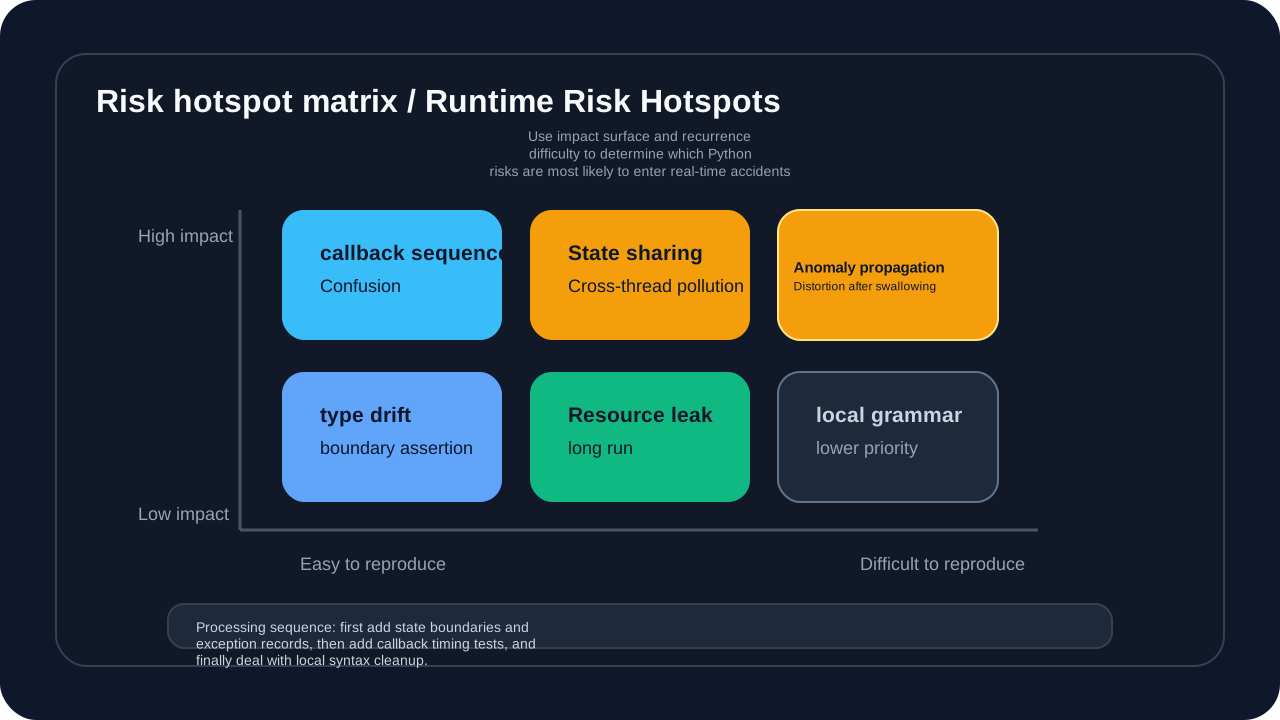
This picture answers “Which Python risks are most likely to enter the real market accident”. State sharing, callback ordering, exception propagation, and type drift are not single-point syntax issues, they span the data layer, strategy layer, graph layer, and execution layer. When readers fix this type of problem, they should not only change the error line, but also check status ownership, thread boundaries, exception records, and regression testing.
Trap 19: Create Qt objects in background thread
Real case: Call multi_timeframe_widget.switch_symbol() in the background thread. This method will create a Qt graphics object.
# illustrative code, not production code
# unsafe code
def _load():
    self.multi_timeframe_widget.switch_symbol(...)  # creates Qt objects

thread = Thread(target=_load)
thread.start()  # runs in a background thread

# : QObject: Cannot create children for a parent that is in a different thread
Principle analysis: Qt’s QObject has thread affinity, and each QObject must belong to the thread that created it. QObject’s parent-child relationship requires that the parent object and child object must be in the same thread. Creating Qt objects in a non-main thread will cause thread affinity errors because Qt requires all GUI operations to be performed on the main thread.
AI guidance suggestions:
Prompt: "When generating code for Trap 19: Create Qt objects in background thread, keep the safe pattern in this section, make the failure mode explicit, and add a regression check for the edge case."Solution:
# illustrative code, not production code
# safe approach: use QTimer.singleShot to run asynchronously on the main thread
from PyQt5.QtCore import QTimer

def _load_multi_data():
    self.multi_timeframe_widget.switch_symbol(...)

# defer execution on the main thread
QTimer.singleShot(100, _load_multi_data)
Trap 20: Concurrent writes to the database cause Locked
Real case: Manual update and automatic update are executed at the same time, resulting in SQLite database is locked error.
# illustrative code, not production code
# unsafe code
# Thread A: manual update
with lock_data:
    save_bar_data(data)  # takes 30 seconds

# Thread B: automatic update(runs concurrently)
with lock_data:
    save_bar_data(other_data)  # database is locked!
Principle analysis: SQLite uses file-level locking by default, allowing only one write operation at a time. When multiple threads try to write at the same time, later threads receive a “database is locked” error. SQLite’s lock timeout is very short by default (such as 5 seconds), and long operations will cause lock competition. You need to use a mutex lock (Lock) to serialize database access, or use WAL mode (Write-Ahead Logging) to improve concurrency.
AI guidance suggestions:
Prompt: "When generating code for Trap 20: Concurrent writes to the database cause Locked, keep the safe pattern in this section, make the failure mode explicit, and add a regression check for the edge case."Solution:
# illustrative code, not production code
# safe approach: centralized lock management
class ManagerEngine:
    def __init__(self):
        self._db_lock = threading.Lock()
        self.is_updating = False

    def update_data(self):
        if self.is_updating:
            return  # skip concurrent request

        with self._db_lock:
            self.is_updating = True
            try:
                self._do_update()
            finally:
                self.is_updating = False
Trap 21: Race condition - read-modify-write
# illustrative code, not production code
# unsafe code
class PositionManager:
    def update_position(self, symbol, qty):
        current = self.positions.get(symbol, 0)  # Thread Areads
        # Thread Breadscurrent
        self.positions[symbol] = current + qty  # Thread Awrites, Thread Bcover
Principle analysis: This is a classic Read-Modify-Write race condition. Threads A and B read the same value at the same time, each calculates a new value, and then writes it one after another. The thread that writes later will overwrite the updates of the thread that wrote first, resulting in data loss. This operation is not atomic and the entire sequence of operations must be protected using a lock.
AI guidance suggestions:
Prompt: "When generating code for Trap 21: Race condition - read-modify-write, keep the safe pattern in this section, make the failure mode explicit, and add a regression check for the edge case."Solution:
# illustrative code, not production code
# safe approach
from threading import Lock

class PositionManager:
    def __init__(self):
        self._lock = Lock()

    def update_position(self, symbol, qty):
        with self._lock:
            current = self.positions.get(symbol, 0)
            self.positions[symbol] = current + qty
Trap 22: Deadlock - inconsistent lock order
# illustrative code, not production code
# unsafe code
# Thread A
with lock_data:
    with lock_position:
        update()

# Thread B
with lock_position:
    with lock_data:  # deadlock
        update()
Principle analysis: A deadlock occurs when two or more threads wait for each other to release a lock. Thread A holds lock_data and waits for lock_position, while thread B holds lock_position and waits for lock_data. Neither thread can continue execution. The key to preventing deadlock is to ensure that all threads acquire locks in the same order, or to use a timeout mechanism.
AI guidance suggestions:
Prompt: "When generating code for Trap 22: Deadlock - inconsistent lock order, keep the safe pattern in this section, make the failure mode explicit, and add a regression check for the edge case."Solution:
# illustrative code, not production code
# safe approach: consistent lock order
LOCK_ORDER = [lock_data, lock_position, lock_order]

def acquire_all_locks():
    for lock in LOCK_ORDER:
        lock.acquire()

def release_all_locks():
    for lock in reversed(LOCK_ORDER):
        lock.release()
Trap 23: Signal and slot calling across threads
# illustrative code, not production code
# unsafe code
# directly update UI in a worker thread
self.label.setText("Update complete")  # crash
Principle analysis: Qt’s signal and slot mechanism is thread-safe. Signals can be emitted in any thread, and the slot function will be executed in the receiver’s thread. Qt uses event queues to schedule signal and slot calls across threads. Operating GUI components directly on the background thread will cause thread safety issues, because Qt’s GUI components are not thread safe.
AI guidance suggestions:
Prompt: "When generating code for Trap 23: Signal and slot calling across threads, keep the safe pattern in this section, make the failure mode explicit, and add a regression check for the edge case."Solution:
# illustrative code, not production code
# safe approach: use signals and slots for cross-thread communication
from PyQt5.QtCore import pyqtSignal, QObject

class Worker(QObject):
    finished = pyqtSignal(str)

    def run(self):
        result = self.do_work()
        self.finished.emit(result)  # notify the main thread through a signal

# main thread connects the signal
worker.finished.connect(self.label.setText)
Trap 24: Mixing asyncio with synchronous code
# illustrative code, not production code
# unsafe code
async def fetch_data():
    return requests.get(url)  # blocks the event loop
Principle analysis:
asyncio uses a single-threaded event loop to handle coroutines. When a coroutine encounters await, it will suspend and give up control to other coroutines. If a synchronous blocking operation (such as requests.get) is called in a coroutine, the entire event loop will be blocked, preventing other coroutines from executing. You must use an asynchronous library (such as aiohttp) or put the blocking operation in the thread pool.
AI guidance suggestions:
Prompt: "When generating code for Trap 24: Mixing asyncio with synchronous code, keep the safe pattern in this section, make the failure mode explicit, and add a regression check for the edge case."Solution:
# illustrative code, not production code
# safe approach
import aiohttp

async def fetch_data():
    async with aiohttp.ClientSession() as session:
        async with session.get(url) as response:
            return await response.text()

# or run blocking work in a separate thread
import asyncio
from concurrent.futures import ThreadPoolExecutor

executor = ThreadPoolExecutor()

async def fetch_data():
    loop = asyncio.get_event_loop()
    return await loop.run_in_executor(executor, requests.get, url)
Trap 25: GIL and CPU-intensive tasks
# illustrative code, not production code
# unsafe code
with ThreadPoolExecutor(max_workers=4) as executor:
    futures = [executor.submit(cpu_intensive_task) for _ in range(4)]
    # because of the GIL, only one thread executes Python bytecode at a time
Principle analysis: Python’s GIL (Global Interpreter Lock, global interpreter lock) ensures that only one thread executes Python bytecode at the same time. For CPU-intensive tasks, multi-threading cannot achieve true parallelism, but will reduce performance due to thread switching overhead. The GIL is only released in IO operations or C extensions (such as NumPy, Numba), CPU-intensive tasks should use multi-process to bypass the GIL.
AI guidance suggestions:
Prompt: "When generating code for Trap 25: GIL and CPU-intensive tasks, keep the safe pattern in this section, make the failure mode explicit, and add a regression check for the edge case."Solution:
# illustrative code, not production code
# safe approach: use multiprocessing
from multiprocessing import Pool

with Pool(processes=4) as pool:
    results = pool.map(cpu_intensive_task, tasks)

# use Numba to release the GIL
from numba import jit

@jit(nogil=True)
def cpu_intensive_task(data):
    ...
Trap 26: Thread local storage misuse
# illustrative code, not production code
# unsafe code
import threading

local_data = threading.local()
local_data.bar = None

def process():
    print(local_data.bar)  # another thread may not see it
Principle analysis: threading.local() creates thread-local storage, and each thread has an independent namespace. Properties set in one thread do not automatically appear in other threads. If accessed without initialization in the current thread, AttributeError will be thrown. Thread local variables must be initialized at the function entry point of each thread.
AI guidance suggestions:
Prompt: "When generating code for Trap 26: Thread local storage misuse, keep the safe pattern in this section, make the failure mode explicit, and add a regression check for the edge case."Solution:
# illustrative code, not production code
# safe approach: initialize before use
local_data = threading.local()

def process():
    if not hasattr(local_data, 'bar'):
        local_data.bar = None
    print(local_data.bar)
Trap 27: Future callback is lost abnormally
# illustrative code, not production code
# unsafe code
future = executor.submit(risky_operation)
future.add_done_callback(lambda f: print(f.result()))  # exception is ignored
Principle analysis:
If the Future’s callback function throws an exception, the exception will be propagated to the event loop, but if there is no event loop or exception handler, the exception may be lost silently. If future.result() is called in the callback function, the exception will be re-thrown if the task fails, and must be caught in the callback. Unhandled exceptions can lead to inconsistent program state or resource leaks.
AI guidance suggestions:
Prompt: "When generating code for Trap 27: Future callback is lost abnormally, keep the safe pattern in this section, make the failure mode explicit, and add a regression check for the edge case."Solution:
# illustrative code, not production code
# safe approach
def on_done(future):
    try:
        result = future.result()
        print(result)
    except Exception as e:
        logger.error(f"Task failed: {e}")

future.add_done_callback(on_done)
Trap 28: Event Loop is not closed properly
# illustrative code, not production code
# unsafe code
loop = asyncio.get_event_loop()
loop.run_until_complete(main())
# loop is not closed; resource leak
Principle analysis:
Asyncio’s event loop manages the scheduling and execution of coroutines. The created event loop, if not closed, can lead to resource leaks, including unfinished tasks, file descriptors, and memory. Python 3.7+ recommends using asyncio.run() directly, which will automatically create a new loop, run the coroutine, and close the loop. When managing manually you need to make sure to close in the finally block.
AI guidance suggestions:
Prompt: "When generating code for Trap 28: Event Loop is not closed properly, keep the safe pattern in this section, make the failure mode explicit, and add a regression check for the edge case."Solution:
# illustrative code, not production code
# safe approach
async def main():
    ...

if __name__ == "__main__":
    asyncio.run(main())  # Python 3.7+

# explicitmanage
loop = asyncio.new_event_loop()
try:
    loop.run_until_complete(main())
finally:
    loop.close()
Risk Group 4: Data Processing and Time Series Risks (Trap 29-40)
Data processing problems are particularly insidious in quantitative systems. Time zone naive/aware mixing, floating point errors, Pandas index type inconsistencies, NumPy view modifications, chained assignments, dtype overflows, missing values, and resampling boundaries can all skew indicator results slightly. Once a slight deviation enters the strategy signal, it is difficult to detect it directly through the naked eye log.
Trap 29: Mixing time zone naive and aware
Real case: An error occurred when comparing the datetime returned by the database query with the local datetime.
# illustrative code, not production code
# unsafe code
can't subtract offset-naive and offset-aware datetimes
Principle analysis: Python’s datetime objects are divided into naive (no awareness, no time zone information) and aware (aware, with time zone information). Two datetime objects cannot be compared or calculated directly. The database, API, and locally generated datetime may use different time zone formats. Must be uniformly converted to aware datetime at boundaries, usually stored as UTC and converted to local time zone when displayed.
AI guidance suggestions:
Prompt: "When generating code for Trap 29: Mixing time zone naive and aware, keep the safe pattern in this section, make the failure mode explicit, and add a regression check for the edge case."Solution:
# illustrative code, not production code
# safe approach: normalize timezone handling
import pytz
from vnpy.trader.setting import SETTINGS

# load database timezone configuration
db_tz_name = SETTINGS.get("database.timezone", "Asia/Shanghai")
database_tz = pytz.timezone(db_tz_name)

# convert all datetimes to the database timezone
if db_earliest.tzinfo is None:
    db_earliest = database_tz.localize(db_earliest)
else:
    db_earliest = db_earliest.astimezone(database_tz)
Trap 30: Floating point precision cumulative error
# illustrative code, not production code
# unsafe code
price = 28500.01
tick_size = 0.01
normalized = price / tick_size  # 2850000.9999999995 !

# validation fails
if normalized == 2850001:  # False!
    ...
Principle analysis: Floating point numbers are represented using the IEEE 754 binary floating point number standard. Many decimal decimals (such as 0.1) are infinitely recurring decimals in binary and can only be stored approximately. This causes seemingly simple operations (such as 0.1 + 0.2) to have inaccurate results. For financial calculations, this error can accumulate and lead to serious errors. Currency calculations should be handled using the integer or decimal modules.
AI guidance suggestions:
Prompt: "When generating code for Trap 30: Floating point precision cumulative error, keep the safe pattern in this section, make the failure mode explicit, and add a regression check for the edge case."Solution:
# illustrative code, not production code
# safe approach:
# "minimum unit"
PRICE_SCALE = 100  # 0.01

price_int = int(28500.01 * PRICE_SCALE)  # 2850001
normalized = price_int  # exact integer

# convert only for display
price_display = price_int / PRICE_SCALE  # 28500.01
Trap 31: Pandas index types are inconsistent
# illustrative code, not production code
# unsafe code
df.index = pd.to_datetime(df.index)  # datetime64[ns, UTC]
# converting again may lose timezone information
Principle analysis:
Pandas’ DatetimeIndex can be in different time zone formats (naive or aware). Repeated conversions may lose time zone information or change data types. pd.to_datetime() will automatically infer based on the input format, but if the index is already a DatetimeIndex, converting again may cause unexpected behavior. Index type and time zone status should be checked before conversion.
AI guidance suggestions:
Prompt: "When generating code for Trap 31: Pandas index types are inconsistent, keep the safe pattern in this section, make the failure mode explicit, and add a regression check for the edge case."Solution:
# illustrative code, not production code
# safe approach: check before converting
if not isinstance(df.index, pd.DatetimeIndex):
    df.index = pd.to_datetime(df.index, utc=True)
elif df.index.tz is None:
    df.index = df.index.tz_localize('UTC')
Trap 32: NumPy array view modifies original data
# illustrative code, not production code
# unsafe code
arr = np.array([1, 2, 3, 4, 5])
view = arr[1:4]
view[0] = 999
print(arr)  # [1, 999, 3, 4, 5] - the original array is mutated
Principle analysis:
NumPy’s slicing operation returns a view of the original array, not a copy. Views share the underlying data buffer, and modifying the view will affect the original array. This is a design choice of NumPy for memory efficiency and performance. The .copy() method must be called explicitly when an independent copy is required.
AI guidance suggestions:
Prompt: "When generating code for Trap 32: NumPy array view modifies original data, keep the safe pattern in this section, make the failure mode explicit, and add a regression check for the edge case."Solution:
# illustrative code, not production code
# safe approach: explicitly copy
view = arr[1:4].copy()
Trap 33: Pandas chain assignment warning
# illustrative code, not production code
# unsafe code
df[df.symbol == 'HSI']['close'] = 100  # SettingWithCopyWarning
Principle analysis:
Pandas’ chained index df[mask][col] will first return a temporary DataFrame slice and then index it. This slice may be a view or a copy of the original DataFrame. Pandas cannot determine this, so SettingWithCopyWarning is issued. If the slice is a view, the assignment may succeed; if it is a copy, the assignment is discarded. Using .loc[] for a single index assignment ensures that the modification takes effect.
AI guidance suggestions:
Prompt: "When generating code for Trap 33: Pandas chain assignment warning, keep the safe pattern in this section, make the failure mode explicit, and add a regression check for the edge case."Solution:
# illustrative code, not production code
# safe approach
df.loc[df.symbol == 'HSI', 'close'] = 100
Trap 34: Data type overflow
# illustrative code, not production code
# unsafe code
import numpy as np

volume = np.int16(30000)
new_volume = volume * 2  # overflow-5536
Principle analysis: NumPy’s integer types (int8, int16, int32, int64) have fixed bit widths, and values outside the range are wrapped around according to the two’s complement rules. The range of int16 is -32768 to 32767, 30000*2=60000 is out of range, and the result becomes -5536. This overflow is silent and does not throw an exception, but it can cause incorrect results.
AI guidance suggestions:
Prompt: "When generating code for Trap 34: Data type overflow, keep the safe pattern in this section, make the failure mode explicit, and add a regression check for the edge case."Solution:
# illustrative code, not production code
# safe approach: use a sufficiently large type
volume = np.int64(30000)
new_volume = volume * 2  # 60000
Trap 35: Inconsistent handling of missing values
# illustrative code, not production code
# unsafe code
import pandas as pd
import numpy as np

df['signal'] = np.where(df['ma'] > df['close'], 1, None)  # mixed types
Principle analysis: Pandas columns need to be of uniform type. Mixing integers and None will cause the column to become an object type (Python object), losing the numerical optimization performance of Pandas. np.nan is a missing value marker of floating point type, mixing with integers will make the column a float64. Pandas 1.0+ supports nullable integer types (Int64, capital I), which can store integers and missing values correctly.
AI guidance suggestions:
Prompt: "When generating code for Trap 35: Inconsistent handling of missing values, keep the safe pattern in this section, make the failure mode explicit, and add a regression check for the edge case."Solution:
# illustrative code, not production code
# safe approach: use a dedicated missing-value marker
df['signal'] = np.where(df['ma'] > df['close'], 1, np.nan)  # normalize to float

# or use Int64 nullable integers
df['signal'] = df['signal'].astype('Int64')
Trap 36: DataFrame merge produces duplicate columns
# illustrative code, not production code
# unsafe code
merged = df1.merge(df2, on='symbol')  # duplicate column names create _x and _y suffixes
# may accidentally use the wrong column
Principle analysis: Pandas’ merge operation will automatically handle duplicate-named columns and add _x and _y suffixes to the same-named non-key columns of the left and right DataFrames. Not knowing which columns conflict can cause subsequent code to use the wrong columns (such as using price_x instead of price_y). Explicitly specifying suffixes can control the suffix name, and the validate parameter can verify the expected type of the merge relationship.
AI guidance suggestions:
Prompt: "When generating code for Trap 36: DataFrame merge produces duplicate columns, keep the safe pattern in this section, make the failure mode explicit, and add a regression check for the edge case."Solution:
# illustrative code, not production code
# safe approach: explicitly specify merge columns and suffixes
merged = df1.merge(df2, on='symbol', suffixes=('_left', '_right'))

# or use the validate argument
merged = df1.merge(df2, on='symbol', validate='one_to_one')
Trap 37: Time series resampling boundary problem
# illustrative code, not production code
# unsafe code
# 15-minute bar resampling
bars_15m = bars_1m.resample('15T').agg({
    'open': 'first',
    'high': 'max',
    'low': 'min',
    'close': 'last'
})
# the first bar timestamp may not match the expected 15-minute boundary
Principle analysis: Pandas resample uses left-closed and right-open intervals (closed=‘left’, label=‘left’) by default. The first interval may start from the first time point of the data, which is not necessarily a standard time boundary (such as 9:00, 9:15). This will cause the K-line timestamps to be inconsistent. Using label=‘right’ and closed=‘right’ can make the interval close to the right, which is a K-line time mark that is more in line with trading habits.
AI guidance suggestions:
Prompt: "When generating code for Trap 37: Time series resampling boundary problem, keep the safe pattern in this section, make the failure mode explicit, and add a regression check for the edge case."Solution:
# illustrative code, not production code
# safe approach: use label and closed arguments
bars_15m = bars_1m.resample('15T', label='right', closed='right').agg({
    'open': 'first',
    'high': 'max',
    'low': 'min',
    'close': 'last'
})
Trap 38: Divide by zero error
Real Case: Divisor not checked when calculating pixel distance.
# illustrative code, not production code
# unsafe code
price_per_pixel = price_range / widget_height if widget_height > 0 else 0
distance_pixels = distance / price_per_pixel  # price_per_pixelmay be zero
Principle analysis: Dividing by zero in Python throws a ZeroDivisionError exception. Even if there is a previous check (such as widget_height > 0), subsequent calculations may produce zero values (such as price_per_pixel is 0). In a chained calculation, every variable that may be a divisor needs to be checked. Divide-by-zero errors can interrupt program execution and in high-frequency trading systems can result in lost orders.
AI guidance suggestions:
Prompt: "When generating code for Trap 38: Divide by zero error, keep the safe pattern in this section, make the failure mode explicit, and add a regression check for the edge case."Solution:
# illustrative code, not production code
# safe approach: also check y_height
if plot_height > 0 and y_height > 0:
    price_per_pixel = y_height / plot_height
    distance_pixels = distance / price_per_pixel
Trap 39: String matching case problem
# illustrative code, not production code
# unsafe code
if symbol == "hSI":  # case mismatch
    ...
Principle analysis: Python’s string comparison is case-sensitive. Strings input by users, configuration files, and APIs may use different case formats, and direct comparison will result in matching failure. Case should be unified at system boundaries (usually uppercase), or a case-insensitive comparison method should be used.
AI guidance suggestions:
Prompt: "When generating code for Trap 39: String matching case problem, keep the safe pattern in this section, make the failure mode explicit, and add a regression check for the edge case."Solution:
# illustrative code, not production code
# safe approach: normalize case
if symbol.upper() == "HSI":
    ...

# or use an enum
from enum import Enum

class Symbol(Enum):
    HSI = "HSI"
    MHI = "MHI"
Trap 40: JSON serialization datetime failed
# illustrative code, not production code
# unsafe code
import json

data = {'time': datetime.now()}
json.dumps(data)  # TypeError: Object of type datetime is not JSON serializable
Principle analysis: Python’s json module can only serialize basic types (str, int, float, bool, list, dict, None) by default. The datetime object is not a natively supported type of JSON, and attempting to serialize it will throw a TypeError. A custom JSONEncoder is required to convert the datetime to an ISO 8601 format string, or manually converted before serialization.
AI guidance suggestions:
Prompt: "When generating code for Trap 40: JSON serialization datetime failed, keep the safe pattern in this section, make the failure mode explicit, and add a regression check for the edge case."Solution:
# illustrative code, not production code
# safe approach: custom encoder
from datetime import datetime
import json

class DateTimeEncoder(json.JSONEncoder):
    def default(self, obj):
        if isinstance(obj, datetime):
            return obj.isoformat()
        return super().default(obj)

json.dumps(data, cls=DateTimeEncoder)

# usepandas
import pandas as pd
data['time'] = pd.Timestamp(data['time']).isoformat()
Risk group five: Qt/GUI life cycle risk (Trap 41-50)
GUI risks are different from regular Python script risks. Qt has object trees, thread affinity, event filters, timers, layout systems, and underlying drawing resources. Many errors will not immediately appear as Python exceptions, but will appear as sporadic crashes, repeated triggers, interface freezes, resource leaks, or abnormal window behavior. The more a trading terminal relies on real-time charts and desktop interaction, the more it needs to manage the GUI lifecycle as a system boundary.
Trap 41: Signal slot loop connection
# illustrative code, not production code
# unsafe code
self.signal_tick.connect(self.process_tick)
self.signal_tick.connect(self.process_tick)  # duplicate connection!
# emithandle
Principle analysis: Qt’s signal and slot mechanism allows one signal to connect multiple slot functions. Repeatedly connecting the same signal and slot will cause the slot function to be called multiple times when the signal is emitted. This can easily happen when UI components are dynamically created or initialized multiple times. The Qt.UniqueConnection type can prevent repeated connections or try to disconnect existing connections before connecting.
AI guidance suggestions:
Prompt: "When generating code for Trap 41: Signal slot loop connection, keep the safe pattern in this section, make the failure mode explicit, and add a regression check for the edge case."Solution:
# illustrative code, not production code
# safe approach: check or disconnect the old connection before connecting
try:
    self.signal_tick.disconnect(self.process_tick)
except (TypeError, RuntimeError):
    pass
self.signal_tick.connect(self.process_tick)

# or use a unique connection
self.signal_tick.connect(self.process_tick, type=Qt.UniqueConnection)
Trap 42: QPainter not ended correctly
# illustrative code, not production code
# unsafe code
painter = QPainter(self)
painter.drawRect(rect)
# forgetting painter.end() may crash
Principle analysis: QPainter is Qt’s drawing device. End() must be called after drawing is completed to release the underlying drawing resources. Improperly ending QPainter can cause memory leaks, inconsistent drawing state, or crashes. QPainter supports context managers (with statements), which ensures that even if an exception occurs, it ends correctly.
AI guidance suggestions:
Prompt: "When generating code for Trap 42: QPainter not ended correctly, keep the safe pattern in this section, make the failure mode explicit, and add a regression check for the edge case."Solution:
# illustrative code, not production code
# safe approach: use a context manager
with QPainter(self) as painter:
    painter.drawRect(rect)

# explicitmanage
painter = QPainter(self)
try:
    painter.drawRect(rect)
finally:
    if painter.isActive():
        painter.end()
Trap 43: Timer not stopped causing crash
# illustrative code, not production code
# unsafe code
self.timer = QTimer(self)
self.timer.timeout.connect(self.update)
self.timer.start(1000)

# the timer is still running when the object is destroyed
Principle analysis: QTimer will automatically stop when the QObject is destroyed, but if the timer’s slot function is triggered during the destruction process, it may access the deleted object and cause a crash. Especially in complex object life cycle management, the timer should be stopped explicitly in closeEvent or destructor. Setting timer as an instance variable ensures life cycle management.
AI guidance suggestions:
Prompt: "When generating code for Trap 43: Timer not stopped causing crash, keep the safe pattern in this section, make the failure mode explicit, and add a regression check for the edge case."Solution:
# illustrative code, not production code
# safe approach: stop it during teardown
class MyWidget(QWidget):
    def __init__(self):
        super().__init__()
        self.timer = QTimer(self)
        self.timer.timeout.connect(self.update)
        self.timer.start(1000)

    def closeEvent(self, event):
        self.timer.stop()
        super().closeEvent(event)
Trap 44: Cross-thread access to QObject
# illustrative code, not production code
# unsafe code
def background_task():
    self.label.setText("Done")  # accesses UI from a background thread

thread = Thread(target=background_task)
thread.start()
Principle analysis: Qt’s QObject and its subclasses (such as QWidget) have thread affinity and can only be accessed in the thread that created it. QMetaObject.invokeMethod can call QObject methods across threads, and use Qt.QueuedConnection to put the call into the event queue of the target thread for asynchronous execution. The signal-slot mechanism automatically handles cross-thread calls and schedules slot function execution to the recipient thread.
AI guidance suggestions:
Prompt: "When generating code for Trap 44: Cross-thread access to QObject, keep the safe pattern in this section, make the failure mode explicit, and add a regression check for the edge case."Solution:
# illustrative code, not production code
# safe approach: use signals or invokeMethod
from PyQt5.QtCore import QMetaObject, Qt, Q_ARG

# method 1: signals and slots
class Worker(QObject):
    result_ready = pyqtSignal(str)

    def work(self):
        result = "Done"
        self.result_ready.emit(result)

# method 2: invokeMethod
QMetaObject.invokeMethod(self.label, "setText",
                         Qt.QueuedConnection,
                         Q_ARG(str, "Done"))
Trap 45: Event filter recursion
# illustrative code, not production code
# unsafe code
def eventFilter(self, obj, event):
    if event.type() == QEvent.MouseMove:
        self.process_mouse_move(event)
        # may trigger a new event and recurse
    return super().eventFilter(obj, event)
Principle analysis: When processing events in the event filter, if a new event is triggered (such as modifying the mouse position to trigger a new MouseMove), infinite recursion may occur. Qt’s event processing is synchronous, and new events may be generated when processing events. You need to add a recursion protection flag, ignore newly generated events during processing, or use QTimer.singleShot to delay processing to avoid recursion.
AI guidance suggestions:
Prompt: "When generating code for Trap 45: Event filter recursion, keep the safe pattern in this section, make the failure mode explicit, and add a regression check for the edge case."Solution:
# illustrative code, not production code
# safe approach: add recursion guard
class MyWidget(QWidget):
    def __init__(self):
        self._processing = False

    def eventFilter(self, obj, event):
        if event.type() == QEvent.MouseMove:
            if self._processing:
                return True  # ignore recursive events
            self._processing = True
            try:
                self.process_mouse_move(event)
            finally:
                self._processing = False
        return super().eventFilter(obj, event)
Trap 46: Style sheet inheritance issues
# illustrative code, not production code
# unsafe code
widget.setStyleSheet("background: red")  # affects all child widgets
Principle analysis: Qt Style Sheet (QSS) supports CSS-like selectors, and the style will be applied to all controls matching the selector. If the style is too broad (such as only setting the background color), it may be accidentally applied to child controls, resulting in inconsistent UI styles. Class names, object names or specific selectors should be used to limit the scope of styles to avoid global impact.
AI guidance suggestions:
Prompt: "When generating code for Trap 46: Style sheet inheritance issues, keep the safe pattern in this section, make the failure mode explicit, and add a regression check for the edge case."Solution:
# illustrative code, not production code
# safe approach: scope the selector
widget.setStyleSheet("""
    MyWidget {
        background: red;
    }
    MyWidget QPushButton {
        background: blue;
    }
""")
Trap 47: The layout is not updated causing abnormal display
# illustrative code, not production code
# unsafe code
self.layout.addWidget(new_widget)
# the new widget may not display or may have the wrong size
Principle analysis: Qt’s layout system needs to recalculate the layout geometry after adding controls. Sometimes the layout doesn’t update automatically, especially when controls are added dynamically. Call layout.update() to notify that the layout needs to be recalculated, adjustSize() to adjust the window size to suit the content, and QApplication.processEvents() to process all pending events to ensure that the UI is updated synchronously.
AI guidance suggestions:
Prompt: "When generating code for Trap 47: The layout is not updated causing abnormal display, keep the safe pattern in this section, make the failure mode explicit, and add a regression check for the edge case."Solution:
# illustrative code, not production code
# safe approach: update the layout
self.layout.addWidget(new_widget)
self.layout.update()
self.adjustSize()
# force pending layout events only when a synchronous size check is required
QApplication.processEvents()
Trap 48: Dialog has no parent window set
# illustrative code, not production code
# unsafe code
dialog = QDialog()  # no parent window
dialog.exec_()
# may show a separate taskbar icon
Principle analysis: The parent window relationship of a Qt dialog box determines the dialog box’s position, life cycle, and taskbar behavior. A dialog box with a parent window will be displayed on top of the parent window and inherit some properties of the parent window. A dialog box without a parent window will become an independent window and display an independent icon on the taskbar. Setting the parent window also ensures that the dialog box is automatically destroyed when the parent window is destroyed.
AI guidance suggestions:
Prompt: "When generating code for Trap 48: Dialog has no parent window set, keep the safe pattern in this section, make the failure mode explicit, and add a regression check for the edge case."Solution:
# illustrative code, not production code
# safe approach: set the parent window
dialog = QDialog(self)  # selfas the parent window
dialog.exec_()
Trap 49: Resource file path problem
# illustrative code, not production code
# unsafe code
icon = QIcon("images/icon.png")  # relative path may not resolve
Principle analysis: The resolution of relative paths depends on the current working directory (CWD), which may be different from the directory where the script is located. CWD may change under IDE, packaging tools or different startup methods. You should use the absolute path to the script or Qt’s resource system (.qrc) to ensure the resource file path is correct. The resource system compiles files into executable files and does not rely on external files.
AI guidance suggestions:
Prompt: "When generating code for Trap 49: Resource file path problem, keep the safe pattern in this section, make the failure mode explicit, and add a regression check for the edge case."Solution:
# illustrative code, not production code
# safe approach: use absolute paths or the resource system
import os

base_dir = os.path.dirname(os.path.abspath(__file__))
icon_path = os.path.join(base_dir, "images", "icon.png")
icon = QIcon(icon_path)

# or use the qrc resource system
icon = QIcon(":/images/icon.png")
Trap 50: Memory leak – forgetting to delete dynamically created objects
# illustrative code, not production code
# unsafe code
for i in range(1000):
    label = QLabel(f"Label {i}", self)
    # no parent object, no saved reference, and no deletion
Principle analysis: Qt uses a parent-child object tree to manage memory. Child objects set to a parent object are automatically destroyed when the parent object is destroyed. But if you create a large number of objects dynamically without setting the parent object or deleting it explicitly, it will cause a memory leak. If controls such as QLabel do not save references and have no parent objects, Python’s garbage collection will not immediately release the Qt objects because they still have references in the C++ layer.
AI guidance suggestions:
Prompt: "When generating code for Trap 50: Memory leak – forgetting to delete dynamically created objects, keep the safe pattern in this section, make the failure mode explicit, and add a regression check for the edge case."Solution:
# illustrative code, not production code
# safe approach: set the parent object or use deleteLater
# 1: settings, destroy with the parent object
label = QLabel(f"Label {i}", self)

# 2: delete explicitly
self.temp_labels.append(label)
# later cleanup
for label in self.temp_labels:
    label.deleteLater()
self.temp_labels.clear()
Upgrade single point repair to anti-regression mechanism
After reading 50 traps, the most important conclusion is not “don’t make these mistakes in the future”, but to precipitate the repair method into an executable mechanism. Python bugs in trading systems rarely affect just one line of code: import rules affect startup paths, type contracts affect event payloads, state lifecycle affects caching and GUI, event boundaries affect threads, async and backtest recurrence.
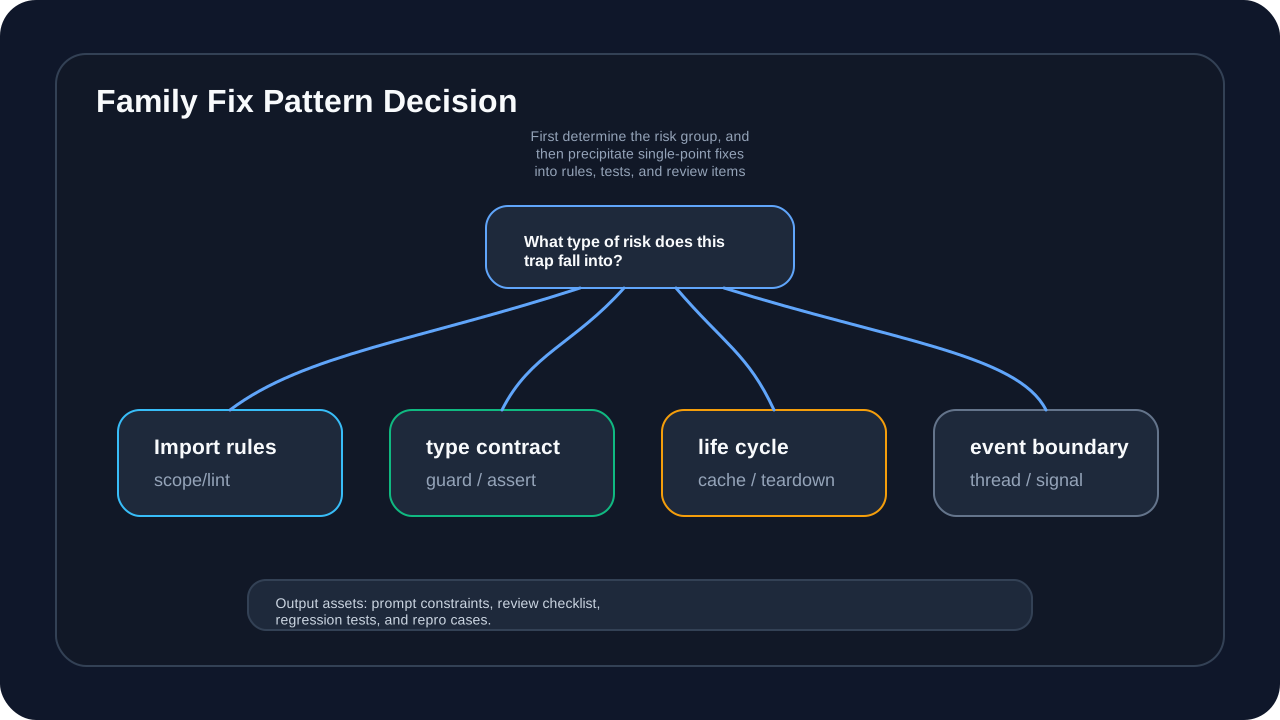
This picture answers the question “After repairing a Trap, how to avoid similar problems from happening again”. Syntax and scope issues should be settled into import rules and lint rules; type boundary issues should be settled into interface contracts, type guards, and runtime assertions; state life cycle issues should be settled into object ownership, cache invalidation, and teardown rules; concurrency and GUI issues should be settled into event boundaries, thread constraints, and fault recurrence use cases.
Readers can rewrite the “AI guidance suggestions” of each Trap into three types of assets. The first type is prompt word constraints to prevent AI from generating similar errors; the second type is Code Review checklist, which allows manual reviewers to have clear checkpoints; and the third type is regression testing or minimal recurrence to ensure that the next refactoring, performance optimization or AI-generated code will not bring back similar problems.
If you only do single-point patches, the 50 Traps will quickly become a new long list; if they are classified into risk groups and precipitated into rules, tests, and review items, they will become inputs for the Part 4 test defense line and the Part 6 architecture evolution.
Series context
You are reading: Quantitative trading system development record
This is article 2 of 7. Reading progress is stored only in this browser so the full series page can resume from the right entry.
Series Path
Current series chapters
Chapter clicks store reading progress only in this browser so the series page can resume from the right entry.
- Quantitative trading system development record (1): five key decisions in project startup and architecture design Taking Micang Trader as an example, this article starts from system boundaries, data flow, trading-session ownership, unified backtesting/live-trading interfaces, and AI collaboration boundaries to establish the architecture thread for the quantitative trading system series.
- Quantitative trading system development record (2): Python Pitfalls practical pitfall avoidance guide (1) Reorganize Python traps from a long list into an engineering risk reference for quantitative trading systems: how to amplify the three types of risks, syntax and scope, type and state, concurrency and state, into real trading system problems.
- Record of Quantitative Trading System Development (Part 3): Python Pitfalls Practical Pitfalls Avoidance Guide (Part 2) Continuing to reorganize Python risks into a reference piece: how GUI lifecycles, asynchronous network failures, security boundaries, and deployment infrastructure affect the long-term stability of quantitative trading systems.
- Quantitative trading system development record (4): test-driven agile development (AI Agent assistance) Starting from a cross-night trading day boundary bug, we reconstruct the test defense line of the quantitative trading system: defect-oriented testing pyramid, AI TDD division of labor, boundary time, data lineage and CI Gate.
- Quantitative trading system development record (5): Python performance tuning practice Transform performance optimization from empirical guesswork into a verifiable investigation process: start from the 3-second chart delay, locate the real bottleneck, compare optimization solutions, and establish benchmarks and rollback strategies.
- Record of Quantitative Trading System Development (6): Architecture Evolution and Reconstruction Decisions Review the five refactorings of Micang Trader, explaining how the system evolved from the initial snapshot to a clearer target architecture, and incorporated technical debt and ADR decisions into long-term governance.
- Quantitative trading system development record (7): AI engineering implementation - from speckit to BMAD Taking the trading calendar and daily aggregation requirements as a single case, explain how AI engineering can enter the delivery of real quantitative systems through specification drive, BMAD role handover and manual quality gate control.
Reading path
Continue along this topic path
Follow the recommended order for Quantitative system development practice instead of jumping through random articles in the same topic.
Next step
Go deeper into this topic
If this article is useful, continue from the topic page or subscribe to follow later updates.
Loading comments...
Comments and discussion
Sign in with GitHub to join the discussion. Comments are synced to GitHub Discussions