Article
Original Analysis: Capability Building for Python Developers in the AI Tools Era—A Practical Guide for Frontline Engineers
Based on Stack Overflow 2025 data, establishing a capability building roadmap from beginner to expert, providing stage assessment, priority ranking, and minimum executable solutions
Copyright Notice and Disclaimer Copyright notice and disclaimer can be found in Part 1 of the series.
Original Nature This article is not a learning resource list or tutorial recommendation, but a practical capability building guide for frontline engineers, providing stage assessment, priority ranking, and minimum executable solutions.
Opening: Real Dilemmas—Skill Anxiety in the AI Tools Era
First, look at the data:
Data Note: The following data comes from Stack Overflow Developer Survey 2025 (published in May 2025, reflecting 2024 developer survey results). This article was written in April 2026.
Stack Overflow Developer Survey 2025
- AI developers using AI tools: 72%
- Python usage rate: 48.2% (4th place, +3.2% growth)
- Docker usage rate: 57.2% (+8%, significant growth)
What does this mean?
Almost every Python developer is using AI tools like Copilot, ChatGPT, Claude, etc. Code completion, function generation, error explanation, documentation writing—AI tools have become standard.
But this also brings anxiety:
Beginner confusion: “Since AI can write code, do I still need to learn Python?”
Intermediate anxiety: “My work (writing CRUD, calling APIs) seems like AI can do it too—where is my core competitiveness?”
Senior confusion: “Technology updates too fast, Mojo, Julia, Rust are all challenging Python—which direction should I go deeper?”
This article establishes a Python developer capability building framework based on the technical depth of the first six articles and the 72% industry data. Not a learning resource list, but stage assessment + priorities + minimum executable solutions.
First, Determine Which Stage You’re In
Stage A: Python Beginner (0-1 year)
Characteristics:
- Just mastered basic syntax
- Depend on AI tools to generate code
- Don’t understand mechanisms behind code
- Debugging mainly by trial and error
Core Question: “Is learning syntax still meaningful?”
Stage B: Project Experience (1-3 years)
Characteristics:
- Can complete projects independently
- Used Django/Flask/FastAPI
- Encountered performance issues but didn’t go deep
- Want to use AI to improve efficiency but don’t know how to systematically learn
Core Question: “How to build deep competitiveness?”
Stage C: Senior Developer (3-5+ years)
Characteristics:
- Responsible for system architecture
- Handled production environment performance issues
- Understand concepts like GIL, memory management
- Follow technology trends (Mojo, PEP 703)
Core Question: “How to stay ahead in the AI era?”
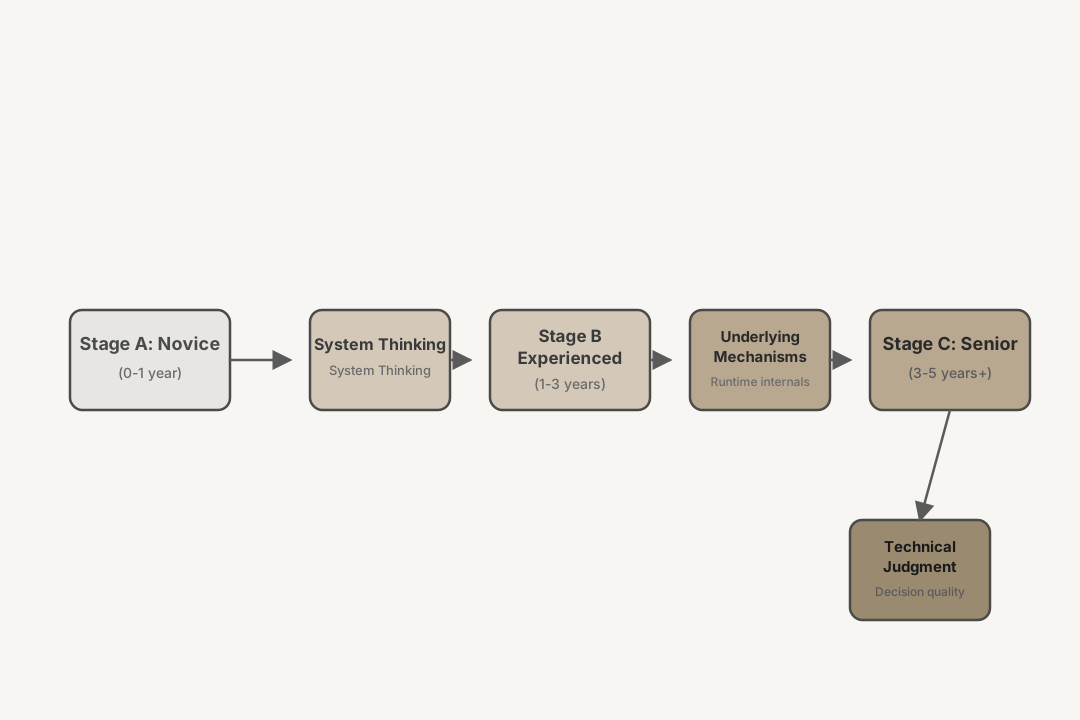 Figure 1: Three-stage capability building path from beginner to expert—System thinking → Underlying mechanisms → Technical judgment
Stage A: What Needs Filling Most at This Stage Is Not Syntax, But System Thinking
What AI Tools Are Good vs Not Good At
What AI Tools Are Good At:
- Code snippet generation (loops, conditions, functions)
- API call examples
- Common error explanations
- Simple algorithm implementation
What AI Tools Are Not Good At:
- System architecture design
- Root cause analysis of performance bottlenecks
- Debugging complex interaction issues
- Engineering trade-off judgment
Key Insight: AI tools are leverage, not replacement. They can amplify your capabilities, but cannot replace your judgment.
Python Developer’s Core Competitiveness Is Shifting
Past:
- Syntax proficiency
- Standard library memorization
- API call speed
Now:
- System understanding: How memory, GC, GIL work
- Problem diagnosis: Performance bottlenecks, memory leaks, concurrency issues
- Engineering judgment: Technology selection, trade-off decisions, code review
Stage A Learning Focus
Step 1: Build System Thinking (More Important Than Syntax)
Don’t rush to learn frameworks. First understand:
- What is a variable: Name vs object reference
- How memory works: Stack vs heap, reference counting basics
- How code executes: Bytecode, GIL, threads vs processes
Recommended path:
- Read Parts 1-3 of this series (memory, GC, GIL)
- Hands-on experiment: Use
sys.getrefcount()to observe reference counting - Understand the concept: Why
a = [1]; b = a; a[0] = 2makesb[0]also 2
Step 2: Develop Code Reading Ability
AI tools generate code, but you need to judge if the code is correct and appropriate.
Practice:
- Read standard library source code (like
dequeincollections) - Understand code structure of high-quality projects on GitHub
- Learn code review: Ask yourself “What might be wrong with this code?”
Step 3: Learn to Ask Questions
AI tool efficiency depends on question quality. Learn to:
- Precisely describe problems (“FastAPI async route blocking” vs “code won’t run”)
- Provide context (error messages, environment, code snippets)
- Ask follow-up questions (“Why does this solution work?”)
Stage A Minimum Executable Version
If you have limited time, only learn these three things:
- Core concepts: Reference, mutable vs immutable, shallow copy vs deep copy
- Debugging skills: pdb basics, logging, unit testing
- Project practice: Write an API with database using FastAPI (don’t let AI generate everything, understand every line)
Avoid:
- Pursuing “mastery” too early (breadth before depth)
- Only watching without practicing (writing code is essential)
- Relying on AI without thinking (understand every piece of AI-generated code)
Stage A Specific Action Plan (Beginner, 0-1 Year)
Weekly Learning Schedule
Time commitment: 8-12 hours per week (1.5-2 hours daily on weekdays)
| Time | Task | Deliverable |
|---|---|---|
| Monday | Read Part 1 of this series (Memory Model Basics) | Concept notes + 3 experiment scripts |
| Tuesday | Hands-on: Use sys.getrefcount() to observe reference counting | Experiment log + screenshots |
| Wednesday | Read Part 2 of this series (Garbage Collection) | Concept notes |
| Thursday | Hands-on: Basic gc module operations | Experiment code |
| Friday | Read Part 3 of this series (GIL) | Concept notes |
| Weekend | Comprehensive project: Implement a simple class with reference tracking | Runnable code + README |
Project Milestones
□ Month 1: Complete memory basics experiments, can explain reference vs object
□ Month 2: Complete GC experiments, can explain generational collection mechanism
□ Month 3: Complete GIL experiments, can explain threads vs coroutines difference
□ Month 4: Complete first REST API project with FastAPI
□ Month 6: Project includes complete tests, type annotations, Docker deployment
Skill Validation Criteria
Monthly self-checklist (must check all boxes to pass):
□ Can write from memory: A variable is a name, an object is a value in memory
□ Can explain and demonstrate: `a = [1]; b = a; a[0] = 2` why `b[0]` becomes 2
□ Can use `tracemalloc` to track memory allocation of a code snippet
□ Can explain why multi-threading doesn't max out CPU (GIL mechanism)
□ Can independently complete a FastAPI project with database (no copy-paste from AI)
□ Can debug a real bug using pdb
□ Can write basic unit tests for own code
Recommended Learning Resources
Prioritized reading order:
- Required: Parts 1-3 of this series (Memory, GC, GIL)
- Required: “Python Cookbook” Chapter 8 (Classes and Objects)
- Optional: Python official documentation “Data Model” chapter
- Project: FastAPI official tutorial + SQLAlchemy basics
Validation Methods
- Can teach others: Try explaining reference counting to colleagues or community; if they understand, you’ve passed
- Can debug: Can independently locate root cause of a memory-related bug
- Can review: Can identify obvious issues in AI-generated code (e.g., mutable default arguments)
Stage B: What Needs Filling Most at This Stage Is Not Frameworks, But Underlying Mechanisms
Why Framework Knowledge Is No Longer Enough
You can already do projects with Django/Flask/FastAPI. But:
- When encountering performance issues, can only add cache, add machines
- When encountering memory issues, restart to solve
- Code runs, but don’t know why it runs
This is knowing the how but not the why.
Truths revealed in first six articles:
- Part 1: Memory usage doesn’t drop because of Arena-Pool-Block pooling strategy
- Part 2:
gc.collect()doesn’t release memory because collection ≠ release - Part 3: Multi-threading CPU doesn’t go up because of GIL
These are debugging weapons. Knowing these, you can locate performance traps in AI-generated code.
Stage B Capability Building Sequence
Step 1: Understand Underlying (Memory, GC, GIL)
Why: AI tools generate code, but you need to know where performance bottlenecks are.
How:
- Deeply read Parts 1-3 of this series
- Hands-on experiments:
import sys import tracemalloc # Observe reference counting a = [1, 2, 3] print(sys.getrefcount(a)) # Why usually 2? # Observe memory allocation tracemalloc.start() # ... your code ... current, peak = tracemalloc.get_traced_memory() print(f"Current: {current / 1024 / 1024:.1f} MB") - Verification standard: Can explain why memory doesn’t drop after deleting large lists
Step 2: Master Bindings (ctypes, Cython)
Why: LLM performance comes from C/C++/CUDA (see Part 4).
How:
- Learn ctypes: Write a script calling C standard library
- Learn Cython: Write a Cython extension computing Fibonacci
- Read PyTorch source code: See how pybind11 binds C++
Verification standard: Can write a simple C extension, understand PyObject structure
Step 3: Master Ecosystem Toolchain (FastAPI, Docker, LangChain)
Why: These are AI deployment standards (see Parts 5-6).
How:
- Write type-safe API with FastAPI + Pydantic
- Deploy with Docker, understand containerization principles
- Write a simple Agent with LangChain
Verification standard: Can deploy FastAPI + LangChain Agent with Docker
Stage B Minimum Executable Version
If you have limited resources, focus on these three items:
Core Skills:
- Type annotations + asyncio: FastAPI foundation
- Memory diagnosis:
tracemalloc, object reference analysis - Performance profiling: cProfile, line_profiler
Toolchain:
- FastAPI: Modern Python API standard
- Docker: Deployment standard
- pytest: Testing foundation
Deep Knowledge (choose 1-2 to go deep):
- Memory management (Part 1)
- GIL and concurrency (Part 3)
- C extensions (Part 4)
Avoid:
- Pursuing “full stack” (first specialize in one direction)
- Only learning without practicing (every knowledge point needs hands-on verification)
- Neglecting underlying (frameworks change, underlying principles don’t)
Stage B Specific Action Plan (Intermediate, 1-3 Years)
Deep Reading List
Monthly commitment: 15-20 hours of deep learning (4-5 hours per week)
| Month | Topic | Specific Resources | Experiment Project |
|---|---|---|---|
| 1-2 | Deep dive into Python memory management | Parts 1-3 of this series + Python source Objects/obmalloc.c | Implement custom memory profiler |
| 3-4 | C extensions and bindings | Python/C API docs + pybind11 tutorials | Write a Cython extension module |
| 5-6 | Concurrency and async | asyncio source + Part 3 GIL section | Rewrite a synchronous service with asyncio |
| 7-9 | Performance optimization | ”High Performance Python” | Optimize a real project bottleneck |
| 10-12 | System architecture | ”Designing Data-Intensive Applications” | Design a service decomposition plan |
Experiment Project Design
Experiment 1: Memory Profiler (2 weeks)
□ Goal: Write a decorator that tracks object lifecycle
□ Requirements: Log creation time, reference changes, collection time
□ Validation: Can accurately detect memory leaks from circular references

Experiment 2: Cython Extension (2 weeks)
□ Goal: Implement Fibonacci sequence with Cython
□ Requirements: Compare with pure Python, 10x+ performance improvement
□ Validation: Correct packaging and installation, usable in other projects

Experiment 3: Async Service (3 weeks)
□ Goal: Implement high-concurrency API with FastAPI + asyncio
□ Requirements: Support 1000+ concurrent connections, latency < 100ms
□ Validation: Stress test and tune with locust

Experiment 4: Performance Diagnosis (2 weeks)
□ Goal: Diagnose a real project performance bottleneck
□ Tools: cProfile, line_profiler, tracemalloc
□ Output: Diagnosis report + optimization plan + before/after comparison
Community Engagement
□ Monthly tech talk within team (30-45 minutes)
  - Topic: Technology learned this month
  - Format: Code demo + Q&A
  - Output: PPT/document + recording

□ Quarterly open-source community participation
  - Option A: Submit a PR to a PyPI project (doc improvement or bug fix)
  - Option B: Answer 5 Python memory-related questions on Stack Overflow
  - Option C: Attend local Python Meetup and give Lightning Talk

□ Maintain a technical blog or note repository annually
  - Frequency: At least 1 technical article per month
  - Content: Learning notes, troubleshooting records, source code analysis
  - Platform: GitHub Pages, Zhihu, Juejin, or personal blog
Quantifiable Stage Goals
□ 6-month goals:
  - Can independently explain and demonstrate Arena-Pool-Block memory allocation
  - Can write a usable Cython extension module
  - Can handle 1000+ concurrent connections with asyncio
  - Complete 3 tech talks within team

□ 12-month goals:
  - Can diagnose and optimize production environment memory/performance issues
  - Can design reasonable deployment architecture for Python projects
  - Can review junior developers' code and provide constructive feedback
  - Visible contribution record in open-source community (PR/Issue/articles)
Self-Validation Checklist
- Technical validation: Given code with memory leak, can locate root cause within 30 minutes
- Teaching validation: Can help a beginner understand why GIL exists and its impact
- Practice validation: Lead completion of production project performance optimization with before/after data comparison
- Community validation: Someone solved a real problem thanks to your article or answer
Stage C: What Needs Attention Most at This Stage Is Not New Technology, But Technology Trend Judgment
Value Shift for Senior Developers
You’ve mastered underlying mechanisms. Now the questions are:
- Will Mojo replace Python?
- Is Rust worth deep learning?
- What will PEP 703 change?
- How will AI tools change development workflows?
These questions have no standard answers. Judgment is more important than knowledge volume.
Stage C Core Capabilities
Step 1: Technology Trend Judgment
Learn to ask these questions:
| Technology | Key Question | Current Judgment |
|---|---|---|
| Mojo | Has the ecosystem flywheel started? | Early, wait and see |
| Rust Python bindings | Is it production-ready? | PyO3 available, try gradually |
| PEP 703 (nogil) | Python 3.13+ experimental, when mainstream? | 3.14/3.15 may default |
| AI code generation | What will it replace? What won’t it replace? | Assistant tool, doesn’t replace judgment |
Judgment Principles:
- Ecosystem > Technology: Julia is technically advanced, but ecosystem insufficient
- Gradual > Revolutionary: PEP 703’s optional path is correct strategy
- Practice validation: Only counts if it runs in production
Step 2: System Architecture Design
From “writing code” to “designing systems”:
- Service boundary division
- Data flow design
- Performance and cost trade-offs
- Observability (logs, metrics, tracing)
Learning resources:
- “Designing Data-Intensive Applications”
- Open source project architectures (like LangChain, Transformers)
- Cloud-native architecture patterns
Step 3: Team Empowerment
Value of senior developers:
- Code review: Find problems in AI-generated code
- Technology sharing: Spread system thinking
- Cultivate newcomers: Build team knowledge system
Stage C Decision Framework
Technology Selection Decision Tree:
New project?
├── Performance sensitive?
│   ├── Compute-intensive → Rust/C++ + Python bindings
│   └── I/O-intensive → Python + asyncio
├── Rapid iteration?
│   ├── Have Python team → Python
│   └── Starting from scratch → Evaluate Mojo (high risk)
└── Existing codebase?
    ├── Local performance bottleneck → Binding optimization
    └── Overall refactoring → Gradual migration
Learning Priorities (sorted by ROI):
- PEP 703 / nogil: Python’s future, must learn
- Rust Python bindings: PyO3 production-ready
- Mojo: Watch, don’t invest
- Julia: Useful in academia, limited in industry
Stage C Minimum Executable Version
If you have limited time, focus on these three things:
Core Technologies:
- PEP 703 progress: Track Python 3.14/3.15 nogil default
- Rust bindings: PyO3 basics, can write simple bindings
- Architecture design: System boundaries, data flow, observability
Team Building:
- Establish code review process
- Regular technology sharing
- Cultivate system thinking
Trend Tracking:
- Follow Python Steering Council decisions
- Track PyTorch, LangChain architecture evolution
- Evaluate new technologies (Mojo, Rust, etc.)
Stage C Specific Action Plan (Senior, 3+ Years)
Technology Radar Maintenance
Time commitment: 2-3 hours per week of continuous tracking
Monthly Technology Radar Review:
□ Read 3-5 core papers (Arxiv + PapersWithCode)
  - Topics: Python performance, concurrency models, memory management
  - Output: Key findings summary (under 200 words)

□ Track key project Release Notes (30 minutes)
  - Python official: Follow nogil progress
  - PyTorch/Transformers: Follow performance optimizations and new architectures
  - FastAPI/Pydantic: Follow ecosystem changes
  - Output: Impact assessment for your projects

□ Browse Python-Dev mailing list summaries (20 minutes)
  - Focus: PEP discussions, core developer decisions
  - Output: Technology decisions that may affect your team

□ Attend 1 tech event (online/offline)
  - Options: Meetup, tech conference talk, internal tech sharing
  - Output: Key takeaways notes

□ Exchange tech trend observations with peers (informal)
  - Methods: Tech communities, colleague lunches, LinkedIn discussions
  - Output: Different perspectives on market awareness
Quarterly Radar Update Process:
□ Reassess each technology's quadrant position (Adopt/Trial/Assess/Hold)
□ Update judgments based on team project experience
□ Write technology radar update document and share with team
□ Organize team discussion (1 hour) to collect feedback
Team Empowerment Methods
□ Code review process establishment (Month 1)
  - Create review checklist
  - Establish review response time standards (within 24 hours)
  - Set review criteria (what must pass, what's open for discussion)
  - Monthly metrics: Average review time, issues found, knowledge transfer cases

□ Tech sharing system (Monthly)
  - Internal sharing: 1 team tech talk per month (45 minutes)
  - Rotation schedule: Each senior developer rotates quarterly
  - Suggested topics:
    * Deep dive into this series' technical points
    * Production environment troubleshooting case studies
    * New technology POC results
    * Common patterns in code reviews
  - Output: Recorded video + documents, building team knowledge base

□ New hire development plan (Ongoing)
  - Pair programming: 2 hours weekly with intermediate developers
  - Mentorship: Each senior developer mentors 1-2 intermediate developers
  - Growth path: 6-month development plan for each intermediate developer
  - Monthly 1-on-1: Review learning progress, adjust development strategy

□ Technology decision participation (Weekly)
  - Architecture review: Participate in team major technology decision reviews
  - Technology selection: Lead or participate in technology evaluation
  - Risk assessment: Identify technical debt and potential risks
  - Document output: Architecture Decision Records (ADR)
Technology Judgment Development
□ Build personal technology judgment log (update weekly)
  - Record decision scenarios, information at the time, decisions made, decision basis
  - Review after 3 months to validate judgment accuracy
  - Quarterly identification of judgment bias patterns, update assessment framework

□ POC best practices (1-2 per quarter)
  - Phase 1 (1-2 days): Quick validation, run official examples
  - Phase 2 (3-5 days): Scenario adaptation, test with real data
  - Phase 3 (1-2 weeks): Production assessment, load testing + operational evaluation
  - Output: Technical feasibility report + risk assessment + recommendation

□ Technology selection scorecard (when new tech is needed)
  - Dimension 1: Technology maturity (weight 30%)
  - Dimension 2: Ecosystem health (weight 25%)
  - Dimension 3: Migration cost (weight 25%)
  - Dimension 4: Long-term maintenance (weight 20%)
  - Thresholds: 4.0+ strongly recommend adoption, 3.5-4.0 trial, 3.0-3.5 assess, <3.0 hold
Quantifiable Stage Goals
□ 6-month goals:
  - Establish team technology radar and update 2 versions
  - Complete POC validation of 2 new technologies and form decision recommendations
  - Lead establishment of team code review process and run smoothly
  - Complete 6 tech talks with team satisfaction > 4.0/5.0
  - Develop 1-2 intermediate developers who can independently handle complex issues

□ 12-month goals:
  - Technology radar becomes standard reference for team technology decisions
  - Lead completion of 1 major technical architecture upgrade or migration
  - Establish team technical knowledge base with 20+ core technical documents
  - Share team technical practices in open-source community or industry conference (1 time)
  - Technology judgment accuracy (validated retrospectively) > 70%
Self-Validation Checklist
- Technology radar validation: Team members actively reference your radar for technology selection
- Decision validation: Your technical recommendations are correct when reviewed 3-6 months later
- Empowerment validation: Intermediate developers you mentored can independently handle more complex tasks
- Influence validation: Other teams or companies reference your team’s technical practices
- Judgment validation: Can provide logic-backed judgments on Mojo/PEP 703/Rust bindings, not just “I think”
Quantitative Research on AI Tool Effectiveness
Understanding the actual impact of AI tools helps developers use them more effectively.
GitHub Copilot Productivity Report
GitHub’s research data shows the real productivity gains from AI coding assistants:
| Metric | Finding | Practical Implication |
|---|---|---|
| Task completion time | 55% faster on average | Routine tasks take half the time |
| Developer satisfaction | 75%+ report reduced frustration | Less time on boilerplate code |
| Code review time | Slight increase (10-15%) | Need to review AI-generated code more carefully |
Key insight: AI tools accelerate routine work but require additional verification effort.
Code Quality and AI-Generated Code
Research from Microsoft and academic institutions reveals important quality patterns:
Positive findings:
- AI generates syntactically correct code 90%+ of the time
- Common patterns and boilerplate are often well-implemented
- API usage typically follows official documentation
Quality concerns:
- Edge case handling is often missing (boundary conditions, error states)
- Performance characteristics may not be optimal
- Security considerations (input validation, injection risks) are frequently overlooked
- Test coverage for AI-generated code is typically lower
Recommendation: Treat AI-generated code as a starting point, not a finished product. Always review for completeness.
Effectiveness Differences Across Experience Levels
Stack Overflow 2025 data reveals interesting patterns:
| Experience Level | AI Tool Benefit | Reason |
|---|---|---|
| Beginners | Moderate risk | May not recognize incorrect code; copy-paste without understanding |
| Intermediate | High benefit | Can judge output quality; saves time on familiar patterns |
| Senior | Strategic benefit | Focuses AI on scaffolding and boilerplate; handles complex logic personally |
Critical finding: Developer experience correlates with ability to effectively utilize AI tools. Less experienced developers need to be more cautious.
Prompt Engineering Skill Development
The quality of AI output depends heavily on input quality. Effective prompting strategies:
Basic patterns:
- Provide specific context (“FastAPI async endpoint” vs “Python function”)
- Include constraints (“with error handling”, “using type annotations”)
- Request explanations (“and explain why this approach”)
Advanced techniques:
- Chain-of-thought: Ask AI to break down complex problems step by step
- Few-shot prompting: Provide examples of desired output format
- Role assignment: “Act as a senior Python reviewer” vs “Act as a beginner tutor”
Skill progression:
Level 1 (Beginner): Direct requests - "Write a function to parse JSON"
Level 2 (Intermediate): Context + constraints - "Write a FastAPI endpoint that accepts JSON,
                                                validates with Pydantic, handles 400 errors"
Level 3 (Advanced): Multi-step reasoning - "Design a rate limiter: first explain algorithm
                                           options, then implement the most suitable one,
                                           then write tests for edge cases"
Bottom line: AI tools provide 30-50% productivity gains for experienced developers who can effectively validate and integrate the output. The return on investment depends on your ability to ask the right questions and judge the answers.
Quantitative Research on AI Tool Effectiveness
Understanding the actual impact of AI tools helps developers use them more effectively.
GitHub Copilot Productivity Report
GitHub’s research data shows the real productivity gains from AI coding assistants:
| Metric | Finding | Practical Implication |
|---|---|---|
| Task completion time | 55% faster on average | Routine tasks take half the time |
| Developer satisfaction | 75%+ report reduced frustration | Less time on boilerplate code |
| Code review time | Slight increase (10-15%) | Need to review AI-generated code more carefully |
Key insight: AI tools accelerate routine work but require additional verification effort.
Code Quality and AI-Generated Code
Research from Microsoft and academic institutions reveals important quality patterns:
Positive findings:
- AI generates syntactically correct code 90%+ of the time
- Common patterns and boilerplate are often well-implemented
- API usage typically follows official documentation
Quality concerns:
- Edge case handling is often missing (boundary conditions, error states)
- Performance characteristics may not be optimal
- Security considerations (input validation, injection risks) are frequently overlooked
- Test coverage for AI-generated code is typically lower
Recommendation: Treat AI-generated code as a starting point, not a finished product. Always review for completeness.
Effectiveness Differences Across Experience Levels
Stack Overflow 2025 data reveals interesting patterns:
| Experience Level | AI Tool Benefit | Reason |
|---|---|---|
| Beginners | Moderate risk | May not recognize incorrect code; copy-paste without understanding |
| Intermediate | High benefit | Can judge output quality; saves time on familiar patterns |
| Senior | Strategic benefit | Focuses AI on scaffolding and boilerplate; handles complex logic personally |
Critical finding: Developer experience correlates with ability to effectively utilize AI tools. Less experienced developers need to be more cautious.
Prompt Engineering Skill Development
The quality of AI output depends heavily on input quality. Effective prompting strategies:
Basic patterns:
- Provide specific context (“FastAPI async endpoint” vs “Python function”)
- Include constraints (“with error handling”, “using type annotations”)
- Request explanations (“and explain why this approach”)
Advanced techniques:
- Chain-of-thought: Ask AI to break down complex problems step by step
- Few-shot prompting: Provide examples of desired output format
- Role assignment: “Act as a senior Python reviewer” vs “Act as a beginner tutor”
Skill progression:
Level 1 (Beginner): Direct requests - "Write a function to parse JSON"
Level 2 (Intermediate): Context + constraints - "Write a FastAPI endpoint that accepts JSON,
                                                validates with Pydantic, handles 400 errors"
Level 3 (Advanced): Multi-step reasoning - "Design a rate limiter: first explain algorithm
                                           options, then implement the most suitable one,
                                           then write tests for edge cases"
Bottom line: AI tools provide 30-50% productivity gains for experienced developers who can effectively validate and integrate the output. The return on investment depends on your ability to ask the right questions and judge the answers.
Things Not to Rush Now
Don’t Obsess Over Python Syntax Sugar
AI tools can generate 90% of syntax code. Your time should be spent on:
- Understanding mechanisms behind code
- Designing system architecture
- Debugging complex problems
Don’t Pursue “Pure Python” Implementation
Performance insufficient? Don’t try to optimize with Python. Correct path:
- Find performance bottleneck (profiling)
- Rewrite critical path with Cython/C++/Rust
- Keep Python layer clean
Don’t Ignore Type Annotations
Type annotations are the foundation of engineering:
- IDE support (auto-completion, refactoring)
- Documentation as code
- Runtime validation (Pydantic)
AI tools generate code, type annotations help you check correctness.
If Resources Are Limited, Minimum Executable Version
Regardless of your stage, this minimum skill stack is universal:
Core Skills:
- Type annotations + asyncio: Modern Python foundation
- Memory diagnosis:
tracemalloc, object reference analysis - Performance profiling: cProfile, line_profiler
- Testing: pytest, unit testing mindset
Toolchain:
- FastAPI: API development standard
- Docker: Deployment standard
- Pydantic: Type safety
Deep Knowledge (by priority):
- Memory management (Part 1)
- GIL and concurrency (Part 3)
- C extension basics (Part 4)
Learning Path:
Beginner → Type annotations + FastAPI → Project practice
     ↓
Intermediate → Memory/GIL → Performance diagnosis → C extensions
     ↓
Expert → Architecture design → Technology trends → Team empowerment
Conclusion: AI Tools Are Leverage, Not Replacement
72% of AI developers use AI tools. This number is still rising.
But data also shows: Python usage 48.2%, still growing.
What does this mean?
AI tools have not replaced Python developers. They have changed Python developers’ value.
Past value was:
- Writing code fast
- Remembering many APIs
- Syntax proficiency
Now value is:
- System thinking
- Problem diagnosis
- Engineering judgment
- Architecture design
AI tools can write code, but cannot make judgment. Python developers who can make judgment are more valuable in the AI era.
The six technical articles in this series, from memory to GIL to bindings, are not for you to remember details, but to build system thinking—when AI generates code, you can judge if it’s correct, appropriate, and has performance traps.
This is the core competitiveness of Python developers in the AI era.
References and Acknowledgments
- Stack Overflow Developer Survey 2025: https://survey.stackoverflow.co/2025/
- First six technical articles in this series
- Designing Data-Intensive Applications — Martin Kleppmann
Series context
You are reading: Python Memory Model Deep Dive
This is article 7 of 7. Reading progress is stored only in this browser so the full series page can resume from the right entry.
Series Path
Current series chapters
Chapter clicks store reading progress only in this browser so the series page can resume from the right entry.
- Original Interpretation: The Three-Layer World of Python Memory Architecture Why doesn't memory drop after deleting large lists? Understanding the engineering trade-offs and design logic of Python's Arena-Pool-Block three-layer memory architecture
- Original Interpretation: Python Garbage Collection - The Three Most Common Misconceptions Deconstructing the three major misconceptions about reference counting, gc.collect(), and del statements, establishing a complete cognitive framework for Python GC mechanisms (reference counting + generational GC + cycle detection)
- Original Analysis: 72 Processes vs 1 Process—How GIL Becomes a Bottleneck for AI Training and PEP 703's Breakthrough Reviewing real production challenges at Meta AI and DeepMind, analyzing PEP 703's Biased Reference Counting (BRC) technology, and exploring the implications of Python 3.13+ nogil builds for large-scale model concurrency
- Original Analysis: Python as a Glue Language—How Bindings Connect Performance and Ease of Use A comparative analysis of ctypes, CFFI, PyBind11, Cython, and PyO3/Rust, exploring the technical nature and engineering choices of Python as a glue language for large models
- Original Analysis: Why FastAPI Rises in the AI Era—The Engineering Value of Type Hints and Async I/O Analyzing Python type hints, async I/O, and FastAPI's rise logic; establishing a feature-capability matching framework for LLM API service development
- Original Analysis: Why Python Monopolizes LLM Development—Ecosystem Flywheel and Data Evidence Synthesizing multi-source data from Stack Overflow 2025, PEP 703 industry testimonies, and LangChain ecosystem to analyze the causes and flywheel effects of Python's dominance in AI
- Original Analysis: Capability Building for Python Developers in the AI Tools Era—A Practical Guide for Frontline Engineers Based on Stack Overflow 2025 data, establishing a capability building roadmap from beginner to expert, providing stage assessment, priority ranking, and minimum executable solutions
Reading path
Continue along this topic path
Follow the recommended order for Python instead of jumping through random articles in the same topic.
Next step
Go deeper into this topic
If this article is useful, continue from the topic page or subscribe to follow later updates.
Loading comments...
Comments and discussion
Sign in with GitHub to join the discussion. Comments are synced to GitHub Discussions