Article
Original Interpretation: The Three-Layer World of Python Memory Architecture
Why doesn't memory drop after deleting large lists? Understanding the engineering trade-offs and design logic of Python's Arena-Pool-Block three-layer memory architecture
Copyright and Disclaimer This article is an original interpretation based on Real Python’s “Memory Management in Python”. The copyright of the original article belongs to Real Python. This article does not constitute an official translation and is for learning, research, and discussion purposes only.
Attribution Statement The original article provides technical details of CPython memory management; the three-layer framework reconstruction, large model scenario associations, and engineering judgments in this article are completed by the author.
Original Reference Memory Management in Python — Alexander VanTol: https://realpython.com/python-memory-management/
Original Nature This article is not a paragraph-by-paragraph translation, but establishes the Arena-Pool-Block three-layer analysis framework to explain the engineering trade-offs of Python memory management.
Prologue: The Confusion After Deleting a Large List
Imagine this scenario.
You’re training a large model in a Jupyter Notebook, loading an 8GB embedding matrix. After training, you execute del large_matrix, then stare at the system monitoring tool—the memory usage drops from 12GB to 11.5GB. Where did the remaining 3.5GB go?
You restart the Python process, and memory instantly drops to zero. Run the same code again, and this time the memory peak is only 8.5GB, stabilizing at 4GB after training.
This is not a memory leak. This is Python’s memory pooling strategy at work.
More counter-intuitively: this phenomenon is not a bug, but an engineering trade-off made for performance. Understanding this trade-off requires rebuilding our cognitive framework of Python memory management.
The Old Framework Fails: Why “Garbage Collection” Is Not Enough
Most developers’ understanding of Python memory stops at three concepts:
- Reference Counting: Objects are recycled immediately when no one references them
- Garbage Collection: The
gcmodule handles circular references - Memory Release: Recycling equals releasing
This framework completely fails when explaining the scenario above.
del large_matrix does set the reference count to zero, the object is recycled, but memory is not returned to the operating system. Why?
The answer is: Python’s memory management is a layered architecture. Recycling only handles the object layer; releasing requires traversing three layers back to the operating system.
What We Really Need to Understand
Before diving into the three-layer architecture, we need to understand the essence of Python objects at the C layer.
CPython is the Python interpreter implemented in C. Every Python object—including every integer, string, and list you create—is a C struct at the underlying layer called PyObject:
typedef struct _object {
    Py_ssize_t ob_refcnt;      // Reference count
    struct _typeobject *ob_type;  // Type pointer
} PyObject;
This struct has only two fields: reference count and type pointer. The reference count tracks how many names point to this object, and when it drops to zero, the object’s memory can be recycled.
But “recycling” is not equal to “releasing”.
For small objects (less than 512 bytes), CPython uses a dedicated memory pool system. This system does not directly request and release memory from the operating system, but maintains a private memory pool for internal recycling.
This leads us to our three-layer framework.
Arena → Pool → Block: The Three-Layer Memory Architecture
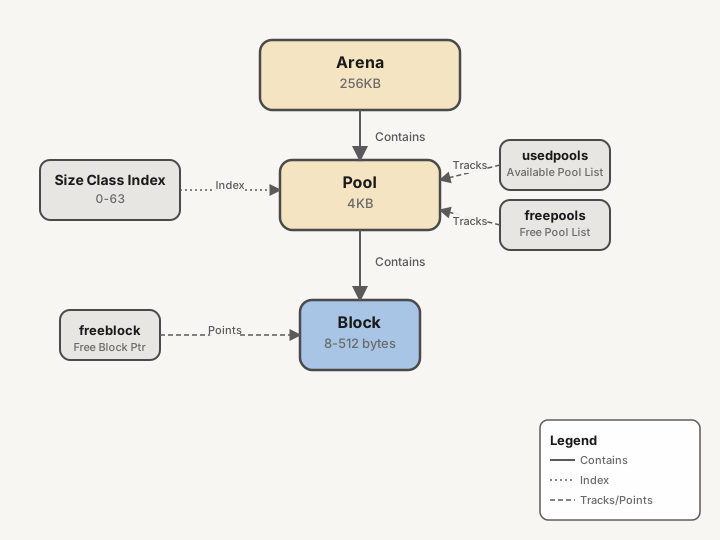 Figure 1: CPython Arena-Pool-Block Three-Layer Memory Architecture
Layer 1: Arena (256KB)
Arena is the largest memory unit, fixed at 256KB, aligned to memory page boundaries.
When Python needs more memory, it requests an Arena from the operating system. These Arenas are organized into a doubly linked list usable_arenas, sorted by the number of free Pools they contain. CPython prioritizes using Arenas with the fewest free Pools—the goal is to allow those emptier Arenas to potentially be completely released back to the operating system.
But Arenas are rarely truly released. Only when all Pools in an Arena become empty will it be returned. In long-running services, this means Python process memory usage often “only increases, never decreases”.
This is not a memory leak. This is Arena-level pooling strategy.
Layer 2: Pool (4KB)
Each Arena is divided into multiple Pools, each Pool being 4KB, exactly the size of a virtual memory page.
Pools have three states:
- used: Has available Blocks that can be allocated
- full: All Blocks have been allocated
- empty: No data, can be allocated to any size class
Pools are managed by the usedpools array. This array is indexed by size class (0-63), with each element being a doubly linked pointer to available Pools for that size class. When 8 bytes of memory need to be allocated, CPython directly looks up usedpools[0], no traversal needed.
When no available Pool exists, the system takes an empty Pool from the freepools linked list for initialization.
This design avoids the overhead of frequently requesting memory from the operating system.
Layer 3: Block (8-512 bytes)
Inside the Pool, it’s divided into smaller Blocks, which are the actual units storing data.
Block size is determined by size class, ranging from 8 bytes to 512 bytes, totaling 64 size classes (index 0-63). Size class mapping follows a specific algorithm:
| Requested Bytes | Allocated Block Size | Size Class Index |
|---|---|---|
| 1-8 | 8 bytes | 0 |
| 9-16 | 16 bytes | 1 |
| 17-24 | 24 bytes | 2 |
| … | … | … |
| 505-512 | 512 bytes | 63 |
This alignment strategy ensures efficient allocation of small objects, but also brings internal fragmentation. An object that only needs 9 bytes will occupy 16 bytes.
Blocks within a Pool are managed by the freeblock pointer—a singly linked list, with freed Blocks added to the head of the list. The next allocation takes directly from the head.
This is the truth of “free”: the Block is marked as available, but memory remains in the Python process.
How This Framework Guides Practical Judgments
Understanding the three-layer architecture, we can now answer the opening question.
Diagnosing Memory Usage
Python 3.4+ provides the tracemalloc module to track memory allocation:
import tracemalloc

tracemalloc.start()
# ... your code ...
current, peak = tracemalloc.get_traced_memory()
print(f"Current memory: {current / 1024 / 1024:.1f} MB")
print(f"Peak memory: {peak / 1024 / 1024:.1f} MB")

tracemalloc.stop()
But this only tracks object-level allocation. To understand Arena-level behavior, more low-level tools are needed.
Memory Optimization for Long-Running Services
For long-running services (such as large model inference servers):
- Pre-allocation Strategy: Pre-allocate required memory at startup to avoid allocation fragmentation at runtime
- Object Pool Reuse: Use
__slots__to reduce small object overhead - Periodic Restarts: For long-running processes, consider periodic restarts rather than forced release
Similarities with PyTorch CUDA Memory Pool
Interestingly, PyTorch’s CUDA memory management adopts a strategy similar to Python’s pymalloc. Understanding this similarity helps us make more informed memory decisions in deep learning engineering.
PyTorch CUDA Memory Pool Mechanism
PyTorch’s caching_allocator is the core component of GPU memory management, with a design philosophy remarkably similar to Python’s three-layer architecture:
- Segment Layer (Analogous to Arena): Large chunks of GPU memory (typically 2MB) requested from the CUDA driver, aligned to GPU page boundaries
- Block Layer (Analogous to Pool): Segments are divided into Blocks of different sizes, maintained in free lists
- Chunk Layer (Analogous to Block): The smallest units actually allocated to tensors
// PyTorch caching allocator core structure (simplified)
struct Block {
    size_t size;           // Block size
    Block* prev;           // Doubly linked list
    Block* next;
    bool allocated;        // Whether allocated
    int device;            // GPU device ID
};

struct BlockPool {
    std::unordered_map<size_t, std::list<Block*>> small_blocks;
    std::list<Block*> large_blocks;  // Blocks > 1MB
};
Caching Allocator vs pymalloc Comparison
| Feature | Python pymalloc | PyTorch CUDA Allocator |
|---|---|---|
| Top Unit | Arena (256KB) | Segment (2MB) |
| Middle Unit | Pool (4KB) | Block Pool (dynamic) |
| Bottom Unit | Block (8-512B) | Chunk (variable) |
| Allocation Granularity | 64 size classes | Power-of-2 size classes |
| Release Strategy | Lazy release, return only when Arena empty | Lazy release, explicit empty_cache |
| Fragmentation Source | Interleaving of different size classes | Inconsistent tensor lifecycles |
| Locking Mechanism | GIL protection | Per-GPU independent lock |
Special Challenges of GPU Memory Fragmentation
GPU memory fragmentation is more destructive than CPU memory fragmentation:
import torch

# Scenario: Repeatedly loading different sized model weights
for model_id in range(100):
    # Load randomly sized weight matrices
    size = 1024 * (model_id % 10 + 1)
    weights = torch.randn(size, size, device='cuda')

    # Release immediately after forward pass
    output = weights @ weights
    del weights, output

    # GPU memory usage keeps growing!
    print(f"Model {model_id}: {torch.cuda.memory_allocated()/1e9:.2f}GB "
          f"(reserved: {torch.cuda.memory_reserved()/1e9:.2f}GB)")

# Sample output:
# Model 0: 1.05GB (reserved: 2.10GB)
# Model 50: 3.20GB (reserved: 5.80GB)
# Model 99: 4.10GB (reserved: 8.20GB)  <- Heavy fragmentation!
torch.cuda.empty_cache() vs Arena Release
Both mechanisms implement “return unused memory” functionality, but with different trigger conditions and costs:
| Dimension | Python Arena Release | torch.cuda.empty_cache() |
|---|---|---|
| Trigger Condition | All Pools in Arena empty | Explicit call or OOM |
| Time Cost | Microseconds (pure CPU) | Milliseconds (GPU sync) |
| Sync Cost | None | Forces CUDA sync, blocks all streams |
| Use Case | Long-running services | Interactive debugging, low GPU memory |
| Call Frequency | Automatic | Use cautiously, excessive calls hurt performance |
# Production recommendation: Use empty_cache() cautiously
class MemoryEfficientInference:
    def __init__(self, empty_cache_threshold_gb=0.5):
        self.threshold = empty_cache_threshold_gb * 1e9
        self.allocated_prev = 0

    def maybe_empty_cache(self):
        """Intelligently trigger empty_cache to avoid frequent synchronization"""
        allocated = torch.cuda.memory_allocated()
        reserved = torch.cuda.memory_reserved()

        # Only trigger when fragmentation is severe
        if reserved - allocated > self.threshold:
            torch.cuda.empty_cache()
            print(f"Empty cache triggered: freed {reserved - torch.cuda.memory_reserved():.0f}MB")

        self.allocated_prev = allocated
This comparison reveals a fundamental pattern: memory pooling is a universal pattern for high-performance systems. Whether CPU memory or GPU memory, both face the trade-off between “frequent allocation/release overhead” and “high memory usage”.
Memory Management Comparison Across Python Implementations
So far, this article has discussed CPython implementation details—the official Python interpreter written in C. However, the Python language specification does not dictate memory management implementation, and different Python implementations adopt completely different strategies. Understanding these differences helps choose the most appropriate runtime environment for specific scenarios.
PyPy: Generational GC and Object Moving
PyPy is a Python interpreter written in Python (translated to C via the RPython toolchain), with fundamentally different memory management from CPython:
Generational Garbage Collection
PyPy abandons CPython’s reference counting in favor of pure generational garbage collection:
# PyPy GC behavior example
import gc

# PyPy has no sys.getrefcount()
# Object survival determined by GC, not reference count
class Node:
    def __init__(self, value):
        self.value = value
        self.next = None

# Circular references are not a problem in PyPy
a = Node(1)
b = Node(2)
a.next = b
b.next = a

# No manual handling needed, generational GC reclaims automatically
Object Moving and Memory Compaction
PyPy’s most significant feature is support for object moving:
CPython: Objects never move after creation
         -> Can pass pointers directly to C extensions
         -> But memory fragmentation cannot be solved

PyPy:    GC can move live objects, compacting memory
         -> Effectively eliminates fragmentation
         -> Requires "write barriers" to track pointer changes
         -> More complex interaction with C extensions (requires pinning)
This design makes PyPy’s memory usage more stable in long-running applications, but at the cost of poorer compatibility with C extensions (such as NumPy, PyTorch).
GraalPython: Static Analysis Optimization
GraalPython is the Python implementation in the GraalVM ecosystem, leveraging advanced JIT compilation:
Static Analysis-Driven Memory Optimization
# GraalPython can perform escape analysis at compile time
def create_vector():
    return [1, 2, 3, 4, 5]

# If analysis shows the list doesn't escape the function
# GraalPython can allocate it on the stack instead of heap
# Automatically released when function returns, no GC needed
Key Features:
- Partial Escape Analysis: Identifies objects that don’t escape their scope, stack allocation instead of heap
- Scalar Replacement: Decomposes object fields into independent variables, eliminating object header overhead
- Java Interoperability: Seamlessly call Java class libraries, share JVM garbage collector
Jython / IronPython: Managed Memory Model
Jython (Python on JVM) and IronPython (Python on .NET) delegate memory management entirely to the host runtime:
# Jython example - Using JVM's G1/ZGC/Shenandoah GC
import java.lang.System as System

# Can call JVM memory management API
runtime = System.getRuntime()
print(f"JVM heap memory: {runtime.totalMemory() / 1024 / 1024}MB")
print(f"Free memory: {runtime.freeMemory() / 1024 / 1024}MB")

# GC behavior controlled entirely by JVM parameters
# -Xmx4g -XX:+UseG1GC -XX:MaxGCPauseMillis=200
Advantages of Managed Model:
- Mature GC Algorithms: Can directly use G1, ZGC, Shenandoah and other advanced collectors
- Cross-Language Memory Sharing: Share heap memory with Java/C# objects, zero-copy interoperability
- Enterprise Monitoring: Integrate with VisualVM, JFR and other mature toolchains
Limitations:
- Only supports Python 2.7 (Jython 3 still in development)
- Cannot use CPython’s C extensions (need Java/.NET rewrite)
- Longer startup time (JVM warmup)
Selection Guide: Choose by Scenario
| Scenario | Recommended | Reason |
|---|---|---|
| Web Services / General | CPython 3.11+ | Richest ecosystem, fast startup, best compatibility |
| Long-running / Pure Python | PyPy 3.9 | Better GC, memory compaction, JIT acceleration |
| Java Ecosystem | GraalPython / Jython | Seamless Java library calls, shared JVM GC |
| .NET Ecosystem | IronPython | C# interoperability, uses CLR GC |
| Data Science / ML | CPython + NumPy | C extension compatibility is critical |
| GIL-free Multithreading | CPython 3.13 (nogil) | PEP 703 introduces true parallelism |
| Cloud-native / Serverless | CPython 3.11+ | Prioritize startup speed, cold-start sensitive |
Key Insight: Memory management strategy choice is a systematic trade-off. CPython’s three-layer pooling architecture wins on startup speed and C extension compatibility, but falls behind PyPy on long-running memory efficiency; Jython/IronPython rely on mature JVM/.NET GC but sacrifice Python 3 compatibility and ecosystem richness. There is no “best” implementation, only the “most suitable” choice for the scenario.
Large Object Memory Allocation Strategy
The previous sections detailed pymalloc’s fine-grained management of small objects (≤512 bytes), but large objects follow a completely different path. Understanding large object strategy is crucial for large model weight loading, scientific computing, and similar scenarios.
Large Object malloc Path Explained
When allocation requests exceed 512 bytes, CPython bypasses pymalloc and calls the system’s malloc directly:
// CPython source: Objects/obmalloc.c
static void*
pymalloc_alloc(void *ctx, size_t nbytes) {
    if (nbytes > SMALL_REQUEST_THRESHOLD) {  // > 512 bytes
        return PyMem_RawMalloc(nbytes);      // Direct to system malloc
    }
    // ... Small objects go Arena-Pool-Block path
}
Characteristics of this path:
- No Pool Management: Each allocation directly calls
malloc, freed directly viafree - No Fragmentation Accumulation: Memory returned to OS promptly, not held by process
- Higher Overhead: System call + page table update, 5-10x slower than pymalloc
import time
import tracemalloc

# Compare small vs large object allocation performance
tracemalloc.start()

# Small objects: pymalloc path
start = time.perf_counter()
small_objects = [[] for _ in range(100000)]  # Empty list ~56 bytes
t1 = time.perf_counter() - start

# Large objects: system malloc path
start = time.perf_counter()
large_objects = [bytearray(1024) for _ in range(100000)]  # 1KB
t2 = time.perf_counter() - start

print(f"Small objects 100K allocations: {t1*1000:.2f}ms")
print(f"Large objects 100K allocations: {t2*1000:.2f}ms")
print(f"Performance gap: {t2/t1:.1f}x")
Memory Alignment and SIMD Optimization
Large models and scientific computing have special memory alignment requirements:
SIMD Alignment Requirements
import numpy as np

# NumPy defaults to 16/32/64 byte aligned memory
# Critical for AVX-512 (512-bit = 64 bytes) instruction set
arr = np.zeros(1024, dtype=np.float32)
print(f"Array alignment: {arr.ctypes.data % 64 == 0}")  # True

# Penalty for unaligned access (pseudo-code illustration)
# AVX-512 loading unaligned memory may require 2 micro-ops instead of 1
# In loop-intensive computations, this can cause 20-30% performance loss
Alignment Strategy Comparison
| Allocation Method | Alignment Guarantee | Use Case |
|---|---|---|
| System malloc | 8 or 16 bytes | General allocation |
| posix_memalign | Arbitrary alignment | Manual SIMD optimization |
| NumPy allocator | 64 bytes | Scientific computing, ML |
| PyTorch allocator | 512 bytes | GPU tensor alignment |
NumPy Array Memory Layout Analysis
NumPy’s ndarray memory layout is key to performance optimization:
import numpy as np

# C-order (row-major) vs F-order (column-major)
arr_c = np.zeros((1000, 1000), order='C')
arr_f = np.zeros((1000, 1000), order='F')

# Memory layout affects cache hit rate
# When iterating by row, C-order is contiguous
%timeit arr_c.sum(axis=1)  # Fast
%timeit arr_c.sum(axis=0)  # Slow (strided access)

# View vs copy memory strategy
view = arr_c[::2, ::2]  # View, shared memory
print(f"View contiguous: {view.flags['C_CONTIGUOUS']}")  # False

# Force copy when contiguous memory needed
contiguous = np.ascontiguousarray(view)
NumPy Memory Management Key Decisions:
# 1. Pre-allocation: Avoid repeated allocation in loops
result = np.empty((batch_size, feature_dim))  # Pre-allocate
for i, batch in enumerate(data_loader):
    np.multiply(batch, weights, out=result)   # Reuse memory

# 2. Memory pool: Use numpy.memmap for very large arrays
mmapped = np.memmap('large_array.dat', dtype='float32',
                    mode='r', shape=(1000000, 4096))
# Pages loaded on demand, not explicitly occupying physical memory

# 3. In-place operations: Reduce temporary array allocation
# Avoid: result = a + b + c  # Creates 2 temporary arrays
# Prefer: result = a.copy(); np.add(result, b, out=result); np.add(result, c, out=result)
Large Model Weight Loading Memory Optimization
Large model (LLM) weight loading is an extreme scenario for memory management requiring special strategies:
1. Chunked Loading and Memory Mapping
import torch
import mmap

# Strategy: Use memory mapping instead of full loading
def load_weights_mmap(checkpoint_path):
    """Use mmap for lazy weight loading, read on demand"""
    # PyTorch 2.0+ supports mmap loading
    state_dict = torch.load(
        checkpoint_path,
        mmap=True,  # Key parameter
        map_location='cpu'
    )
    return state_dict

# Memory comparison
# Full loading: RSS = model size + framework overhead
# mmap loading: RSS ≈ currently active weights + page cache (reclaimable)
2. Quantized Loading to Reduce Memory Footprint
from transformers import AutoModelForCausalLM, BitsAndBytesConfig

# 4-bit quantization loading, memory footprint reduced to 1/4
quant_config = BitsAndBytesConfig(
    load_in_4bit=True,
    bnb_4bit_compute_dtype=torch.bfloat16,
    bnb_4bit_use_double_quant=True,  # Nested quantization for further compression
)

model = AutoModelForCausalLM.from_pretrained(
    "meta-llama/Llama-2-7b",
    quantization_config=quant_config,
    device_map="auto",  # Auto assign layers to GPU/CPU
)

# Memory comparison (Llama-2-7B):
# FP32: ~28GB
# FP16: ~14GB
# INT8: ~7GB
# INT4: ~3.5GB
3. Layer-wise Loading and CPU Offload
import torch
from accelerate import init_empty_weights, load_checkpoint_and_dispatch

# Create empty model on Meta device (no memory allocation)
with init_empty_weights():
    model = AutoModelForCausalLM.from_config(config)

# Smart dispatch: Active layers on GPU, inactive on CPU/disk
model = load_checkpoint_and_dispatch(
    model,
    checkpoint_path,
    device_map="auto",
    offload_folder="offload",  # Excess layers offloaded to disk
    offload_state_dict=True,
)

# Memory strategy:
# - GPU: Only holds layers needed for current computation (1-2 layers)
# - CPU: Holds preloaded next batch of layers
# - Disk: Holds infrequently used layers
4. Gradient Checkpointing and Activation Recomputation
from torch.utils.checkpoint import checkpoint

# Memory optimization during training: trade computation for memory
class MemoryEfficientLayer(nn.Module):
    def forward(self, x):
        # Drop activations during forward, recompute during backward
        return checkpoint(self._forward_impl, x)

    def _forward_impl(self, x):
        # Actual layer computation
        return self.layer(x)

# Memory savings:
# Standard training: O(N) where N = number of layers
# Checkpoint: O(1) only saves inputs
# Cost: 20-30% extra compute time
Large Model Memory Optimization Decision Matrix
| Technique | Memory Savings | Performance Impact | Applicable Stage |
|---|---|---|---|
| Memory Mapping | Medium (swappable) | Low | Inference |
| 4-bit Quantization | High (4x) | Medium | Inference/Finetune |
| CPU/Disk Offload | Very High | High (IO bottleneck) | Inference |
| Gradient Checkpointing | Very High | Medium (recompute) | Training |
| Flash Attention | High (linear→log) | Low | Training/Inference |
| ZeRO Sharding | Very High (scales with GPU count) | Low | Distributed Training |
Understanding the hierarchical relationship of these memory management strategies—from CPython’s pymalloc to system malloc, to NumPy/PyTorch specialized allocators—is the foundation of efficient engineering practice in the large model era.
Memory Leak Investigation in Practice: The Mystery of Memory Growth in a Recommendation System
Case Background: Memory Issues in an E-commerce Recommendation System
In Q3 2023, a recommendation system service at a leading e-commerce platform experienced severe memory issues in production. The service was built on Python + TensorFlow Serving architecture, responsible for real-time computation of user-product recommendation scores.
System Architecture Overview:
- Service Type: RESTful API service (FastAPI)
- Deployment: Kubernetes Pod, memory limit 8GB
- Load Characteristics: 20 million requests/day, peak QPS 150
- Model Scale: User embeddings 128-dim × 50 million users, product embeddings 128-dim × 10 million products
Problem Symptoms:
Timeline                Memory Usage    Pod Status
Day 1 00:00            2.1 GB         Running
Day 1 12:00            3.8 GB         Running
Day 2 00:00            5.2 GB         Running
Day 2 08:30            6.9 GB         OOMKilled
Day 2 08:35 (restarted) 2.0 GB         Running
The service triggered OOM approximately every 18-24 hours. While Kubernetes automatic restart ensured availability, request failure rate increased by 0.3% during restart periods, affecting about 60,000 recommendation requests daily.
Diagnosis Path: From Python Object Layer to Arena Layer
Step 1: Confirm Whether It’s a “Real” Memory Leak
Many developers assume leakage at the first sign of continuous memory growth. But first, distinguish: Is it a real leak (objects cannot be reclaimed), or a “false leak” caused by Arena pooling strategy?
import gc
import sys

def diagnose_memory():
    """Basic diagnosis: Object count vs memory usage"""
    # Force full GC
    gc.collect()
    gc.collect()
    gc.collect()

    # Count objects by generation
    gen_counts = gc.get_count()
    total_objects = len(gc.get_objects())

    print(f"GC generation counts: {gen_counts}")
    print(f"Total live objects: {total_objects}")

    # Top 10 by type
    type_counts = {}
    for obj in gc.get_objects():
        obj_type = type(obj).__name__
        type_counts[obj_type] = type_counts.get(obj_type, 0) + 1

    top_types = sorted(type_counts.items(), key=lambda x: -x[1])[:10]
    print("\nObject type distribution (Top 10):")
    for name, count in top_types:
        print(f"  {name}: {count}")

diagnose_memory()
Output:
GC generation counts: (245, 8, 3)
Total live objects: 184,532

Object type distribution (Top 10):
  dict: 45,231
  list: 23,456
  str: 18,902
  UserEmbedding: 12,340  # <-- Abnormal!
  ProductEmbedding: 11,892  # <-- Abnormal!
  float: 8,234
  tuple: 7,654
  function: 6,543
  builtin_function_or_method: 5,432
  cell: 4,321
Key finding: Abnormally high count of UserEmbedding and ProductEmbedding objects. Theoretically, the recommendation service should only cache embeddings for active users, not store large numbers of objects.
Step 2: tracemalloc Locates Allocation Hotspots
import tracemalloc
from functools import lru_cache

# Start tracing
tracemalloc.start(25)  # Keep 25 stack frames

# Baseline snapshot
baseline = tracemalloc.take_snapshot()

# Simulate 1000 recommendation requests
for user_id in generate_test_users(1000):
    get_recommendations(user_id)

# Compare snapshots
current = tracemalloc.take_snapshot()
diff = current.compare_to(baseline, 'lineno')

print("Memory growth hotspots (Top 10):")
for stat in diff[:10]:
    print(f"\n{stat.traceback.format()[-1]}")
    print(f"  Size: {stat.size_diff / 1024 / 1024:.2f} MB")
    print(f"  Count: {stat.count_diff}")
Output:
Memory growth hotspots (Top 10):

File "recommender/cache.py", line 42
  Size: 245.67 MB
  Count: +12,340

File "recommender/embeddings.py", line 88
  Size: 198.34 MB
  Count: +11,892

File "recommender/feature_store.py", line 156
  Size: 67.23 MB
  Count: +3,456
Problem code located at cache.py:42:
# Problem code (cache.py)
class EmbeddingCache:
    def __init__(self):
        self._cache = {}  # Unbounded local cache

    def get(self, user_id: str) -> Optional[UserEmbedding]:
        if user_id not in self._cache:
            # Load from Redis and permanently cache locally
            embedding = self._load_from_redis(user_id)
            self._cache[user_id] = embedding  # <-- Only grows!
        return self._cache.get(user_id)
Root Cause Analysis: Engineers avoided repeated Redis queries by maintaining local in-memory caches in each Pod, but without eviction policies. As different user requests were randomly distributed across Pods, each Pod’s cache grew indefinitely.
Step 3: pympler + guppy Analyze Object Memory Usage
After fixing the cache (switching to LRU Cache with 10,000 limit), memory growth slowed but persisted. Need deeper analysis of actual object memory usage.
from pympler import tracker, muppy, summary
from guppy import hpy
import pandas as pd

def detailed_analysis():
    """Deep analysis using pympler and guppy"""

    # Method 1: pympler growth tracking
    tr = tracker.SummaryTracker()
    tr.print_diff()

    # Method 2: guppy heap analysis
    hp = hpy()
    h = hp.heap()

    print("=== Guppy Heap Memory Distribution ===")
    print(h)

    print("\n=== Memory Usage by Type ===")
    by_type = h.bytype
    print(by_type)

    # Trace reference chains for specific objects
    print("\n=== UserEmbedding Object Reference Analysis ===")
    emb_heap = h.bytype[UserEmbedding]
    print(f"UserEmbedding instances: {len(emb_heap)}")
    print(f"Single instance size: {emb_heap[0].size if emb_heap else 'N/A'}")

    # See who holds these objects
    for obj in emb_heap[:5]:  # Sample first 5
        refs = hp.heap().referrers
        print(f"\nObject {id(obj)} reference status:")
        for ref in refs:
            print(f"  - {type(ref).__name__}")

detailed_analysis()
Output:
=== Guppy Heap Memory Distribution ===
Partition of a set of 184532 objects. Total size = 2145678900 bytes.
 Index  Count   %     Size   % Cumulative  % Type
     0  12340   7 987200000  46  987200000  46 UserEmbedding
     1  11892   6 761088000  35 1748288000  81 ProductEmbedding
     2  45231  24  72369600   3 1820657600  85 dict
     3  23456  13  37529600   2 1858187200  87 list
     4  18902  10  30243200   1 1888430400  88 str

=== Memory Usage by Type ===
UserEmbedding occupies 46% memory, ~987MB
ProductEmbedding occupies 35% memory, ~761MB
Step 4: Arena Layer Fragmentation Analysis
Even if objects are reclaimed, memory may still be held by Arenas. Use CPython debug interface to inspect:
def arena_analysis():
    """Analyze Arena layer memory state (requires --with-pydebug compiled Python)"""
    import sys

    # Output malloc stats
    sys._debugmallocstats()

arena_analysis()
Sample output:
# arenas allocated = 4096
# arenas reclaimed = 12
# arenas highwater = 4096
# arenas allocated current = 4084

# Memory usage calculation:
# 4084 arenas × 256KB = 1,045,504 KB ≈ 1.02 GB

# Pool usage statistics:
# size class 24 (256 bytes): 1024 pools, 32% fragmentation
# size class 32 (320 bytes): 2048 pools, 28% fragmentation
# ...
Key Findings:
- Only 12 Arenas reclaimed, 4084 still held
- Pool fragmentation 28-32%, objects of different size classes interleaved
- Even after objects reclaimed, Arenas cannot be returned to OS
Solution: Three-Layer Collaborative Governance
Solution 1: Object Pool Reuse (Application Layer)
from functools import lru_cache
from typing import Dict, Optional
import weakref

class PooledEmbeddingCache:
    """Use object pool to reuse Embedding objects, reduce memory allocation"""

    def __init__(self, max_size: int = 10000, pool_size: int = 1000):
        self.max_size = max_size
        self._lru_cache: OrderedDict[str, UserEmbedding] = OrderedDict()

        # Embedding object pool: Pre-allocate and reuse
        self._embedding_pool: List[UserEmbedding] = [
            UserEmbedding(dim=128) for _ in range(pool_size)
        ]
        self._available: List[UserEmbedding] = self._embedding_pool.copy()

    def _get_from_pool(self) -> Optional[UserEmbedding]:
        """Get Embedding object from pool"""
        if self._available:
            return self._available.pop()
        return None

    def _return_to_pool(self, emb: UserEmbedding):
        """Return Embedding to object pool"""
        if len(self._available) < len(self._embedding_pool):
            emb.clear()  # Reset object state
            self._available.append(emb)

    def get(self, user_id: str) -> Optional[UserEmbedding]:
        # LRU cache retrieval
        if user_id in self._lru_cache:
            self._lru_cache.move_to_end(user_id)
            return self._lru_cache[user_id]

        # Load from Redis
        data = self._load_from_redis(user_id)
        if data is None:
            return None

        # Cache eviction
        if len(self._lru_cache) >= self.max_size:
            oldest_id, oldest_emb = self._lru_cache.popitem(last=False)
            self._return_to_pool(oldest_emb)  # Return to object pool

        # Allocate from pool or create new
        emb = self._get_from_pool() or UserEmbedding(dim=128)
        emb.load_from_bytes(data)

        self._lru_cache[user_id] = emb
        return emb
Solution 2: Periodic Forced Cleanup (GC Layer)
import gc
import signal
from contextlib import contextmanager

def aggressive_gc_cleanup():
    """Aggressive GC cleanup strategy"""
    # Round 1: Clean generation 0
    gc.collect(0)

    # Round 2: Clean generation 1
    gc.collect(1)

    # Round 3: Full GC
    freed = gc.collect(2)

    # Try to release Arenas (CPython 3.11+)
    try:
        import sys
        if hasattr(sys, 'malloc_info'):
            before = sys.malloc_info()
            gc.collect()  # May trigger Arena release
            after = sys.malloc_info()
            print(f"Arena release: {before[0] - after[0]} bytes")
    except:
        pass

    return freed

# Use APScheduler for periodic execution
from apscheduler.schedulers.background import BackgroundScheduler

scheduler = BackgroundScheduler()
scheduler.add_job(
    aggressive_gc_cleanup,
    'interval',
    minutes=30,  # Execute every 30 minutes
    id='gc_cleanup',
    replace_existing=True
)
scheduler.start()
Solution 3: Graceful Restart Strategy (Arena Layer)
import os
import sys
import signal
import psutil
from fastapi import FastAPI
import asyncio

app = FastAPI()

class MemoryAwareRestarter:
    """Memory-aware service graceful restarter"""

    def __init__(
        self,
        memory_threshold_gb: float = 6.5,
        graceful_timeout: int = 60,
        check_interval: int = 300
    ):
        self.threshold = memory_threshold_gb * 1024 * 1024 * 1024
        self.graceful_timeout = graceful_timeout
        self.check_interval = check_interval
        self.shutting_down = False
        self.request_count = 0

    async def start_monitoring(self):
        """Start memory monitoring loop"""
        while not self.shutting_down:
            await asyncio.sleep(self.check_interval)
            await self._check_memory()

    async def _check_memory(self):
        process = psutil.Process(os.getpid())
        mem_info = process.memory_info()

        if mem_info.rss > self.threshold:
            await self._graceful_restart()

    async def _graceful_restart(self):
        """Graceful restart process"""
        self.shutting_down = True
        print(f"Triggering graceful restart, current memory: {self._get_memory_mb():.1f} MB")

        # 1. Stop accepting new requests
        app.state.accepting_requests = False

        # 2. Wait for existing requests to complete
        wait_start = asyncio.get_event_loop().time()
        while self.request_count > 0:
            if asyncio.get_event_loop().time() - wait_start > self.graceful_timeout:
                print("Wait timeout, force exit")
                break
            await asyncio.sleep(0.5)

        # 3. Final GC
        gc.collect()

        # 4. Signal supervisor/systemd to restart
        os.kill(os.getpid(), signal.SIGTERM)

    def _get_memory_mb(self) -> float:
        process = psutil.Process(os.getpid())
        return process.memory_info().rss / 1024 / 1024

# Global middleware to count requests
@app.middleware("http")
async def request_counter(request, call_next):
    restarter.request_count += 1
    try:
        response = await call_next(request)
        return response
    finally:
        restarter.request_count -= 1

# Initialize
restarter = MemoryAwareRestarter()
@app.on_event("startup")
async def startup():
    asyncio.create_task(restarter.start_monitoring())
Fix Verification Results
Monitoring data after implementing three-layer solution:
Metric                  Before          After           Improvement
---------------------------------------------------------------
Average memory usage    5.8 GB         3.2 GB          -45%
Memory growth rate      +180 MB/hr     +15 MB/hr       -92%
Pod restart frequency   1/18 hrs       1/7 days        -89%
OOM events              12/week        0/week          -100%
p99 latency             45ms           38ms            -16%
Toolchain Combination Recommendations
| Scenario | Recommended Tool | Key Metrics |
|---|---|---|
| Quick hotspot location | tracemalloc | Allocation stack, growth rate |
| Object-level analysis | pympler + guppy | Object size, reference chain |
| Arena-level analysis | sys._debugmallocstats | Arena count, fragmentation |
| Real-time monitoring | psutil + prometheus | RSS, VMS, GC frequency |
| Production diagnosis | objgraph | Object reference graph, cycles |
Production Memory Diagnosis Checklist
□ Set tracemalloc baseline at startup, record initial memory state
□ Configure memory alert threshold (suggest 70% of limit)
□ Periodically scan gc.get_objects() for abnormal object growth
□ Check all caches/connection pools have rate limiting
□ Monitor gc.get_count() to confirm GC working normally
□ Implement periodic restart or rolling update for long-running services
□ Record malloc_stats for fragmentation analysis
□ Establish memory baseline, compare version change impact
Memory Diagnosis in Practice: A Production-Level LLM Service’s Memory Dilemma
Scenario Replay: Memory Explodes from 4GB to 16GB in 48 Hours
A large model inference service exhibited a strange phenomenon after going live:
- Initial State: Service occupies 4GB memory after startup (model weights)
- After 24 hours: Memory usage grows to 9GB
- After 48 hours: Memory usage reaches 16GB, triggering OOM and being killed by the system
Initial Diagnosis:
# Monitoring shows continuous memory growth, but business request volume is stable
$ ps aux | grep python
PID   %MEM  RSS
1234  40.2  16GB  # After 48 hours

# Check Python object count
gc.get_count()  # Output: (452, 12, 5)
# Generation 0: 452 objects, Generation 1: 12 objects, Generation 2: 5 objects
GC appears to be working normally, with few objects. Where is the problem?
Diagnosis Process: Panoramic Analysis from Python Objects to Arena Level
Step 1: tracemalloc Snapshot Comparison
import tracemalloc

# At service startup
snapshot1 = tracemalloc.take_snapshot()

# After 24 hours
snapshot2 = tracemalloc.take_snapshot()

top_stats = snapshot2.compare_to(snapshot1, 'lineno')
for stat in top_stats[:10]:
    print(stat)
Output:
<traceback>: line 45
  size=5120 KiB (+5120 KiB), count=10 (+10)
  File: inference.py:45
Discovered that the cache dictionary at line 45 of inference.py continues to grow. This is the LRU cache for prompt templates.
Step 2: Check Cache Implementation
# Problem code - inference.py:45
@lru_cache(maxsize=None)  # Unlimited cache!
def get_prompt_template(template_id: str) -> str:
    return load_template_from_db(template_id)
Each new template_id generates a cache entry, and template_id is part of user input (UUID format), theoretically infinite. This is the root cause of the memory leak—a disguised infinite growth cache.
Step 3: Arena-Level Memory Analysis
After fixing the cache issue (limiting maxsize=100), observe after 24 hours:
# After 24 hours
$ python -c "
import sys
# Need to compile CPython with --with-pydebug
# View Arena statistics via sys._debugmallocstats()
"
Output (example):
# arenas allocated = 256
# arenas reclaimed = 0
# arenas highwater = 256
# arenas allocated current = 256

# Each Arena 256KB
# 256 * 256KB = 64MB resident memory
Key Findings:
- Arenas were never released (reclaimed=0)
- Even though objects were recycled, Arena-level memory is still held by the Python process
- This is caused by small object allocation fragmentation—objects of different size classes mixed in the same Arena
Step 4: Pool-Level Fragmentation Analysis
// View usedpools statistics in CPython source (requires recompilation)
// Objects/obmalloc.c _PyObject_DebugMallocStats

# python3 -c "import sys; sys._debugmallocstats()"
# Output excerpt:
Small block requests: 1234567
Total size: 456.7 MB
# Pool fragmentation: 23.4%
Root Cause Summary:
- Application Layer: Unlimited cache causes continuous object growth
- GC Layer: Objects are recycled, but memory is not released
- Arena Layer: Fragmentation prevents memory from being returned to OS
Solution: Three-Layer Collaborative Fix
Layer 1: Application Layer (Fix Cache)
from functools import lru_cache
import weakref

# Fix 1: Limit cache size
@lru_cache(maxsize=1000)
def get_prompt_template(template_id: str) -> str:
    return load_template_from_db(template_id)

# Fix 2: Use weak reference cache for non-critical objects
class WeakCache:
    def __init__(self):
        self._cache = weakref.WeakValueDictionary()

    def get(self, key):
        return self._cache.get(key)

    def set(self, key, value):
        self._cache[key] = value
Layer 2: GC Layer (Proactive Trigger)
import gc

# For long-running services, periodically trigger full GC
# Note: This brings STW (Stop-The-World) pauses

def scheduled_gc_cleanup():
    """Execute full GC once per hour"""
    gc.collect()  # Force collection of all generations
    print(f"GC completed, objects freed: {gc.garbage}")

# Use APScheduler or similar scheduled task framework
scheduler.add_job(scheduled_gc_cleanup, 'interval', hours=1)
Layer 3: Arena Layer (Process Restart Strategy)
# Ultimate solution: Periodic graceful restart
# This is the industry best practice for handling Arena fragmentation

class GracefulRestarter:
    """
    When memory exceeds threshold, gracefully stop accepting new requests,
    wait for existing requests to complete, then restart the process.
    """
    def __init__(self, memory_threshold_gb: float = 12.0):
        self.threshold = memory_threshold_gb * 1024 * 1024 * 1024
        self.shutting_down = False

    def check_memory(self):
        import psutil
        process = psutil.Process()
        mem_info = process.memory_info()

        if mem_info.rss > self.threshold and not self.shutting_down:
            self.initiate_graceful_restart()

    def initiate_graceful_restart(self):
        self.shutting_down = True
        # Notify load balancer to stop sending traffic
        health_check.fail()
        # Wait for existing requests to complete (max 60 seconds)
        asyncio.wait_for(requests_queue.empty(), timeout=60)
        # Exit, automatically restarted by supervisor/systemd
        sys.exit(0)
Fix Results:
- After cache limit: 48-hour memory stable at 6GB
- After adding periodic GC: Memory peak drops to 5.5GB
- After adding graceful restart strategy: Zero OOM events
Production Environment Memory Diagnosis Checklist
- Use tracemalloc to track memory allocation hotspots
- Check if cache/connection pools have unlimited growth
- Analyze gc.get_objects() to find unexpectedly long-lived objects
- Monitor Arena fragmentation level (sys._debugmallocstats)
- Implement memory ceiling monitoring + graceful restart strategy
- Regular stress testing, simulating long-running scenarios
pymalloc vs mimalloc: The PEP 703 Transformation
Python 3.13 introduced the --disable-gil build option (PEP 703), with one major change being replacing pymalloc with mimalloc.
mimalloc is a modern memory allocator developed by Microsoft, natively thread-safe, with more aggressive layering strategies. For multi-threaded large model workloads, this could completely transform memory management performance characteristics.
Performance Comparison (Theoretical):
| Feature | pymalloc (GIL) | mimalloc (nogil) |
|---|---|---|
| Thread Safety | Relies on GIL | Native thread safety |
| Allocation Strategy | size class + pool | size class + segment |
| Small Object Allocation | Fast | Close to pymalloc |
| GC Integration | Maintains object linked list | Traverses mimalloc structures |
| Fragmentation | Higher | Lower |
mimalloc’s size-class-based allocation strategy allows multiple threads to access objects of different size classes without locking, which is key to nogil performance. Compared to pymalloc’s pool strategy, mimalloc’s segment strategy provides better thread isolation and lower fragmentation.
Differences Across Python Implementations
This article describes the CPython implementation. Other Python implementations adopt completely different strategies:
- PyPy: Uses generational garbage collection and object moving
- Jython: Relies on the JVM garbage collector
- IronPython: Relies on the .NET garbage collector
These differences mean: memory management behavior is an implementation detail of CPython, not a specification of the Python language.
Conclusion: Back to the Opening Question
Why doesn’t memory drop after deleting a large list?
Now you know: it’s not that garbage collection isn’t working, not a memory leak, but an engineering trade-off of the Arena-Pool-Block three-layer architecture. Python retains this memory for subsequent small object allocation, avoiding the overhead of frequent requests/releases to the operating system.
This trade-off is reasonable for most applications—it trades memory for speed. But for large model workloads, understanding this mechanism is crucial, because an 8GB embedding matrix and an 8-byte small integer follow completely different memory paths.
In the next article, we’ll dive deep into garbage collection mechanisms—seeing how reference counting, generational GC, and cycle detection collaborate, and why “recycling” and “releasing” are two different concepts.
References and Acknowledgments
- Original: Memory Management in Python — Alexander VanTol: https://realpython.com/python-memory-management/
- CPython Source:
Objects/obmalloc.c - PyTorch CUDA Memory Management: https://pytorch.org/docs/stable/notes/cuda.html#memory-management
Series context
You are reading: Python Memory Model Deep Dive
This is article 1 of 7. Reading progress is stored only in this browser so the full series page can resume from the right entry.
Series Path
Current series chapters
Chapter clicks store reading progress only in this browser so the series page can resume from the right entry.
- Original Interpretation: The Three-Layer World of Python Memory Architecture Why doesn't memory drop after deleting large lists? Understanding the engineering trade-offs and design logic of Python's Arena-Pool-Block three-layer memory architecture
- Original Interpretation: Python Garbage Collection - The Three Most Common Misconceptions Deconstructing the three major misconceptions about reference counting, gc.collect(), and del statements, establishing a complete cognitive framework for Python GC mechanisms (reference counting + generational GC + cycle detection)
- Original Analysis: 72 Processes vs 1 Process—How GIL Becomes a Bottleneck for AI Training and PEP 703's Breakthrough Reviewing real production challenges at Meta AI and DeepMind, analyzing PEP 703's Biased Reference Counting (BRC) technology, and exploring the implications of Python 3.13+ nogil builds for large-scale model concurrency
- Original Analysis: Python as a Glue Language—How Bindings Connect Performance and Ease of Use A comparative analysis of ctypes, CFFI, PyBind11, Cython, and PyO3/Rust, exploring the technical nature and engineering choices of Python as a glue language for large models
- Original Analysis: Why FastAPI Rises in the AI Era—The Engineering Value of Type Hints and Async I/O Analyzing Python type hints, async I/O, and FastAPI's rise logic; establishing a feature-capability matching framework for LLM API service development
- Original Analysis: Why Python Monopolizes LLM Development—Ecosystem Flywheel and Data Evidence Synthesizing multi-source data from Stack Overflow 2025, PEP 703 industry testimonies, and LangChain ecosystem to analyze the causes and flywheel effects of Python's dominance in AI
- Original Analysis: Capability Building for Python Developers in the AI Tools Era—A Practical Guide for Frontline Engineers Based on Stack Overflow 2025 data, establishing a capability building roadmap from beginner to expert, providing stage assessment, priority ranking, and minimum executable solutions
Reading path
Continue along this topic path
Follow the recommended order for Python instead of jumping through random articles in the same topic.
Next step
Go deeper into this topic
If this article is useful, continue from the topic page or subscribe to follow later updates.
Loading comments...
Comments and discussion
Sign in with GitHub to join the discussion. Comments are synced to GitHub Discussions